Google Classroom is free, simple and wired into Docs, Drive, Forms and Meet. That’s why so many schools use it. It’s also why you usually can’t leave it on your own. The school’s admin chooses the platform, manages student accounts and signs the data agreements.
So this page has two halves. First, the real alternatives a school, or a teacher with permission, can move to. Then what a single teacher or a parent can do while the school stays on Google.
Quick Comparison
| Alternative | Best for | Price (Oct 2026) | Privacy | Based in | Open source |
|---|---|---|---|---|---|
| Moodle | Schools that want full control | Free to self-host; MoodleCloud from about $160/year for 50 users | Your server, or MoodleCloud | Australia | Yes (GPL) |
| Canvas LMS | Polished courses; one teacher on Canvas Lite | Canvas Lite free for individual educators; school plans quoted | Hosted by Instructure | US | Core is AGPL |
| Nextcloud | Files, hand-ins and calls on your own server | Free to self-host | Your server | Germany, or your server | Yes (AGPL) |
| Kolibri | Learning with little or no internet | Free | Runs on your own devices | US non-profit | Yes |
| Microsoft Teams for Education | Schools moving to Microsoft | Free with an eligible school email address | Microsoft’s cloud | US | No |
Who Decides, and What You Can Change
A school or district picks its learning platform, creates the student accounts and decides which services are switched on. Teachers and parents rarely get a vote on the platform itself.
Student-data rules are a big reason. In the US, FERPA covers education records, and COPPA covers online services aimed at children under 13. In Europe and the UK, the GDPR applies. In practice, these rules usually mean a school has to vet a tool, and often sign an agreement with its maker, before teachers use it with students. Rules differ by country, state and school, and we’re not lawyers, so check your school’s policy before moving any class.
That leaves three realistic paths.
- The school moves to Moodle, Canvas, Nextcloud or another platform. That’s a long project for any school, and it starts with someone asking.
- A teacher pilots an alternative with one class, with the school’s approval. Canvas Lite and MoodleCloud’s free trial make this cheap.
- Parents and teachers reduce what Google holds while the school stays on Classroom. The last two sections cover this.
The Alternatives, One by One
Moodle
Moodle is free, open-source software that more than 148,000 registered sites run, from small schools to large universities. It has assignments with in-line feedback, quizzes, forums, peer assessment through its Workshop activity, a gradebook, badges and groups. The Moodle app lets students use courses on a phone, online or offline.
- Pick it because no single company holds your courses. You can host it yourself, move between hosting providers, and extend it with plugins.
- Possible deal-breakers are setup and upkeep. Someone has to install, update and back it up, and its menus are busier than Classroom’s. MoodleCloud removes the server work but doesn’t allow plugins.
- Prices (Oct 2026) start at free if you self-host. MoodleCloud runs from Starter, about $160/year for 50 users and 1 GB, to Standard, about $2,080/year for 750 users. Plans are billed yearly in Australian dollars and include video conferencing for up to 100 users. You can try one free for 28 days.
Canvas LMS and Canvas Lite
Canvas, made by Instructure in the US, is widely used in higher education and is the most polished option here. Canvas Lite gives individual educators a free account without a school license. Instructure says it’s for teachers, students and homeschool educators.
- Pick it because a teacher can sign up alone and run a real course. Canvas Lite includes modules and pages, grading with SpeedGrader and rubrics, audio and video feedback, announcements, discussions and messaging, plus the Canvas Teacher and Canvas Student apps.
- Possible deal-breakers are that your class data sits in a US company’s cloud, and that Canvas Lite has its own terms and limits. Read them on Instructure’s site before you rely on it. The core code is open source (AGPL), but running Canvas yourself is a big job.
- Prices (Oct 2026) are free for Canvas Lite. School and district licenses are quoted by Instructure.
Nextcloud
Nextcloud isn’t a learning platform. It’s a self-hosted suite for files, office documents (through Collabora), chat and video calls, and forms. Schools use it this way at scale. Nextcloud reports one project serving 33,000 middle school students in France.
- Pick it because your school already runs Nextcloud or has IT staff who could. Everything stays on your own server. A teacher can share an upload-only link so students hand in files without seeing each other’s work, and collect answers with Nextcloud Forms (see Google Forms alternatives).
- A possible deal-breaker is that it has no class roster or gradebook like Classroom’s. It works best next to a learning platform, and Nextcloud Enterprise advertises integration with popular e-learning platforms.
- It’s free to self-host. Education pricing for Nextcloud Enterprise is by quote.
Kolibri
Kolibri is a free learning platform from Learning Equality, a US non-profit, built to work offline. Teachers can assign lessons and quizzes to a student or group, and it runs on computers, tablets and an Android app. Choose it for schools, learning centers or homeschool groups with poor or no internet.
Teams for Education and Schoology
Microsoft Teams for Education is free for students and teachers with an eligible school email address. It covers video calls, chat, assignments, class materials and notes. Schoology, now sold by PowerSchool, is another platform districts consider. Both move a school off Google and onto another large US vendor. That’s a change of supplier more than a privacy upgrade.
BigBlueButton for Live Lessons
BigBlueButton is an open-source virtual classroom with a shared whiteboard, breakout rooms and polls. Schools can host it themselves, and its makers say MoodleCloud, Canvas and Schoology have adopted it as their default virtual classroom. For everyday video calls, see our Google Meet alternatives.
What a Single Teacher Can Do
- Ask before you move students. Talk to your school’s IT lead or data protection officer before you put any student data into an outside tool, even a free one.
- Propose a pilot. Offer to run one class on Moodle or Canvas Lite for a term, with permission. A working example persuades a school more than a policy argument.
- Keep your own materials portable. Store master copies of your lessons as .docx, .odt or PDF files outside Google, so they move with you to any platform or school. Our Google Docs alternatives page covers the tools.
- Keep work and personal accounts apart. Use the school account only for school, in its own browser profile. Your personal mail, photos and files can leave Google even if your job can’t.
What a Parent Can Do
Most of a parent’s power is in asking good questions and keeping school accounts contained.
- Get updates without a Google account. Classroom’s guardian email summaries go to any email address. The teacher or school sends you an invitation. You only need a Google account to change how often summaries arrive. Summaries list missing work, upcoming work and class activity. Grades aren’t included.
- Ask the school what’s switched on. Google says its core education services, such as Classroom, Drive and Gmail, show no ads and don’t use personal information to target ads. Extra services a school allows, such as YouTube and Maps, follow Google’s general privacy policy, and some show ads. For primary and secondary schools, Google says students don’t see personalized ads. Ask which extra services are on, whether AI features are on for students, and how long data is kept.
- Use your access rights. In the US, FERPA lets parents inspect and review their child’s education records, and schools must respond within 45 days. These rights pass to the student at 18 or on entering college. In the UK and the EU, you can make a subject access request for personal data, and organizations usually have one month to respond.
- Contain the school account at home. Keep it on the school device or in its own browser profile. Don’t add it to the family phone or your personal browser.
- Download your child’s work before they leave. A school can delete the account once a student moves on, so export what matters with Google Takeout while you still can.
How to Export From Google Classroom
Whether you’re a teacher moving platforms or a family keeping a record, export first. On school accounts, the admin may block some data from download. Admins can export the whole school’s data.
Download Grades
- On a computer, open classroom.google.com and click the class.
- Click Classwork and select an assignment.
- Click the number above Turned in or Assigned to open the Student Work page.
- Click the settings icon and choose Download all grades as CSV. The file saves to your computer.
Download Everything Else With Takeout
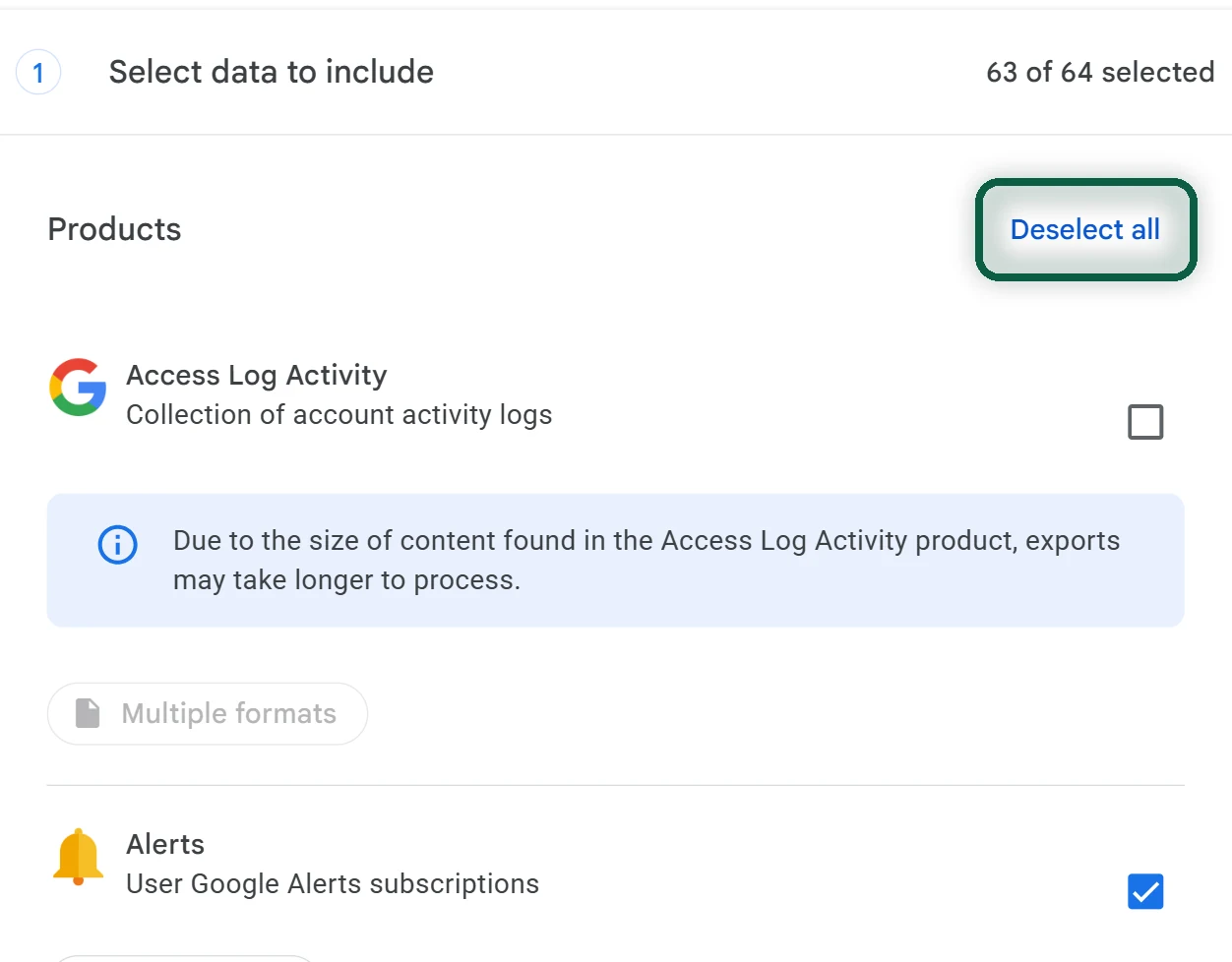
- Open takeout.google.com and click Deselect all.
- Tick Classroom. Tick Drive too, because class files live in Drive folders.
- Click Next step, then Create export, and download the archive when Google emails you. Links expire after about 7 days.
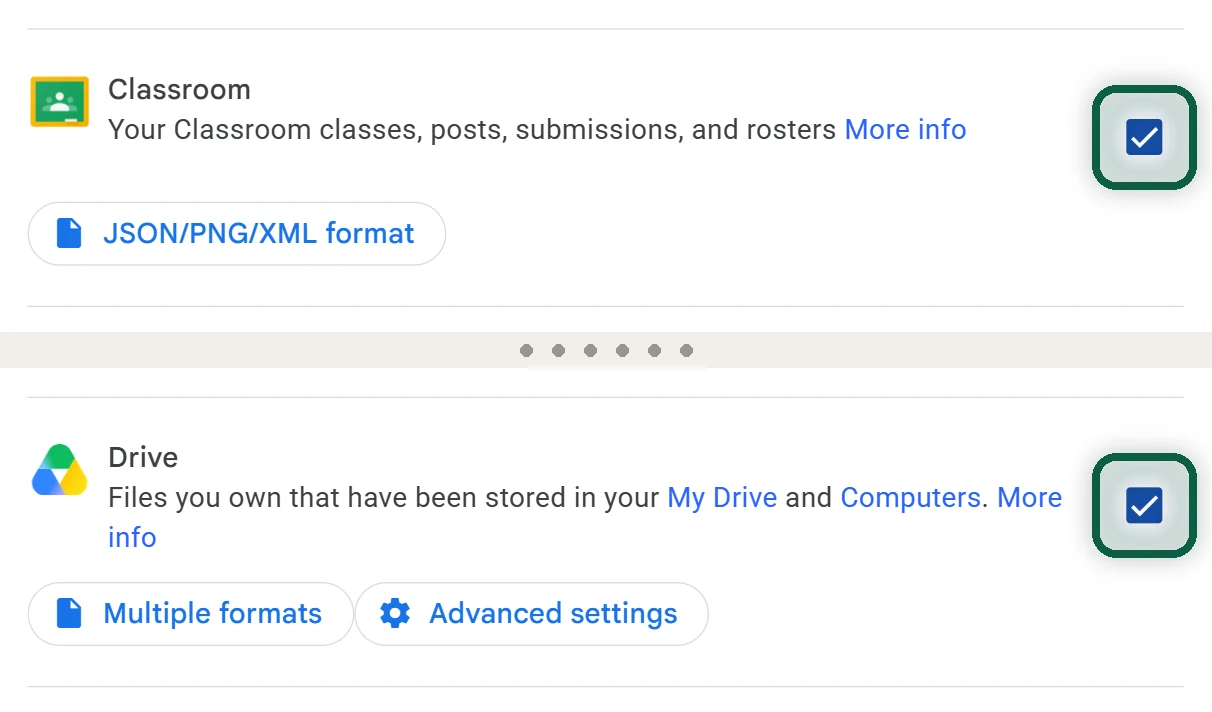
For teachers, the export includes class details, rosters and roles, posts, assignments, questions and materials, and student submissions with grades, comments and rubric scores. Students get their own posts and submissions. Our Google Takeout guide explains the other export options.
Rebuild in the New Platform
Expect to rebuild each course by hand. Your files re-upload easily. Assignments, rosters and settings don’t carry over in one step. Start with the course you’ll teach next, recreate its first few weeks, then invite students.
Classroom is often one of many Google services a family relies on. Our free scan reads files you download from Google and shows the rest, and nothing is uploaded.
What You Lose
Partial is fine. If the school stays on Classroom, keeping your own files, mail and photos outside Google still shrinks what one company holds about your family.