Nearly 90% of the world’s search-engine traffic goes through Google (StatCounter, Sept 2026). Search is also where Google’s AI push is hardest to avoid. After Google announced more AI-driven search at its May 2026 I/O conference, DuckDuckGo’s US app installs rose by up to 30% in a week, according to TechCrunch.
Search is the best first step when you degoogle. There’s no data to move, it works on every device, and you can switch back in seconds.
Own Index or Someone Else’s Results?
Most private search engines don’t crawl the web themselves. They buy results from Bing or Google and strip out the tracking. That’s still a real privacy gain. If your goal is to depend less on Google and Microsoft, though, check where the results come from.
- Own index. Brave Search and Mojeek crawl the web themselves. Kagi reportedly runs a small index of its own and blends it with results from bigger providers.
- European index. Ecosia and Qwant built a shared index, EUSP (its API is called Staan). It has served French results since August 2025, and Ecosia started using it in Germany in July 2026.
- Bing underneath. DuckDuckGo says its links come “largely” from Bing.
- Google underneath. Startpage shows Google’s results through a proxy, without Google’s cookies.
- Many engines at once. SearXNG queries several engines and merges what they return.
Quick Comparison
| Engine | Best for | Price (Oct 2026) | Results come from | Based in |
|---|---|---|---|---|
| Brave Search | Most people | Free; ad-free Premium about $3/month | Own index | USA |
| DuckDuckGo | The easiest switch | Free; optional subscription from about $9.99/month | Largely Bing | USA |
| Kagi | Best results, no ads | From about $5/month | Own index plus major providers | USA |
| Startpage | Google-quality results | Free, with ads | Google, via a proxy | Netherlands |
| Ecosia / Qwant | European sourcing | Free, with ads | EU index in France (and Germany for Ecosia); US providers elsewhere | Germany / France |
| Mojeek | Full independence | Free | Own index | UK |
| SearXNG | Maximum privacy | Free (you host it) | Many engines at once | Open-source project |
The Alternatives, One by One
Brave Search
Brave Search runs on its own index and handled about 2.51 billion queries in August 2026. You don’t need the Brave browser or an account to use it. Goggles let you re-rank results with your own rules, and AI answers can be turned off.
- Choose it if you want one free engine that works everywhere and doesn’t resell Bing or Google.
- Skip it if you want to avoid US companies. Results in smaller languages may also trail Google’s.
- Price. Free with ads. Premium removes them for about $3/month or $29.99/year.
DuckDuckGo
The best-known private search engine. It’s already offered as a choice in Safari and Chrome, so switching takes one click. Its !bangs send a search straight to another site, and a no-AI version lives at noai.duckduckgo.com.
- Choose it if you want the most familiar, lowest-effort switch.
- Skip it if you want results that don’t depend on Microsoft. DuckDuckGo says its links come largely from Bing.
- Price. Search is free. The optional Plus (about $9.99/month or $99.99/year) and Pro (about $19.99/month or $199.99/year) subscriptions add a VPN, data-broker removal, identity restoration and extra AI models. You don’t need them to search.
- Compared with Google. Our DuckDuckGo vs Google Search comparison covers results, AI answers and tracking side by side.
Kagi
A paid search engine with no ads. You can block or boost domains so a site you dislike never shows up again, group sources with Lenses, and use an optional AI Assistant. It’s the best-rated search engine in degoogle community reviews. Kagi reportedly combines its own small index with results from bigger providers.
- Choose it if you search all day and results matter more to you than price.
- Skip it if you don’t want an account. Kagi needs one, and the cheapest plan’s 300 searches a month go fast.
- Price. A free trial of 100 searches. Starter about $5/month (300 searches), Professional about $10/month (unlimited), Ultimate about $25/month. Yearly billing saves about 10%, and sales tax is extra. You can pay in Bitcoin.
Startpage
Startpage gives you Google’s results without Google’s cookies or account tracking. It belongs to Surfboard Holding B.V. in the Netherlands. US ad-tech company System1 took a stake in 2019, which makes some privacy users wary.
- Choose it if you’re happy with Google’s results and only want the tracking gone.
- Skip it if your goal is independence from Google. Every result still comes from Google.
- Price. Free, with ads.
Ecosia and Qwant
The European option. Ecosia (Germany, steward-owned) and Qwant (France) set up a joint venture, European Search Perspective (EUSP), in 2024. Its index runs in EU data centers. Ecosia says most of its French traffic is now answered from EUSP. It began serving EUSP results in Germany on 30 July 2026 and aims to answer most German queries that way by the end of 2026.
Outside France and Germany, Ecosia still uses Bing and Google results. Both engines are small. In France, where they’re strongest, they take just over 2% of search traffic between them.
- Choose it if you live in France or Germany and want results built and hosted in Europe.
- Skip it if you live elsewhere and want to leave US providers. You’d still be getting Bing and Google results.
- Price. Free, with ads.
SearXNG
Open-source metasearch software. It sends your query to many engines at once and shows the combined results, with no account and no profile. You can run your own copy or use a public instance run by a volunteer.
- Choose it if you’re comfortable running a small server. The install guide is at docs.searxng.org, and self-hosting is the only way to get the full privacy benefit.
- Skip it if you want zero maintenance. Public instances are often rate-limited and come and go.
- Price. Free.
Mojeek (UK) is worth a look if independence matters most. It runs its own crawler, but its index is smaller, so niche searches turn up less.
Search Engines Without AI
If AI answers are why you’re leaving Google, you have three simple options.
- DuckDuckGo without AI. Bookmark noai.duckduckgo.com or make it your homepage.
- Brave Search with AI answers off. Switch them off in Brave Search’s settings.
- SearXNG. It returns plain lists of links from the engines you pick.
Your browser matters too. Firefox now has a global AI kill switch, and Vivaldi refuses to add AI at all. See our Chrome alternatives for both. If you still want a chatbot for some questions, our Gemini alternatives page compares private ones. On Android, Gemini keeps answering through Google until you change the digital assistant setting (steps below).
How to Switch From Google Search
Change the default in every browser you use, on every device. Each one takes about two minutes. Nothing in your Google account changes until you clean it up at the end.
Chrome
- Click More (three dots), then Settings.
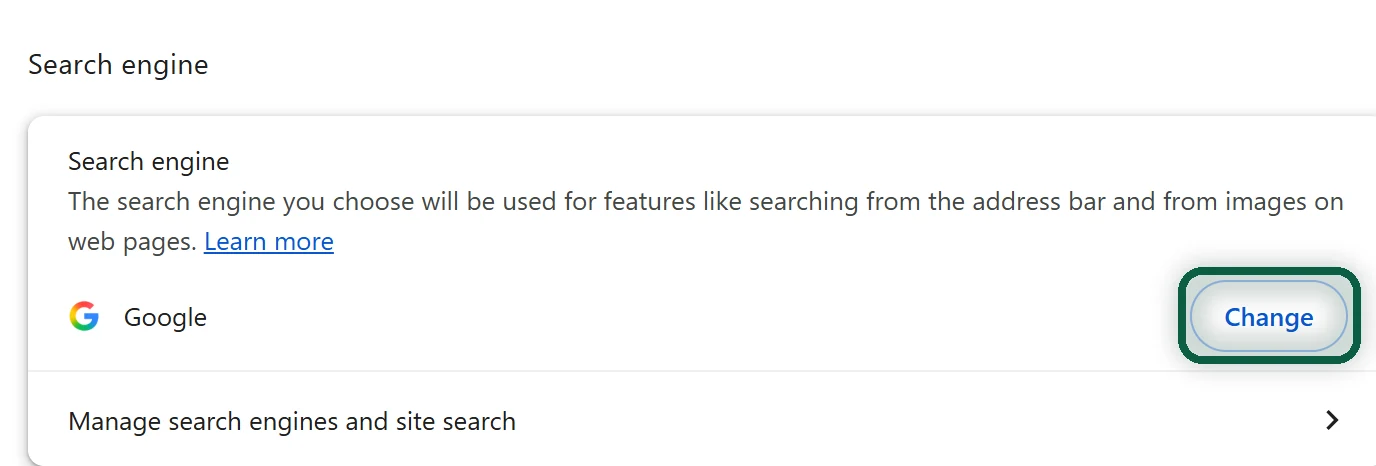
- Open Search engine. Next to Search engine, click Change.
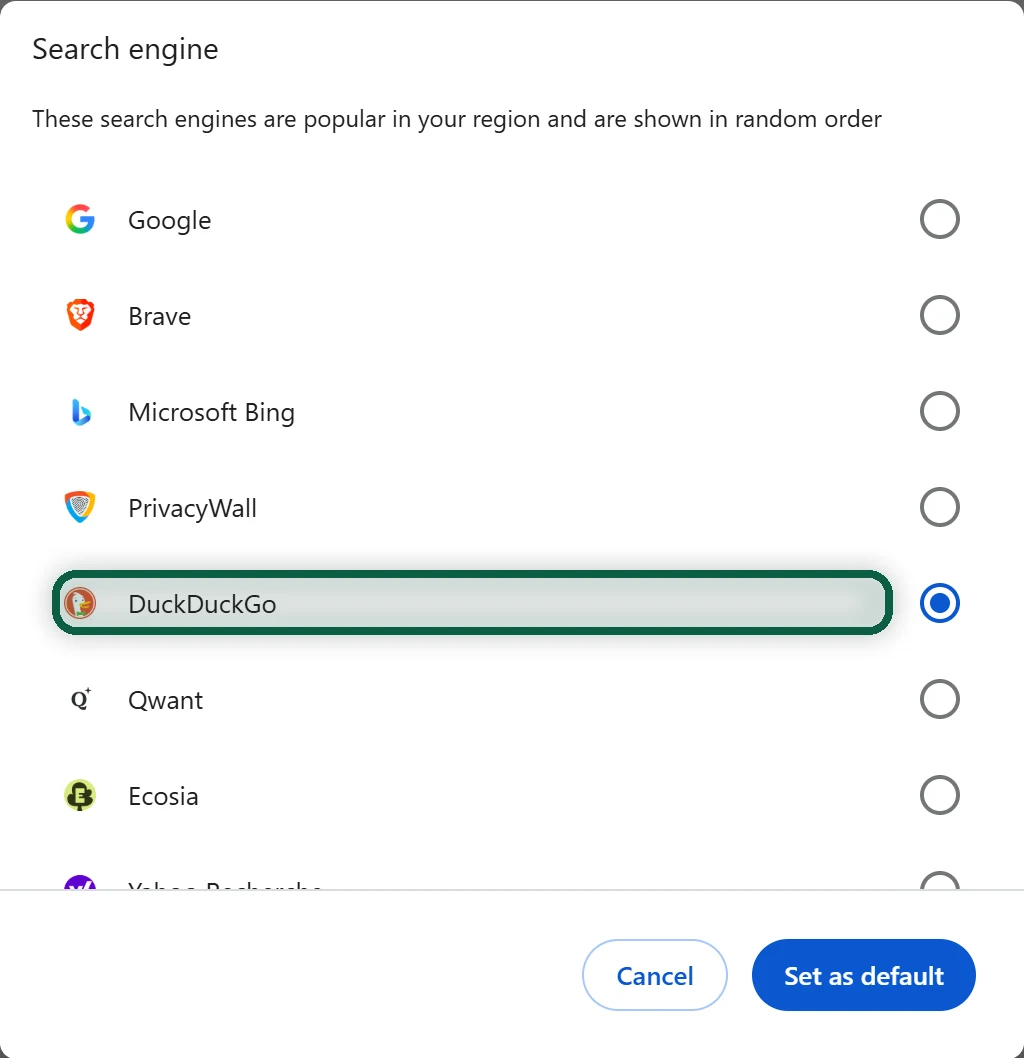
- Pick your new engine from the list and confirm.
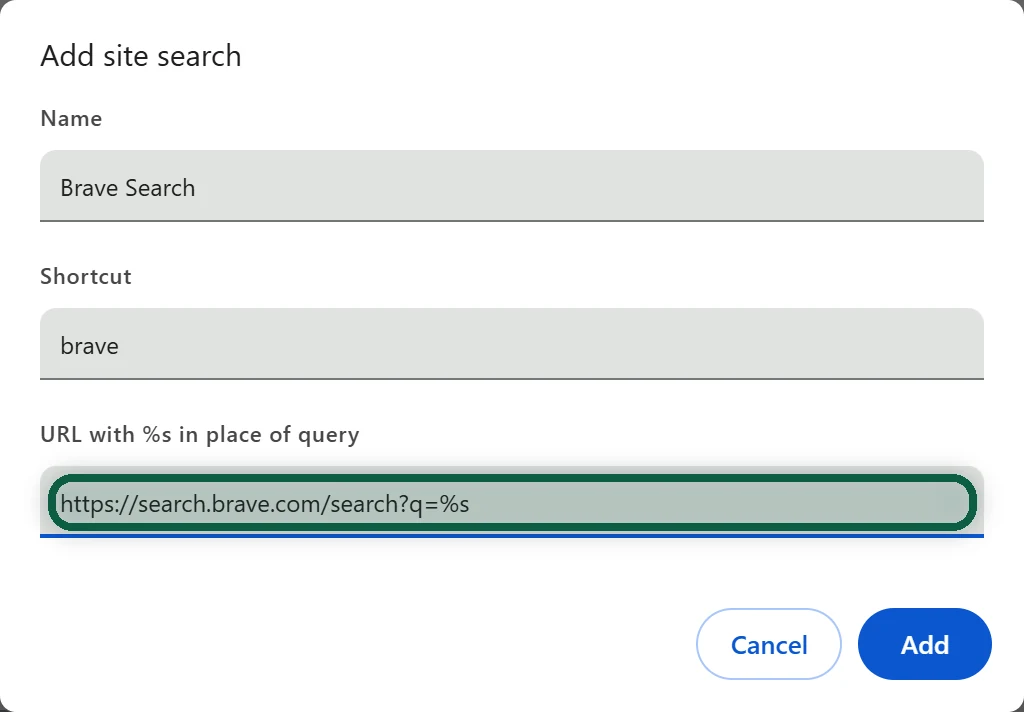
If your engine isn’t in the list (Kagi, or a SearXNG instance), go to Search engine, then Manage search engines and site search. Next to Site search, click Add. Fill in Search engine, Shortcut and URL with %s in place of query, click Add, then make the new entry the default from its menu.
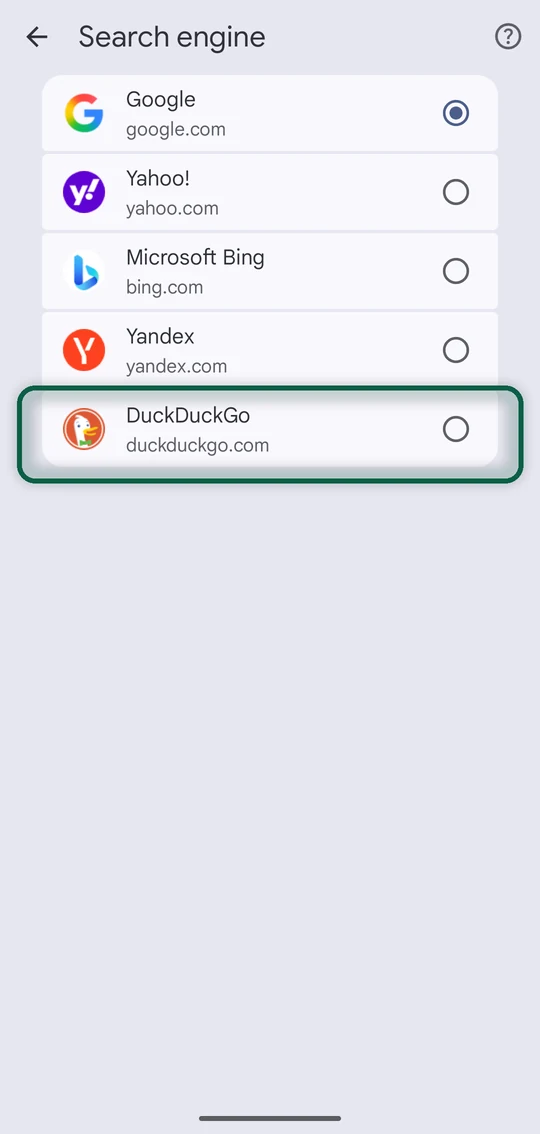
On Android and iPhone, open Chrome, tap More, then Settings, then Search engine, and choose.
Firefox
- Open the menu, then Settings.
- Choose Search in the left pane.
- Pick your engine in the dropdown under Default Search Engine.
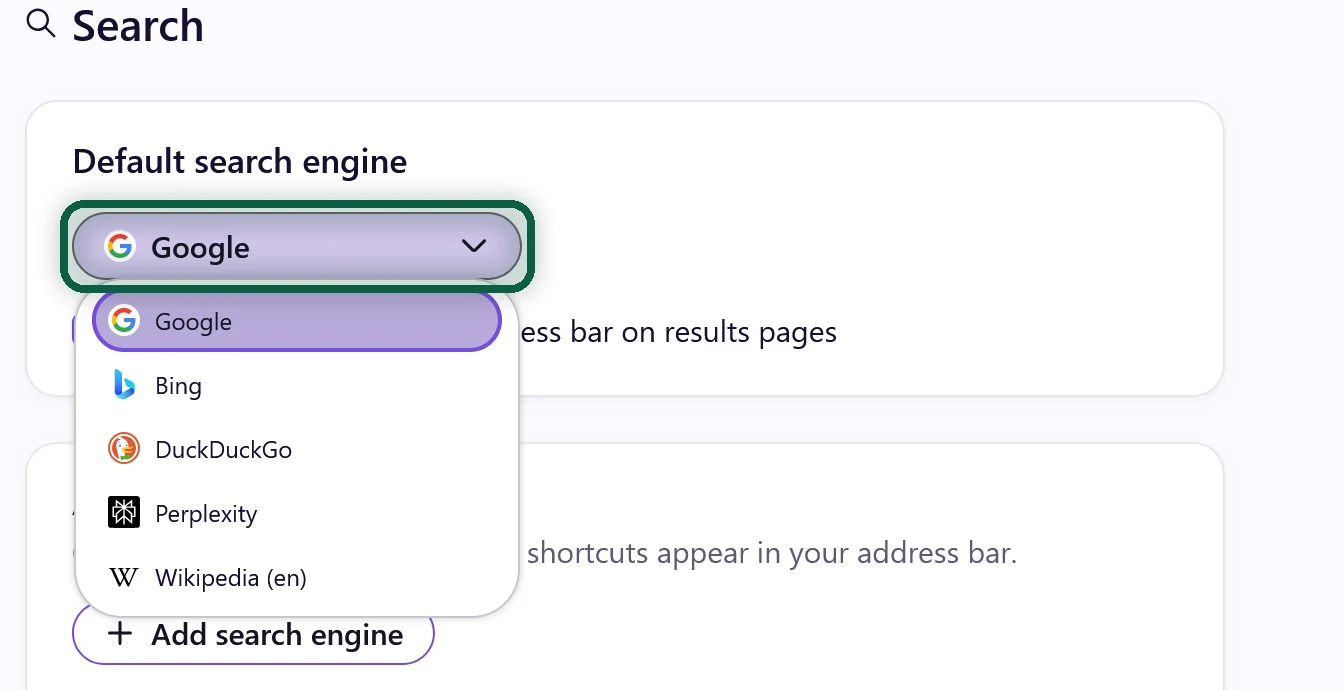
If your engine isn’t listed, click Find more search engines at the bottom of the page and choose Add to Firefox.
Safari
- Mac. Safari, then Settings, then Search. Choose next to Search engine. Private Browsing has its own Private Browsing search engine setting, so change that too.
- iPhone. Settings, then Apps, then Safari, then Search Engine. On iOS 17 and earlier, it’s Settings, then Safari, then Search Engine.
Safari only offers a short built-in list. If your pick isn’t on it, use a different browser on that device, such as Brave, or check whether the engine offers a Safari extension.
Edge
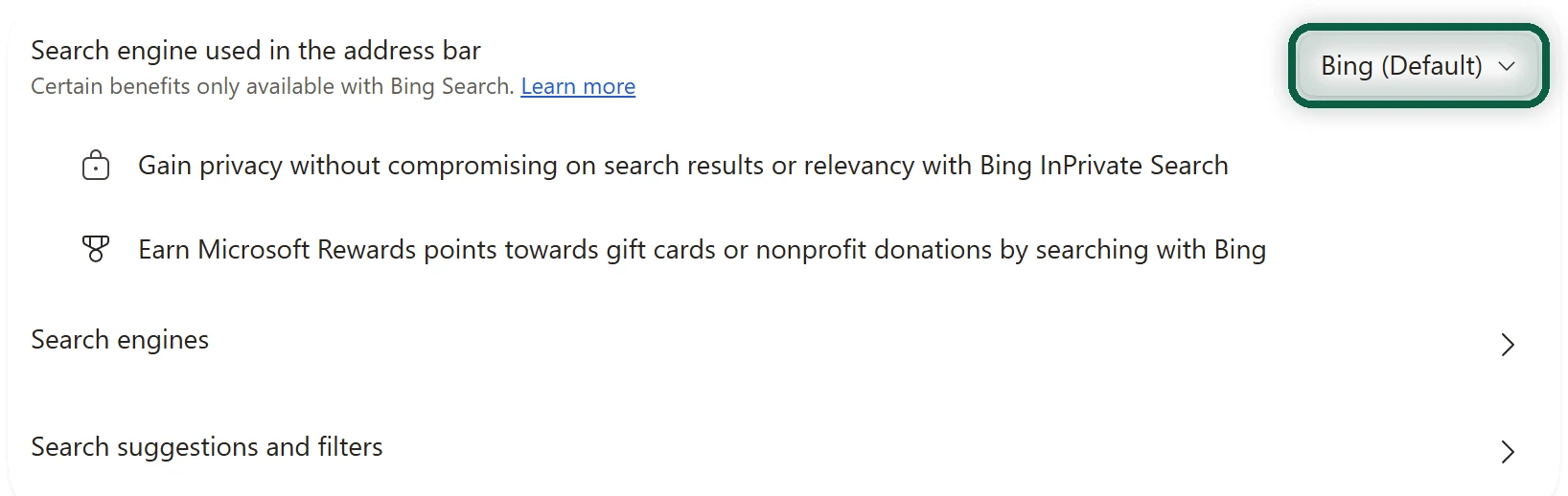
First, run one search on your new engine’s site in Edge. Then open Settings and more (three dots), Settings, Privacy and services, then Address bar, and choose under Search engine used in the address bar.
Your Phone, Beyond the Browser
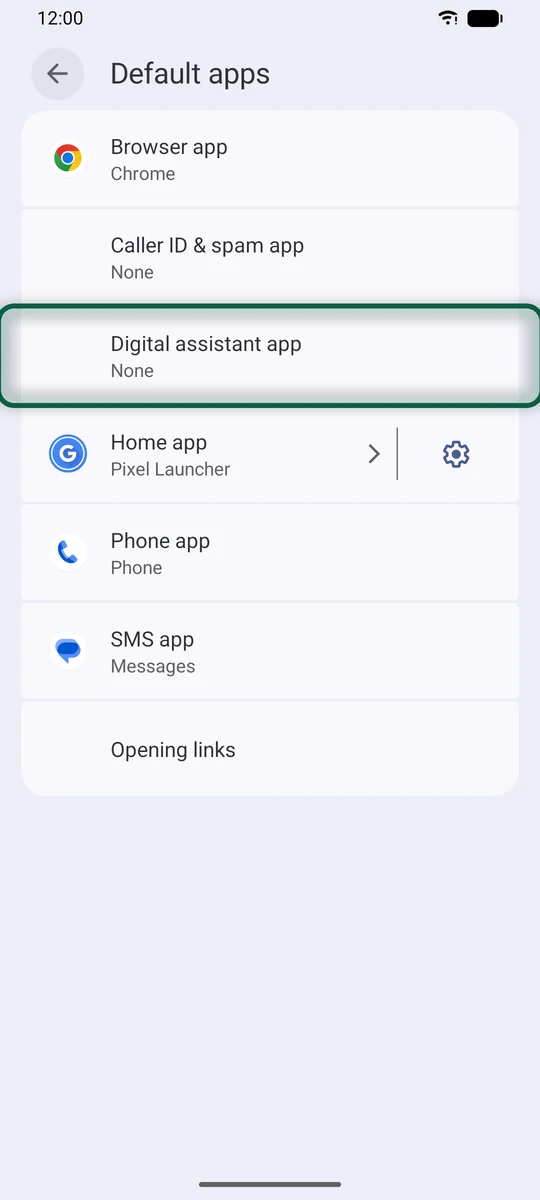
On Android, the Google Search bar on your home screen and the Google assistant keep sending searches to Google. Long-press the search widget and remove it. Then go to Settings, Apps, Default apps, Digital assistant app and choose None. On Pixels, the launcher’s own search bar stays Google until you switch launchers. Our phone guide covers that.
Clean up What Google Already Has
- If you want, save a copy of your past searches first. In Google Takeout, choose My Activity (HTML or JSON).
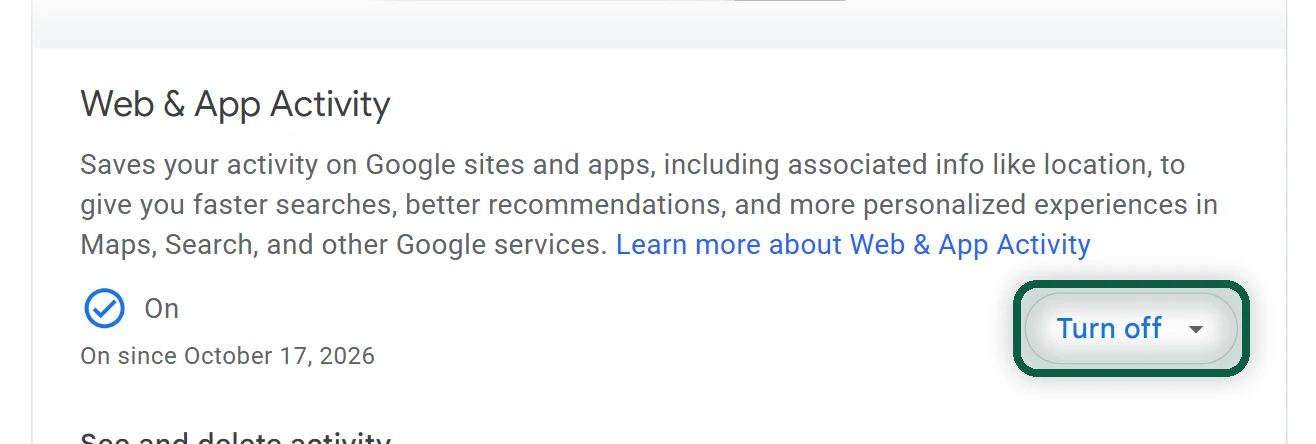
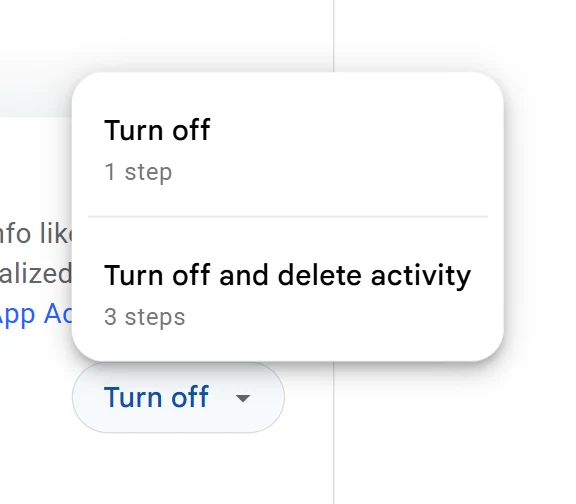
- Go to myaccount.google.com/activitycontrols. On Web & App Activity, click Turn off.
- Choose Turn off and delete activity to erase past searches as well, or Turn off to keep them.
Google is rolling out a separate search-history control on some accounts. If yours shows one, turn it off too. The full walkthrough is in turn off Google tracking.