Quick Comparison
| Alternative | Best for | Price (Oct 2026) | Encryption and privacy | Based in | Open source |
|---|---|---|---|---|---|
| Proton Drive | Most people, Proton Mail users | 5 GB free; 200 GB about $4.99/month | End-to-end encrypted | Switzerland | Apps, yes |
| Filen | Cheapest encrypted terabyte, Linux users | 10 GiB free; 2 TiB about €8.99/month | End-to-end encrypted | Germany | Check filen.io |
| pCloud | Paying once instead of monthly | Lifetime 2 TB about $499 (promo price) | Not end-to-end encrypted unless you buy the add-on | Switzerland | No |
| Nextcloud | Self-hosters and families with a home server | Free software; you pay for hardware or hosting | Your own server; optional encrypted folders | Germany (you choose the server location) | Yes |
| iCloud Drive | All-Apple households | Small free tier; paid iCloud+ plans | End-to-end encrypted with Advanced Data Protection on | USA | No |
Price per Terabyte and Family Plans
Small plans cost a lot per gigabyte everywhere, so compare at the size you actually need. The table below shows the rough monthly cost per terabyte at October 2026 list prices.
| Plan | Storage | Price | Per TB, per month |
|---|---|---|---|
| Filen Pro X | 10 TiB | about €39.99/month | about €4 |
| Filen Pro III | 2 TiB | about €8.99/month | about €4.50 |
| Proton Duo | 2 TB | about $19.99/month | about $10 |
| Proton Family | 3 TB | about $29.99/month | about $10 |
| Proton Drive Plus | 200 GB | about $4.99/month | about $25 |
| pCloud Lifetime | 2 TB | about $499 once | none after purchase |
Proton’s prices above are for monthly billing, and yearly billing is cheaper, so check its pricing page before you buy. pCloud’s lifetime plan costs about the same as two years of Proton Duo, or roughly four years of Filen’s 2 TiB plan. It only pays off if pCloud is still around to honor it.
Sharing with family. If you share a Google One plan with a partner or family, Proton Duo (2 TB) and Proton Family (3 TB) are the closest encrypted equivalents. With Nextcloud you create an account for each person on your own server. Filen’s plans stack if you need more space later.
Drive for work. If your Drive belongs to a paid Google Workspace account, the move takes in mail, calendars and a domain too. Our Google Workspace alternatives page covers that switch for a team.
Does the Country Matter?
With end-to-end encryption the provider only stores scrambled files, so it has nothing readable to hand over. The country still decides who can demand your account details and metadata, and how easily. Proton and pCloud are Swiss, Filen and Nextcloud’s developer are German, and Apple is American. In 2025 Proton threatened to leave Switzerland over a proposed surveillance law and began investing outside the country. With self-hosted Nextcloud, the rules are those of wherever your server sits.
The Alternatives, One by One
Proton Drive
Encrypted storage from Proton AG, the Swiss company behind Proton Mail. Apps cover the web, Windows, macOS, iOS and Android. If you use Linux, check current support before you commit.
- Pick it because one subscription can cover email and storage. The Docs and Sheets editors live inside Drive, the mobile apps back up photos, and Drive Plus keeps 10 years of version history.
- A possible deal-breaker is that the sync apps are younger and less polished than Google’s. The free plan starts at 2 GB and rises to 5 GB after setup, which won’t hold most Drives. Proton sells bundles, so you can’t always buy only the pieces you want.
- Prices (Oct 2026) run from about $4.99/month for Drive Plus 200 GB to about $29.99/month for Family 3 TB. Unlimited 500 GB is about $12.99/month, or $9.99/month billed yearly, and Duo 2 TB is about $19.99/month.
Filen
End-to-end encrypted storage from Filen Cloud Dienste UG in Germany, with apps for web, Windows, macOS, Linux, iOS and Android.
- Pick it for the cheapest encrypted storage per terabyte we found and the most generous free tier. It’s a good fit if you only need a place for files.
- Possible deal-breakers are that it’s a small company and that sharing and collaboration features are basic.
- Prices (Oct 2026) start with 10 GiB free. Pro I (200 GiB) is about €1.99/month, Pro II (500 GiB) about €3.99/month, Pro III (2 TiB) about €8.99/month and Pro X (10 TiB) about €39.99/month.
pCloud
A Swiss service best known for lifetime plans and a desktop app that shows your cloud as a drive on your computer. It runs on every major platform, Linux included.
- Pick it because you pay once and stop thinking about subscriptions.
- A possible deal-breaker is that files are not end-to-end encrypted by default. Client-side encryption is a paid extra, so check its current price. A lifetime deal is only as good as the company’s lifetime, and the apps aren’t open source.
- Lifetime plans (Oct 2026) cost about $219 for 500 GB, $499 for 2 TB and $1,499 for 10 TB (promotional prices).
Nextcloud (Self-Hosted)
Free, open-source software from Nextcloud GmbH in Germany. You run it on a home server, a NAS or a rented server, and it gives you files plus calendar, contacts, chat and online office editing (through Collabora). The current release is Hub 26 Summer.
- Pick it because your files never sit with a third party, and one server can serve the whole family.
- A possible deal-breaker is that you are the sysadmin. Updates, backups and security are your job. Nextcloud also offers optional end-to-end encrypted folders. Test how they behave with your apps before you rely on them.
- The software is free, and you pay for hardware, electricity or hosting. If you’d rather rent a server in Europe, our Google Cloud alternatives page compares hosts such as Hetzner and OVHcloud.
If you only want folders kept in sync between your own devices, Syncthing does that with no cloud at all. Deletions sync too, though, so it doesn’t replace a backup.
iCloud Drive With Advanced Data Protection
The easiest route for a household that only uses Apple devices. With Advanced Data Protection (ADP) turned on, iCloud Drive is end-to-end encrypted.
- A possible deal-breaker is that there’s no Android app. ADP is not available to new users in the UK. It’s US-based and closed source.
- Pricing starts with a small free tier, followed by paid iCloud+ plans. Check Apple’s current prices.
Also on the horizon is Tuta Drive, which Tuta, the German email provider, has had in closed beta since April 2026.
Google Drive, Privacy and Gemini
Drive is not end-to-end encrypted. Google holds the keys, so its systems can process your files to provide features such as Workspace search and Gemini. Those features are controlled by “smart features” settings that, oddly, live in Gmail. If your files stay in Drive for a few more weeks while you migrate, turn them off by following these steps.
- In Gmail on a computer, click the gear icon, then See all settings, then General.
- Under Google Workspace smart features, click Manage Workspace smart feature settings.
- Turn off Smart features in Google Workspace and Smart features in other Google products, then click Save.
Google lists Gemini features among the things you lose. With end-to-end encrypted storage, the question doesn’t come up, because nothing on the provider’s side can read your files.
How to Switch From Google Drive
Google Takeout’s Drive export gives you your files in their original format and converts Google Docs, Sheets and Slides into files other apps can open. Extract everything into one folder and you get back the folder tree you had in My Drive. Our Google Takeout guide covers the export screens in more detail.
Before You Export
- Clean up. Delete what you don’t need and check your usage at drive.google.com/settings. You’ll need free disk space for the zip files plus the extracted copy.
- Collect files shared with you. Files under Shared with me are not exported unless you added them, or shortcuts to them, to My Drive. Ask owners for copies of anything important.
- Hand over files others rely on. If you plan to delete your account, open Share on the file, click the person’s dropdown and choose Transfer ownership. With personal accounts, the other person has to accept.
Export With Takeout
- Go to takeout.google.com and click Deselect all.
- Tick Drive. To leave folders out, click All Drive data included and untick them.
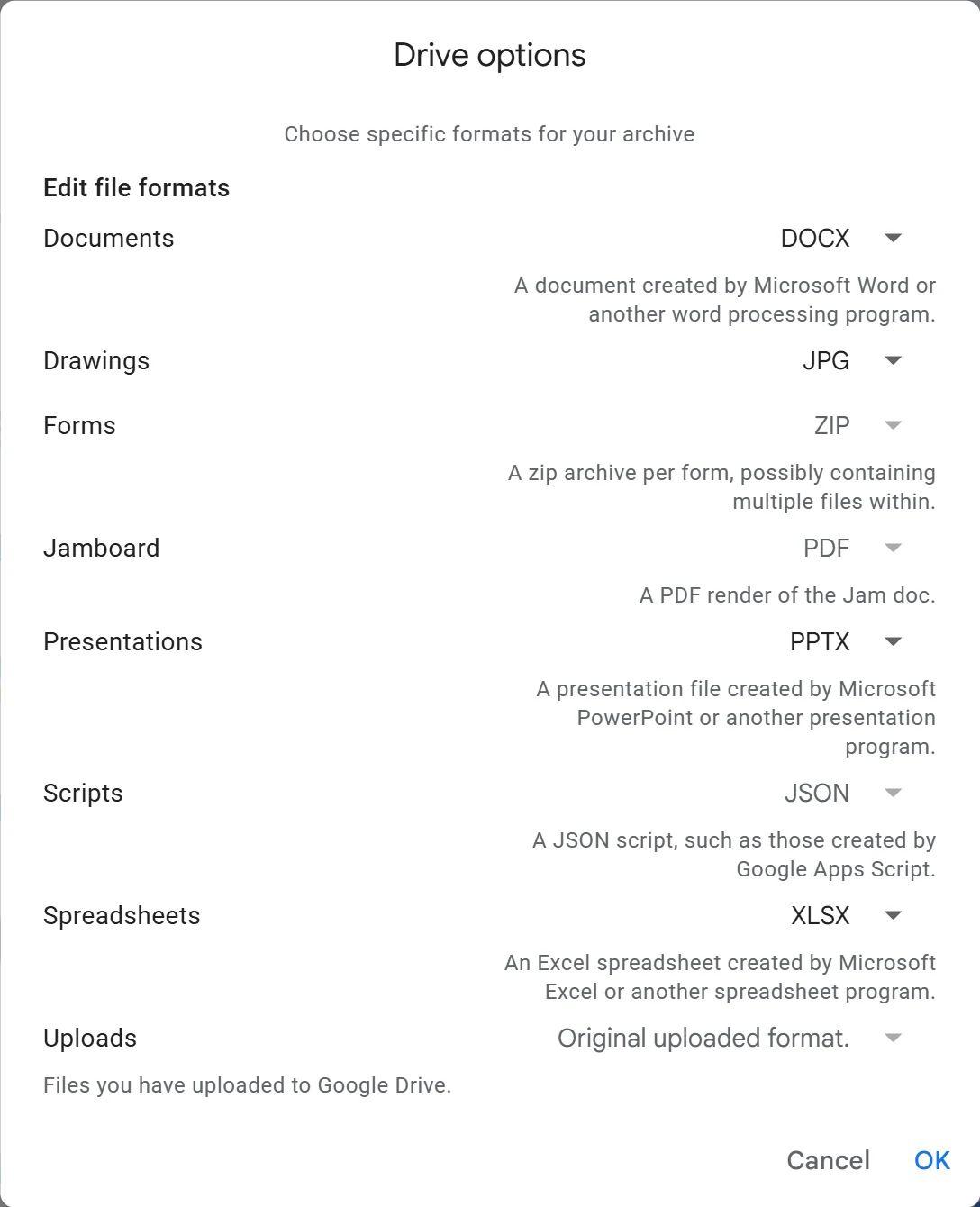
- Click Multiple formats and choose how Docs, Sheets and Slides are converted. Office formats (DOCX, XLSX, PPTX) work almost everywhere. Choose OpenDocument (ODT, ODS, ODP) if you’ll edit in LibreOffice.
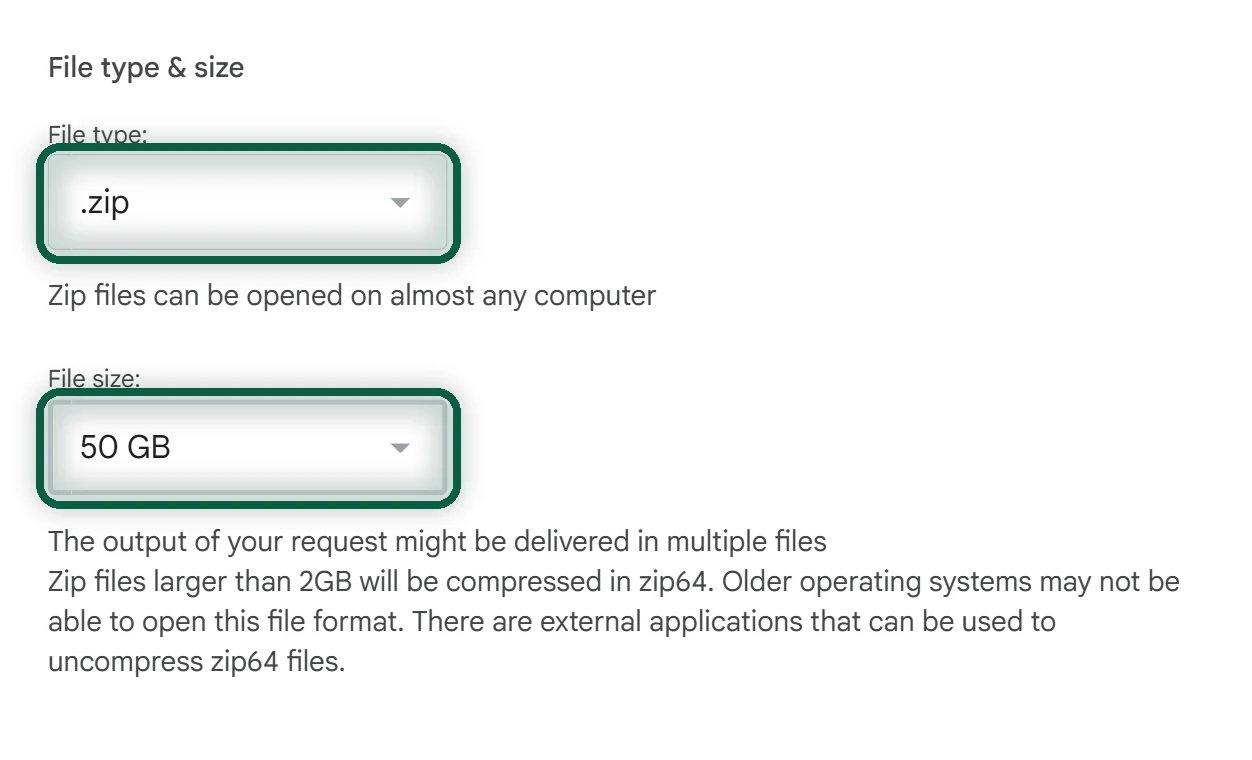
- Click Next step. Choose Send download link via email, a one-time export, .zip and 50GB, then click Create export.
- When Google’s email arrives, download every part. Links expire after about 7 days, and each part can be downloaded 5 times.
- Extract all the parts into the same folder, so the pieces of each folder merge back together.
Upload to Your New Storage
- Install the desktop app for Proton Drive or Filen, or the Nextcloud desktop client. Desktop apps cope with interrupted uploads better than a browser tab.
- Drag your extracted top-level folder into the app and leave the computer on. A large Drive can take hours or days.
- Spot-check. Compare file counts and sizes for a few folders, then open some converted documents and spreadsheets.
- Re-share anything other people need. Old Google Drive links stop working once the files are gone.
- When you’re sure everything arrived, delete the files from Google Drive and empty its Trash.
Moving to Proton? Our Google Drive to Proton Drive walkthrough covers the upload, turning files into Proton Docs and Sheets, and re-sharing folders.
Files are usually only one part of the move. To see which accounts and services still hang off your Google account, run our free scan. It reads files you download from Google and uploads nothing.
What You Lose
Partial is fine. Plenty of people move their personal files first and leave a shared family folder in Drive until everyone is ready. If photos are your biggest storage hog, start with Google Photos alternatives instead.