Google Maps is one of the hardest Google apps to give up. Plenty of committed degooglers keep it for search, business details, traffic and transit. No single Google Maps alternative has to replace all of that. Most people who switch end up with two tools. One is an offline OpenStreetMap app for everyday navigation. The other is a traffic app or a signed-out browser tab for everything else. If you plan trips with Google too, our Google Flights alternatives page covers fare searches and price alerts.
Why bother? Your location says more about you than almost anything else Google collects. In September 2026, Ireland’s data protection regulator fined Google €403 million over how it collected and kept users’ location data.
Quick Comparison
| Alternative | Best for | Price (Oct 2026) | Privacy | Based in | Open source |
|---|---|---|---|---|---|
| CoMaps | Everyday offline navigation | Free | No tracking | Not-for-profit community project | Yes |
| Organic Maps | Same as CoMaps, and opens Google’s starred-places file | Free (donations) | No tracking | Estonia | Yes |
| OsmAnd | Hiking, cycling, power users | Free with limits; paid upgrades | Minimal data collection | OsmAnd B.V. | Yes |
| Magic Earth | Live traffic without Google | Paid Premium License available | Says it collects no personal data | Magic Lane | No |
| HERE WeGo | Traffic and public transit | Free | Account optional | HERE Technologies (carmaker-owned) | No |
| Apple Maps | iPhone owners | Free | No Google account involved | USA | No |
Offline, Traffic and the Car at a Glance
| App | Offline maps | Live traffic | CarPlay | Android Auto |
|---|---|---|---|---|
| CoMaps | Yes | No | Yes, since Aug 2025 | Yes, when installed from Google Play |
| Organic Maps | Yes | No | Yes | Yes |
| Magic Earth | Yes | Yes, crowd-sourced | Yes | Not mentioned on its site |
| HERE WeGo | Yes | Yes | Yes | Beta |
| Apple Maps | Depends on iOS version | Yes, plus incident reports | Yes | No (iPhone only) |
Public transit is where Google is hardest to beat. Of the apps here, HERE WeGo is the strongest for transit directions. Organic Maps added routing by subway, light rail, bus and tram in June 2026.
The Alternatives, One by One
CoMaps
CoMaps started in May 2025 as a community fork of Organic Maps. Some Organic Maps contributors disagreed with how the project was governed, since a private company runs it. They set up CoMaps as a not-for-profit project with open finances and open decision-making, and the first Android preview arrived in June 2025.
For you, the two apps still look and work almost the same, and both are actively developed. CoMaps ships smaller releases more often, about every two to four weeks in the first half of 2026, and has added EV charging plug types, speed-limit display, and map updates that arrive without an app update. It ships as the default maps app on CalyxOS and iodéOS, and it’s the app the privacy community now recommends most often.
- Pick it because it’s free, has no tracking, works fully offline, offers good turn-by-turn navigation for walking, cycling and driving, and supports CarPlay. Android Auto works too if you install CoMaps from Google Play.
- The deal-breakers are that there’s no live traffic and address search is weaker than Google’s.
- It’s free, and its funding is public through Open Collective.
- It runs on Android, iPhone, macOS and Linux.
Organic Maps
The original app that CoMaps forked from. It passed 6 million installs by December 2025 and is sponsored by NLnet and FUTO, among others. It’s run by Organic Maps OÜ, a company in Estonia. Our Organic Maps vs Google Maps comparison goes through offline maps, traffic and transit in detail.
- Choose it if you want public transport routing, which it added in June 2026, or you want to open Google’s starred-places file without converting it first. Organic Maps supports both CarPlay and Android Auto.
- Its deal-breakers are the same as CoMaps’ (no traffic, weaker address search).
- It’s free and funded by donations.
- It runs on Android and iPhone, with a Linux beta.
OsmAnd
The most powerful OpenStreetMap app. Hikers and cyclists like it for contour lines, track recording and plugins.
- Choose it if you spend time on trails, want to record routes, or like to tweak every setting.
- Watch for these deal-breakers. The cluttered interface takes time to learn. The free version has limits, so check what they are on OsmAnd’s site before a long trip. If you drive with CarPlay or Android Auto, confirm current support before you rely on it.
- It’s free with limits, and Maps+ and Pro are paid upgrades. Check current prices on OsmAnd’s site.
- It runs on Android, iPhone and the web.
Magic Earth
One of the apps people name most often when they want traffic without Google. Its site describes real-time traffic from a network of drivers, offline maps, and CarPlay support, and says the app is “100% surveillance free” because the company doesn’t collect personal data.
- Choose it if you commute by car and need traffic.
- Watch for these deal-breakers. It’s closed source, so you’re trusting the company’s privacy claims. Its site doesn’t mention Android Auto, so check before you buy if that matters to you.
- A paid Premium License is sold on its website. Check the pricing page for what the free version includes.
- It runs on Android and iPhone, plus CarPlay and Apple Watch.
HERE WeGo
A mainstream navigation app with good traffic and transit, from HERE Technologies, which is owned by a group of carmakers including Audi, BMW and Mercedes-Benz. HERE isn’t a privacy company. The app does work without an account, and your trips don’t feed a Google profile.
- Choose it if you rely on public transit or want traffic on Android without Google.
- The deal-breakers are that it’s closed source and owned by carmakers rather than a privacy-focused company.
- It’s free.
- It runs on Android, iPhone and the web, with CarPlay and Android Auto (beta). Offline maps are included.
Apple Maps
If you have an iPhone, this is the easiest mainstream switch. It has live traffic and crowd-sourced incident reports, which makes it the closest thing to Waze on iPhone.
- Choose it if you’re on iPhone and want something that feels as polished as Google Maps.
- The deal-breakers are that there’s no Android app and you swap Google for Apple, which some people are happy with and others aren’t.
- It’s free.
- It runs on iPhone, Mac and the web (maps.apple.com).
Keep Google Maps for Lookups, Signed Out
Partial is fine here. You can drop the Google Maps app and still use Google’s business data when you need it.
- Open maps.google.com in a private window, or in a browser you never sign in to Google with. You get opening hours, reviews, photos and Street View without tying the lookups to your Google account.
- On Android, some people use a small wrapper app such as GMapsWV to do the same thing without the Google Maps app.
- Apple Maps on the web is another fallback for checking a business.
If you used Google Earth for satellite views and 3D flyovers, our Google Earth alternatives page covers free imagery viewers.
You can also fix the map yourself. CoMaps and Organic Maps have a built-in OpenStreetMap editor, and the StreetComplete app turns map fixes into quick quizzes. Every fix you make helps the next person who searches there.
Quality varies by region. Before you commit, search CoMaps for five places you visit often (your doctor, a favorite restaurant, your kid’s school). If it finds them, you’ll probably be fine.
CarPlay and Android Auto on a Degoogled Phone
- On iPhone, CarPlay works with CoMaps, Organic Maps, Magic Earth, HERE WeGo and Apple Maps.
- On stock Android, Android Auto keeps working. Use CoMaps installed from Google Play, Organic Maps, or HERE WeGo (beta).
- On GrapheneOS, Android Auto is officially supported through sandboxed Google Play. Install it from the GrapheneOS App Store. Only apps installed from the Play Store show up in the car.
- On /e/OS, Android Auto support was announced with version 2, but it runs through microG, so test it with your car before relying on it.
- On other microG-based systems, assume Android Auto may not work. A phone mount with an offline maps app is the reliable fallback.
Our degoogled phone guide covers which system fits a car-heavy life.
How to Switch From Google Maps
Start by Exporting Your Saved Places
- On a computer, open takeout.google.com and sign in.
- Click Deselect all so you only export what you need.
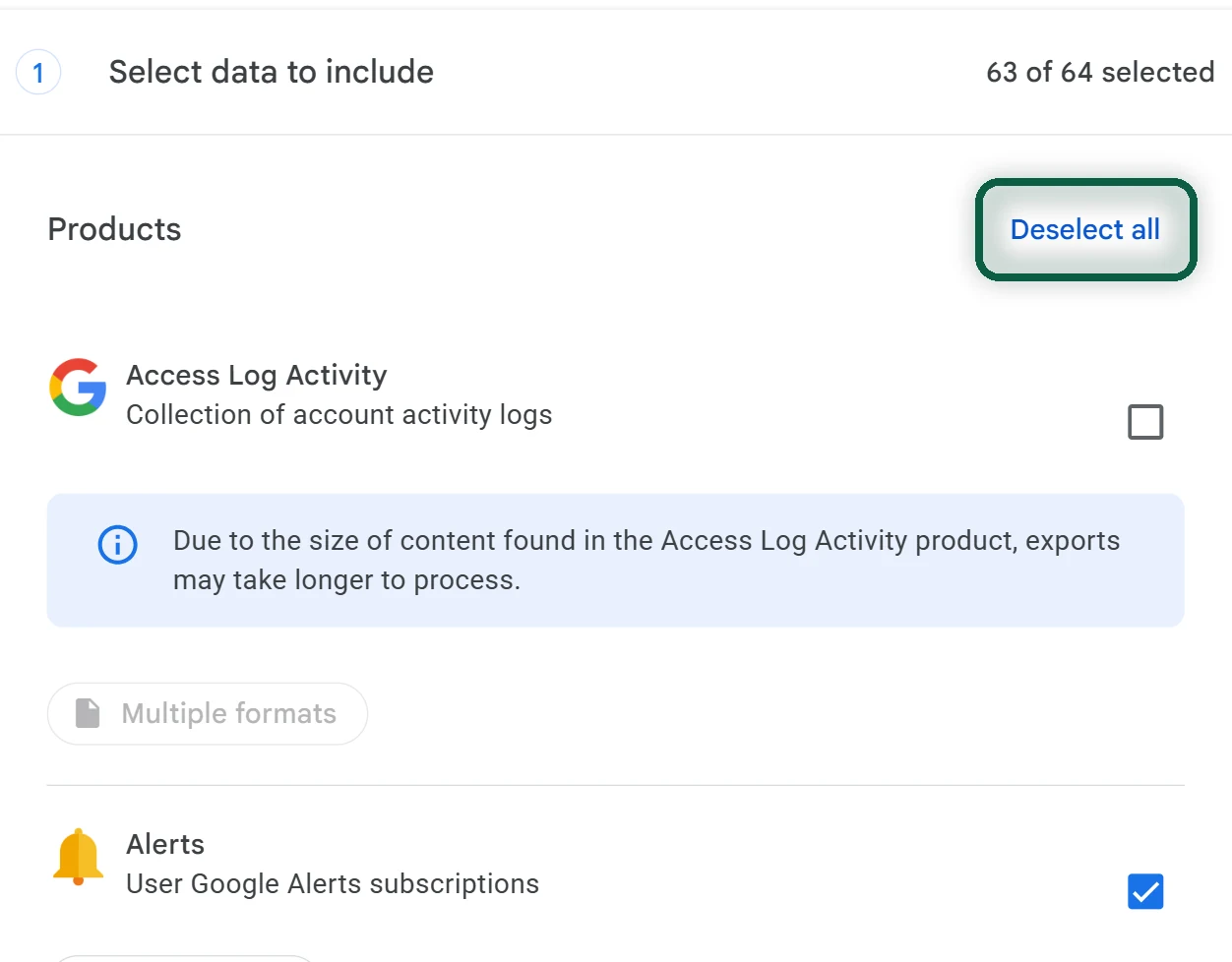
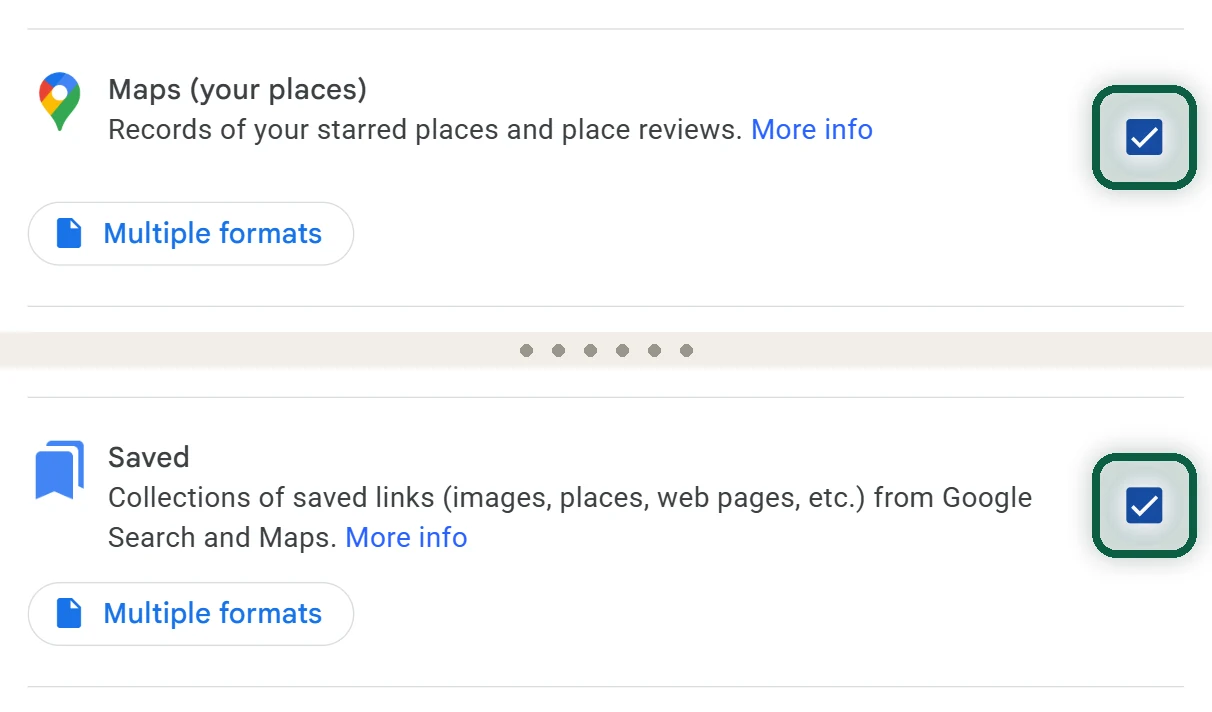
- Scroll down and tick Maps (your places) (your starred places) and Saved (your lists, such as Want to go and Favorites).
- Click Next step. Choose to export once, pick .zip, then click Create export.
- Wait for Google’s email (usually the same day), then click Download archive. The link expires after about 7 days.
- Unzip the archive and open archive_browser.html to see what’s inside.
Your starred places usually arrive as a GeoJSON file (often called Saved Places.json). Saved lists usually arrive as one CSV file per list. The CSV files typically hold place names and Google Maps links rather than coordinates, so map apps can’t import them directly. Our Google Takeout guide covers the export screens in more detail.
Import Them Into CoMaps, Organic Maps or OsmAnd
- Install CoMaps and download the offline map for your country or region over Wi-Fi. Install Organic Maps as well for the one-time conversion in step 3.
- Copy the GeoJSON file to your phone, for example over USB or by emailing it to yourself.
- CoMaps imports KML, KMZ and GPX files but not GeoJSON, so convert the file first. Open it in Organic Maps, which reads Google’s format, export the list as KMZ, then open that KMZ file in CoMaps. Your places appear as a new list.
- For your CSV lists, re-add the places you actually use by searching for them and saving them to a list. Most people have 10–30 that matter. If you have hundreds, a converter tool can turn the CSV into KML or GPX, but expect to fix some entries by hand.
- Using OsmAnd? It reads GPX and KML files. If it won’t open the GeoJSON, convert it to GPX first.
- Set your home and work addresses in the new app, and choose it as the navigation app in CarPlay or Android Auto.
Our Google Maps to CoMaps walkthrough shows every conversion screen, including how to turn your CSV lists into a KML file with Google My Maps.
Turn off Google’s Location Features on Android
- Open Settings → Location and turn off Google Location Accuracy (the exact name varies by phone).
- If you used Timeline, export it before you reset or replace the phone. On many phones, go to Settings → Location → Location services → Timeline and tap Export Timeline data. The path varies on other brands.
- Turn Timeline off and delete it on every phone where it was on, including any backup.
Turning off the rest of Google’s location history is covered in how to turn off Google tracking.