Degoogling works best as a sequence, with each level making the next one safer. You set up a password manager before you change email, open a new address before you unlink accounts, and check every export before you delete anything. Most people never finish every level, and they don’t need to.
Take an Inventory Before You Start
You can’t plan an exit from services you’ve forgotten about. Before you change anything, write down three lists.
- Google products you use. On takeout.google.com, Google pre-selects every product that holds your data. Mark the ones you’d actually miss.
- Accounts tied to Google. Everything you log into with your Gmail address or with Sign in with Google. This is usually the longest list, and the one that can lock you out.
- Your constraints. Your phone, your bank’s app, your car (Android Auto or CarPlay), family members who share calendars or albums with you, and any work or school account you can’t change.
Our free scan builds this inventory from files you download from Google yourself, such as the password export, a light Takeout or the pasted Sign in with Google list. It runs in your browser and uploads nothing, and you never connect your Google account.
Partial is fine. Plenty of people stop after Level 2 and keep YouTube and Maps. Every task you tick reduces what Google collects and how much a single locked account could cost you.
Level 1 Gets the Quick Wins Done in About an Hour
These are settings and app swaps. The first five tasks take about an hour together. Moving passwords and 2FA codes adds 30 to 60 minutes each, so give them a second sitting in the same week.
Switch Your Default Search Engine
Pick one engine and set it everywhere you search. Our default is Brave Search, which runs its own index, needs no account and is free. DuckDuckGo is the easiest familiar name, and Kagi is the community’s highest-rated engine if you’ll pay (about $10/month for unlimited searches, Oct 2026). In Chrome on a computer, go to More > Settings > Search engine and click Change; in Firefox it’s Settings > Search > Default Search Engine. On Android, also remove the Google Search widget from your home screen.
Compare engines in Google Search alternatives.
Move From Chrome to Brave or Firefox
Brave is the smoothest switch because it’s built on the same Chromium code as Chrome, runs Chrome extensions and blocks ads and trackers on its own. Choose Firefox with uBlock Origin if you’d rather use a browser that isn’t based on Chromium; uBlock Origin has been disabled in Chrome since March 2025. Quit Chrome, then import bookmarks and history. In Firefox that’s Settings > General > Import Browser Data > Import Data, and in Brave it’s Bookmarks > Import Bookmarks and Settings. Leave saved passwords for the password task below. Make the new browser your default on every device, then sign out of Chrome and turn off sync so it stops copying your browsing to your Google Account.
Other options are in Chrome alternatives, and we walk through each move in Chrome to Brave and Chrome to Firefox.
Turn off Web & App Activity, Timeline and YouTube History
Go to myaccount.google.com/activitycontrols. On Web & App Activity, click Turn off, then choose Turn off or Turn off and delete activity (deleting can’t be undone). If your account shows a separate search history control, turn that off too. Timeline is off by default; if you ever turned it on, switch it off on the same page and delete it on each phone in Google Maps (profile picture > Your Timeline > More > Settings > Delete all Timeline data). For YouTube, open myactivity.google.com/product/youtube, then Controls > Turn off, and use Subscriptions since your home feed goes blank. For anything you leave on, set Auto-delete to 3 months under Data & privacy > History settings.
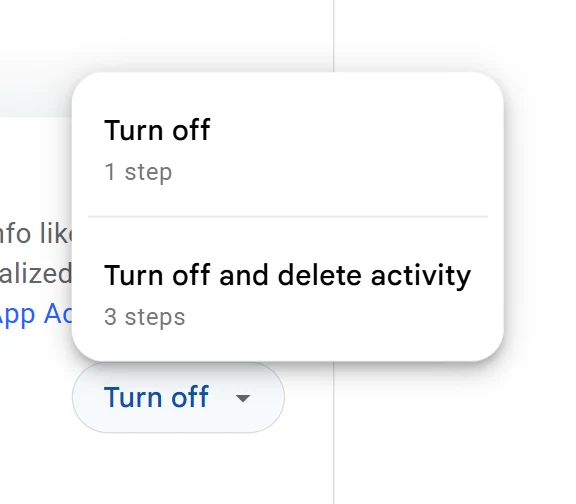
The full walkthrough shows how to turn off Google tracking.
Turn off Gemini Keep Activity and Gmail Smart Features
At myactivity.google.com/product/gemini, turn Keep Activity off. Google says human reviewers read a subset of Gemini chats, and it keeps reviewed chats for up to three years; with Keep Activity off, new chats are still kept with your account for 72 hours. In Gmail on a computer, open the gear, then See all settings > General, untick Turn on smart features in Gmail, Chat, and Meet, open Manage Workspace smart feature settings, turn off both switches and click Save. You lose inbox categories, Smart Compose, summary cards and Gemini features in Gmail. Google says it does not use Gmail content to train Gemini; smart features are what let its systems process your mail for these tools.
More in turn off Google tracking. To stop using Gemini altogether, compare Gemini alternatives.
Turn off Personalized Ads
Go to myadcenter.google.com and set Personalized ads to Off, then confirm. This applies on every device where you’re signed in and covers sites that partner with Google. If you also browse signed out, visit adssettings.google.com in each browser and turn off the three personalized-ads switches there. On Android, also reset or delete the advertising ID in system settings. You’ll still see ads, but they stop being based on your profile.
Details in turn off Google tracking.
Move Your Passwords Out of Google Password Manager
Do this before you touch your email, so you have a vault for new passwords and backup codes. In Chrome on a computer, go to chrome://password-manager/settings, click Export passwords, then Download file. Import the CSV into Bitwarden, our free, open-source default, under Tools > Import with the format Chrome (csv). The file holds every password in plain text, so delete it straight away (after loading it into the scan, if you want a plan; the tool reads only the site and username columns). Passkeys aren’t in the CSV, so add new ones in Bitwarden. After two weeks without problems, use Delete all Google Password Manager data in Google Password Manager’s Settings.

The rest of the browser move is in Chrome alternatives.
Move Your 2FA Codes Out of Google Authenticator
Install Ente Auth (free, on every platform), Proton Authenticator if you’ll use Proton, or Aegis on Android. In Google Authenticator, open the menu and tap Transfer codes, then Export codes. It shows one or more QR codes, and you scan each one with the new app. Test every account with the new code, turn on the new app’s encrypted backup and save each site’s recovery codes in Bitwarden or on paper. Only then delete the codes from Google Authenticator, and check that your Google account’s own 2-Step Verification still works. Bank apps, Steam and Microsoft push approvals don’t use standard codes and must be set up again.
Compare apps in Google Authenticator alternatives, or follow our Google Authenticator to Aegis walkthrough on Android.
Level 2 Moves Email and Accounts in a Weekend, Then a Slow Tail
Your Gmail address is the key to most of your other accounts, so this level is about identity more than mail. Expect a weekend of setup, then at least 12 months of forwarding while stragglers turn up, because yearly emails such as tax and insurance renewals arrive only once a year. Many people keep forwarding for two years.
Pick a New Email Provider
Our default is Proton Mail. Its Easy Switch tool imports your Gmail mail, contacts and calendars and keeps forwarding new mail, and Mail Plus costs about $4.99/month, or $3.99/month billed yearly (Oct 2026). Choose Tuta if you want the most encryption for the least money (Revolutionary is €3/month billed yearly) and are happy to use only Tuta’s own apps. Choose Fastmail (about $5/month billed yearly) for the most Gmail-like experience if you can live without end-to-end encryption. If your Gmail uses more than about 1 GB, start on a paid plan, because the free tiers are small.
Compare providers in Gmail alternatives.
Forward Gmail to Your New Address
In Gmail on a computer, open the gear, See all settings, then the Forwarding and POP/IMAP tab. Click Add a forwarding address, enter your new address and confirm with the link Google sends there. Back in Gmail, select Forward a copy of incoming mail to, choose whether Gmail keeps or archives its copy, and click Save Changes. Proton’s Easy Switch sets up forwarding for you if you use it. Then turn on the Vacation responder under General with a short note giving your new address, and leave the contacts-only option unticked so companies see it too.
Import Your Old Mail
With Proton, go to Settings > All settings > Import via Easy Switch > Google > Connect to Gmail, and tick Select all on Google’s permission screen, or the setup fails. Easy Switch brings in your most recent mail up to 80% of your Proton storage; use More import options to pick a time range or import everything. Fastmail has its own Gmail import under Settings > Migration > Import. Large mailboxes take hours to days. For a complete offline archive, also export Mail from Takeout as an MBOX file and keep it on a drive.
See how to move from Gmail step by step, or follow the full Gmail to Proton Mail or Gmail to Tuta walkthrough.
Find Every Account Tied to Your Gmail
Combine three lists, because none is complete on its own. First, your saved logins at passwords.google.com or in the CSV you exported. Second, the sites at myaccount.google.com/linkedapps under the Sign in with Google filter. Third, a Gmail search such as subject:(welcome OR verify OR confirm OR "activate your account") in:anywhere, repeated for receipts and password resets, with a label on the results. Include accounts where Gmail is only the recovery address, such as an Apple or Microsoft account.
The scan merges these lists for you and sorts them into what to fix first.
Set Passwords, Then Switch Your Logins
Start with your bank, government services, phone carrier and anything that recovers other accounts (Apple, Microsoft, your password manager), then shops with saved cards, then social media; unsubscribe from newsletters instead of moving them. Google Alerts stay tied to your Google Account, so re-create the ones you want with one of the Google Alerts alternatives. For each site, log in, change the email to your new address, confirm it, set a password saved in Bitwarden and turn on the site’s own 2FA. Only then go to myaccount.google.com/linkedapps and remove the Google link under Sign in with Google > the site > See details > Stop using Sign in with Google > Confirm. Google says unlinking doesn’t delete your data in the app, but some apps allow only one sign-in method, so ask them first.
Read the full guide on how to replace Sign in with Google.
Set up Aliases or Your Own Domain
An alias is a separate address for each site that still lands in your inbox, so a leaky site can be cut off without changing your main address. Proton Mail Plus includes 10 addresses plus hide-my-email aliases, Fastmail has masked email, and SimpleLogin or addy.io work with any provider. With a custom domain, your address stays the same when you change provider, because moving only means updating DNS records. Proton Mail Plus includes one custom domain and Tuta Revolutionary three. Turn on auto-renew, and log in to your registrar with an address outside that domain, so a lapsed renewal can’t cut off the mail you’d need to fix it.
More in Gmail alternatives.
Level 3 Moves Files, Photos, Calendar and Notes
Each move here follows the same pattern of export, import and check, and only then delete from Google. Takeout download links expire after about 7 days and each archive can be downloaded 5 times, so start an export only when you have time to fetch it.
Move Your Google Drive Files
Delete what you don’t need, then go to takeout.google.com, click Deselect all, tick Drive and choose 50 GB zip files so the export splits into fewer parts. Upload with the new service’s desktop app, which resumes better than a browser. Our default is Proton Drive (200 GB for about $4.99/month, or Proton Unlimited at about $9.99/month billed yearly for mail plus 500 GB); Filen is the budget pick with 10 GiB free. Files others shared with you aren’t exported unless you added them to My Drive, and Google share links stop working, so re-share from the new service. Compare file counts per folder before you empty Google Drive.
More in Google Drive alternatives and Google Takeout. Moving to Proton? Follow Google Drive to Proton Drive.
Convert Your Docs, Sheets and Slides
In the Drive export, click Multiple formats and choose Office files (DOCX, XLSX, PPTX), or OpenDocument (ODT, ODS, ODP) for LibreOffice. Proton Docs and Sheets are free with a Proton account and support live collaboration; use LibreOffice Impress for slides, or CryptPad for an encrypted suite with presentations. Check complex spreadsheets, because functions such as IMPORTRANGE, GOOGLEFINANCE and QUERY won’t survive, and version history and Apps Script are lost. For Google Forms, export the responses to Sheets or CSV before you rebuild the form elsewhere.
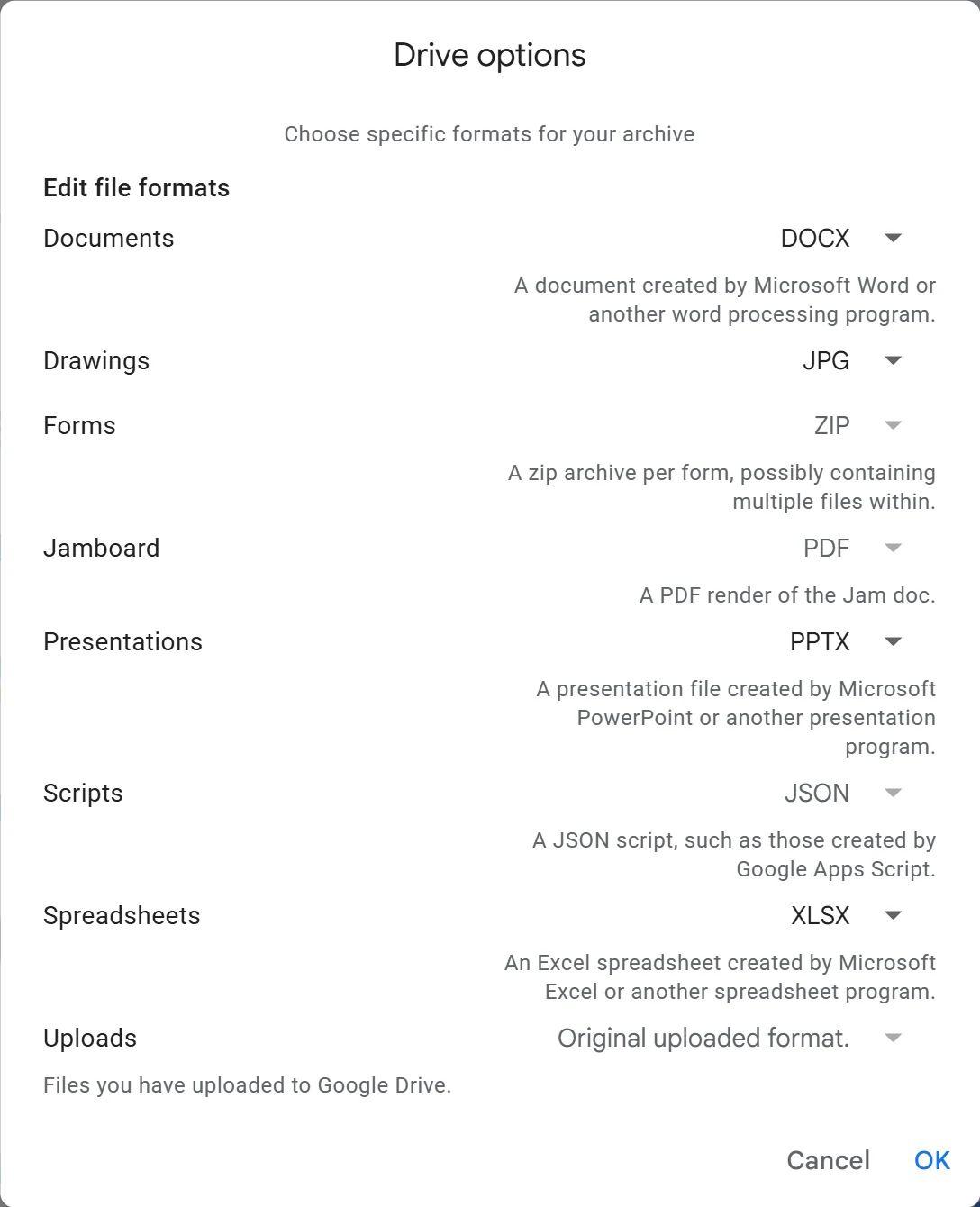
More in Google Docs alternatives, Google Sheets alternatives, Google Slides alternatives and Google Forms alternatives.
Move Google Photos Without Losing Dates and Places
Check your usage at photos.google.com/storage and free about twice that space on a computer. Export Google Photos from Takeout, download every part and unzip them all into one folder. Takeout keeps each photo’s date, location and description in a separate JSON file, so copying only the images can leave your 2018 holiday sorted under the year you exported it. Import with a tool that reads those files, such as the Ente desktop app’s Google Takeout option (Ente is our default, free up to 10 GB) or immich-go for a self-hosted Immich server; on an iPhone, Google’s direct transfer to iCloud Photos keeps them too. Compare photo counts per year before you delete anything from Google.
See how to move off Google Photos step by step, with full walkthroughs for Ente Photos and Immich, and compare options in Google Photos alternatives.
Move Calendar and Contacts
With Proton, open Import via Easy Switch, choose More import options, then Google, and tick Contacts and Calendars. For other providers, in Google Calendar on a computer go to Settings > Settings > Import & export > Export to get one .ics file per calendar, and at contacts.google.com select all, then More actions > Export as vCard. Import both into your new provider. Calendars other people shared with you aren’t in the export, so ask the owners to share them with your new address, and export Google’s “Other contacts” too if you want them. On Android, set the default account for new contacts to something other than Google.
More in Google Calendar alternatives and, for address books alone, Google Contacts alternatives. If your events carry Meet links, set up a replacement from Google Meet alternatives.
Move Your Keep Notes
Export Keep from Takeout. Notesnook, our default, has a Google Keep importer that runs on your device; go to Settings > Import & export > Notesnook Importer > Google Keep and drop in the zip. Check a few checklists and image notes, then delete the notes in Keep. Reminders and collaborators don’t come across, and checklist indentation is lost because Keep doesn’t export it.
More in Google Keep alternatives.
Level 4 Deals With Apps That Are Hard to Replace
Google is still the better product here, since nothing matches YouTube’s catalog or Google Maps’ traffic and business data. Stop handing these services your identity, and use them signed out when you need them.
Watch YouTube Signed Out
Export your subscriptions from Takeout (YouTube and YouTube Music), then import them into FreeTube on a computer or NewPipe on Android; both are free, need no account and keep your subscriptions on your device. Grayjay on Android also follows creators on PeerTube, Nebula and other platforms. On an iPhone there’s no good app, so watch in the browser while signed out. These apps break when YouTube changes things, and using them is against YouTube’s terms, so keep them updated and expect the odd outage. Cancel YouTube Premium if you pay for it, and pause YouTube history if you still sign in now and then.
More in YouTube alternatives, and for the box under your TV, see Google TV alternatives.
Use Offline Maps Day to Day
Install CoMaps (or Organic Maps, which is nearly identical), download your region over Wi-Fi and set home and work. Import your starred places from Takeout’s Maps (your places) export; saved lists may need re-adding by hand. Neither app has live traffic, so add Magic Earth or HERE WeGo for commutes, or use Apple Maps on an iPhone. When you need opening hours or reviews, open Google Maps in a browser without signing in. On Android, also turn off Google Location Accuracy in your location settings.
More in Google Maps alternatives, and see how to move from Google Maps to CoMaps with your saved places.
Replace Google Messages
Install Signal, set a username so you don’t have to share your number, and personally invite the 10 or 20 people you message most. Keep a plain SMS app such as Fossify Messages as your Android default for 2FA texts and holdouts. Before you leave Google Messages or change phones, turn off RCS chats in its settings, so messages from other RCS users don’t go missing. To keep your text history, export it on the phone with an SMS backup app first. The hard part is persuading people, which takes weeks.
More in Google Messages alternatives.
Port or Retire Your Google Voice Number
List every account that sends 2FA texts to your Voice number, and export Voice from Takeout, because your history won’t move with the number. To keep the number, sign up with JMP.chat (about $4.99/month, Oct 2026) or a mobile carrier, then unlock it at voice.google.com > Settings > Account > Unlock for $3 (free if you originally ported it in). The new provider asks for your 10-digit Voice number as the account number and your voicemail PIN; don’t delete the number while the port runs. Some banks reject numbers that started at Google Voice even after a port, and JMP has no 911, so keep a normal mobile line too.
More in Google Voice alternatives, and follow our Google Voice port-out guide when you’re ready to move the number.
Level 5 Changes the Phone If You Want To
You can skip this level and still be well degoogled. If you do change the phone, check your apps first, then choose the device, then install.
Check Your Bank and Must-Have Apps First
List the apps you can’t do without, such as banking, payments, government ID, work and car apps. Look each one up on the PrivSec.dev banking compatibility list and on Plexus before you buy or flash anything. Apps that require Google’s Play Integrity “device integrity” check fail on custom systems, and you should treat Google Wallet tap-to-pay as lost on GrapheneOS and /e/OS. Plan a replacement, such as a contactless card, a watch wallet or your bank’s website, using our Google Wallet alternatives. If an app you depend on won’t work, an iPhone or a cleaned-up stock Android phone is the safer path.
More in degoogled phones.
Strip Google From the Phone You Already Have
On stock Android, install your replacement apps first (F-Droid, Obtainium or Aurora Store for apps, plus a browser, keyboard, maps, mail and 2FA app), because the Play Store stops working once the Google account is gone. Set the digital assistant to None in your default-apps settings, disable the Google apps you’ve replaced, and leave Google Play services, Android System WebView and Google Play system updates switched on. Export your contacts, then remove the account under Settings > Passwords & accounts (the name varies by phone). On an iPhone, change Safari’s search engine, remove the Gmail account in Settings under Mail accounts, and delete the Google apps.
More in degoogled phones, and see Google Play Store alternatives for which app store to start with.
Move to GrapheneOS or /e/OS When You Replace the Phone
GrapheneOS is our default. It runs only on Google Pixels, and a Pixel 8 or newer, except the Pixel 11 series, gives you years of support. The web installer at grapheneos.org takes about an hour the first time; add sandboxed Google Play only if your apps need it, and it runs as an ordinary app with no special access while letting most banking apps and Android Auto work. Avoid carrier-locked Pixels, the Pixel 6 and 6 Pro (support ends in October 2026) and recent Samsung phones, which can no longer be unlocked. If you’d rather not install anything, Murena sells phones with /e/OS preinstalled, such as a refurbished Pixel 8 for about $380 or the Fairphone 6 for about $650 (Oct 2026). /e/OS uses microG, which has lower app compatibility, and it usually gets security patches later.
Compare every option in degoogled phones, follow our GrapheneOS install guide, or pick hardware from the best degoogled phones.
Level 6 Closes the Account or Keeps It Dormant
Wait until forwarded mail has dried up, which takes at least 12 months for most people. Then choose how much of the account to remove.
Download a Final Takeout and Check It
Run one last Takeout of everything still in the account, download every part within the 7 days and open archive_browser.html to see what’s inside. Check photo counts, a few Drive files and your mail archive before you go further. Takeout doesn’t include your passwords or Authenticator codes, which is why those came first in this checklist.
More in Google Takeout.
Clear Everything That Depends on the Account
Make sure the Sign in with Google list at myaccount.google.com/linkedapps is empty and no account still uses your Gmail as its login or recovery address. Cancel Google One, YouTube Premium and Play subscriptions; Play purchases such as apps, films and books go with the account. Transfer ownership of Drive files others rely on (Share > the person’s menu > Transfer ownership; they have to accept), and decide about your YouTube channel, because deleting the owner account deletes the channel. Remove the account from every Android phone and sort out any family group or child account you manage. Last, revoke your new email provider’s Access to your Google Account on the linked-apps page.
Use the full checklist to delete your Google account.
Delete the Account, Delete Only Gmail, or Keep It Dormant
Deleting only Gmail keeps your purchases, YouTube and Drive. At myaccount.google.com/deleteservices, delete Gmail and give a non-Gmail address that becomes your new Google sign-in. Deleting the whole account is under Data & privacy > More options > Delete your Google Account, and Google allows recovery only for a short time it doesn’t specify. Keeping it dormant preserves forwarding, but Google may delete personal accounts unused for 2 years, so sign in at least once a year, or plan a deletion at myaccount.google.com/inactive. A deleted Gmail address is never given to anyone else, and you may not be able to get it back yourself.
Read delete your Google account before you click.
If You Only Do Three Things
- Change your search engine and browser. It takes well under an hour, costs nothing, and moves your everyday searching and browsing away from Google.
- Switch off the account settings. Web & App Activity, YouTube history, personalized ads, Gemini Keep Activity and Gmail smart features take about 25 minutes together.
- Start the email move. Open a new mailbox, forward Gmail to it, and change the address on your bank and your account-recovery services first. That step decides whether you can ever leave Google without getting locked out of something.
Everything else can wait for a free weekend.
What Breaks, and How People Handle It
Most of what breaks is predictable, and each item has a known workaround.
| What breaks | Why | Workaround |
|---|---|---|
| Banking or government app on a degoogled phone | Some apps require Google’s Play Integrity “device integrity” check | Check the app before switching; use GrapheneOS with sandboxed Google Play; fall back to web banking or a stock phone |
| Google Wallet tap-to-pay | Needs a Google-certified Android phone | Contactless card, watch wallet, or Apple Pay on an iPhone |
| Push notifications | Many apps send them through Google Play services | Sandboxed Google Play on GrapheneOS with a battery exception; apps that support UnifiedPush |
| Android Auto | Depends on Google apps | GrapheneOS supports it through sandboxed Google Play; CarPlay on iPhone; offline maps on a phone mount |
| YouTube apps stop working | YouTube changes block third-party apps | Update the app or switch to another; watch signed out in a browser |
| Search results feel weaker | Alternatives use different or smaller indexes | Use !g for the odd query, or try Kagi |
| Opening hours, reviews, live traffic | OpenStreetMap data is thinner and CoMaps has no traffic | Magic Earth, HERE WeGo or Apple Maps for traffic; Google Maps signed out for reviews |
| Photo dates and places | Takeout stores them in separate JSON files | Import with Ente’s desktop app or immich-go |
| Shared links, calendars and albums | Google links die, and items shared with you aren’t exported | Transfer ownership, re-share, ask owners to invite your new address |
| Sites that only offer Sign in with Google | Some apps allow just one sign-in method | Ask the app to add a password, open a new account with your new email, or keep the Google account dormant |
| RCS chats | RCS lives in Google Messages | Signal for regular contacts, SMS for the rest |
| Bought apps, films and books | Tied to the Google account | Delete only Gmail and keep the account, or accept the loss |
Family, Work and School
Move yourself first and don’t force anyone; a partner or parent who sees it working is easier to persuade. For shared logistics, a family email plan or your own family domain gives everyone addresses you control, and Signal groups replace family chats. Before you cancel Google One, check whether anyone shares its storage through a family plan, and before you delete your account, decide what happens to any child account you manage with Family Link. If you rely on Family Link for younger kids, keeping it is fine. Our Family Link alternatives page compares the options for when you’re ready.
You can’t delete a work or school Google Workspace account yourself; your administrator does. If your job or school runs on Google, keep it in its own browser profile or on its own device and degoogle your personal side. If you run Workspace for your own business or family, our Google Workspace alternatives page covers the move. Teachers and parents can see what’s realistic to change in Google Classroom alternatives. Some work device-management apps refuse custom Android systems such as GrapheneOS, so check with IT before changing your only phone. School-managed Chromebooks can’t be changed, while a personal Chromebook with an Intel or AMD chip can be switched to Linux, as our Chromebook alternatives page explains.
Common Mistakes
- Deleting the account before unlinking Sign in with Google. Every site you log into with Google needs a password and your new email first, or you lose access.
- Losing your 2FA codes. Wiping or replacing the phone before exporting Google Authenticator, or never saving recovery codes, is the classic lockout.
- Deleting Google Photos before checking the export. Compare counts per year and spot-check dates first. Photos backed up in Storage saver export at that reduced quality, so keep any originals you still have.
- Buying a phone before checking your bank app. Also avoid carrier-locked Pixels, the Pixel 6, the Pixel 11 series and recent Samsung phones.
- Letting Takeout links expire. Archives expire after about 7 days and allow 5 downloads each.
- Leaving the password CSV on your disk. It’s plain text, so delete it right after importing.
- Stopping forwarding too early. Annual renewals and rare senders turn up for months, so give it at least 12 months.
- Assuming an abandoned account deletes itself. Under Google’s policy, a subscription, a digital purchase or a gift-card balance keeps an account active. Delete it on purpose.
- Removing the Google account from Android before installing replacements. The Play Store stops working, so install your new apps first.
- Trying to do everything in one weekend. All-or-nothing plans are how people burn out. Do one level, live with it, then do the next.
More answers are in the degoogle FAQ.