YouTube has billions of monthly logged-in users and earned over $60 billion in 2025. It’s also the one Google product with no real replacement. Most degooglers keep watching YouTube and simply stop doing it while signed in, so what they watch and search no longer lands in their Google account.
The tools below make that comfortable. They aren’t perfect. YouTube works against them, and from time to time something breaks until the next update.
Quick Comparison
| Tool | Best for | Platforms | Price (Oct 2026) | Needs an account |
|---|---|---|---|---|
| FreeTube | Watching on a computer | Windows 10+, macOS 12+, Linux | Free | No |
| NewPipe | Watching on Android | Android 6+ | Free | No |
| Grayjay | Following creators across platforms | Android (desktop in testing) | Free; optional one-time license | Optional |
| Invidious | A web front end you host yourself | Any browser | Free | No |
| Browser with blocking | iPhone, or any device | Any | Free | No |
| PeerTube | Creators who publish off YouTube | Web, apps | Free | No |
The Alternatives, One by One
FreeTube
A desktop app for Windows 10 or later, macOS 12 or later, and Linux. Subscriptions, history and playlists are stored on your computer and never touch a Google account. FreeTube can fetch videos directly or through an Invidious server. It’s open source (AGPLv3), and the current version, 0.25.3, is still labeled beta.
- Choose it if you watch mostly on a computer.
- Skip it if you need your subscriptions synced across devices. They live on that one computer.
NewPipe and Its Relatives
NewPipe is the Android standard. It’s free, open source (GPLv3) and runs on Android 6 or later. It adds background play, a popup player and downloads. Install it from F-Droid, from NewPipe’s own F-Droid repository, which gets updates faster, or from GitHub.
Tubular, PipePipe and LibreTube cover the same ground with different extras. Some people keep a second one installed as a backup for when YouTube breaks the first.
- Choose it if you’re on Android.
- Skip it if you’re on iPhone. There’s no iOS version.
Keep an eye on Google’s Android developer verification rules. Since 30 September 2026 they apply to installs from Google Play and other participating stores in four countries, and Google plans to extend them to all apps worldwide in 2027. NewPipe has said it won’t comply. Our phone guide explains what that means for installing apps outside the Play Store.
Grayjay
Grayjay, from FUTO, puts YouTube, PeerTube, Nebula, Odysee, Rumble, Patreon and more into one feed, with casting. It’s free. An optional pay-once license exists, but the app works the same without it. An account is optional. It runs on Android, a desktop version is in internal testing, and no iOS version is planned. It can import your NewPipe subscriptions from a JSON export.
- Choose it if the creators you follow post on several platforms.
- Skip it if you only watch YouTube. NewPipe is simpler.
Invidious
A YouTube front end you open in any browser, and an optional back end for FreeTube. It’s open source (AGPL). YouTube blocked it in 2024, and today the official list shows only 6 public instances. The project says the list is short “due to the recent YouTube issues” and recommends hosting your own if you can.
- Choose it if you run a home server and want YouTube in any browser, on any device.
- Skip it if you want something that just works. Public instances come and go.
On iPhone, Use a Browser
There’s no great iOS app. The practical option is YouTube signed out, in a browser that blocks ads and trackers, such as Brave. On a computer, Firefox with uBlock Origin works the same way.
On Your TV
On an Android TV or Google TV box, SmartTube plays YouTube without ads and doesn’t need Google services. Our Google TV alternatives page covers it, along with boxes that don’t need a Google account at all.
RSS Instead of Subscriptions
Follow channels in a feed reader instead of a YouTube account. New videos show up next to everything else you read, and nothing is tied to Google. Vivaldi has a feed reader built in (see Chrome alternatives), and our Google News alternatives page compares feed reader apps.
Support Creators off YouTube
Watching through a third-party app means creators lose your watch-time signals. If a channel matters to you, there are two fixes. Watch it signed out on YouTube itself, which still counts. Or follow the creator where else they publish.
- PeerTube is a federated video platform from Framasoft, a French non-profit. Instances run independently, and it has its own creators rather than YouTube’s.
- Nebula, Odysee and Patreon. Some creators also publish there, and Grayjay can show those feeds next to YouTube.
YouTube Music Alternatives
| Service | Based in | Price (Oct 2026) | Why pick it |
|---|---|---|---|
| Deezer | France | Free with ads (limited); Premium about $11.99/month or $107.99/year | Mainstream catalogue, free plan, EU company |
| Qobuz | France | Studio from about $10.83/month; Family about $17.99/month | Hi-res audio, DRM-free downloads to buy |
| Navidrome | Self-hosted | Free | Your own files, played through any Subsonic app |
Deezer also has Duo (about $15.99), Family (about $19.99) and Student (about $5.99) plans. TIDAL (Individual about $11.99/month) is another mainstream choice, though it doesn’t market itself on privacy. Navidrome is open source (GPLv3) and supports the OpenSubsonic API, so you can pick from many player apps.
Moving your music. Songs you uploaded to YouTube Music come out of Google Takeout as audio files, ready for Navidrome. Playlists are harder. A playlist-transfer service can copy them to Deezer, Qobuz or TIDAL, but it needs access to both accounts, which is a privacy trade-off. The alternative is to rebuild them by hand from the playlist files in your Takeout.
How to Switch From YouTube
1. Download Your YouTube Data
- Go to takeout.google.com and click Deselect all.
- Tick YouTube and YouTube Music. Use the button under it to choose what’s included, and keep subscriptions, playlists and history, plus your music library and uploads if you use YouTube Music.
- Click Next step, choose a one-time export as Zip files, then click Create export.
- When Google emails you, download the archive. You should find a subscriptions file (CSV), one CSV per playlist, and your watch history.
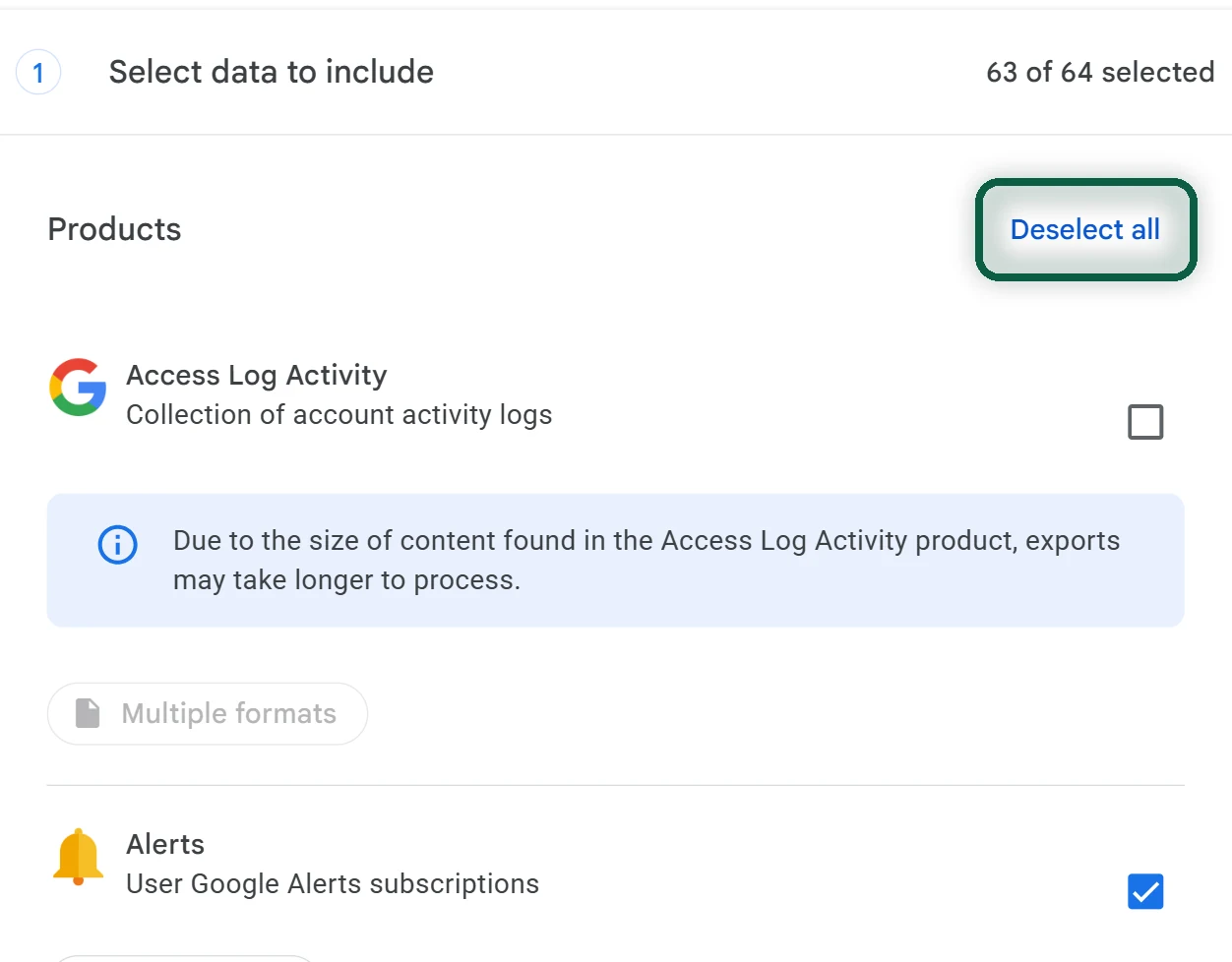
The full Takeout walkthrough, including archive sizes and download limits, is in Google Takeout.
2. Import Into Your New App
- FreeTube. Open Settings, then Data settings, then Import subscriptions, and choose the subscriptions CSV.
- NewPipe. Open the Subscriptions tab, then its menu, and choose the option to import from YouTube using your Takeout file.
- Grayjay. Export your subscriptions from NewPipe as JSON, then import that file into Grayjay.
3. Close Things Down on Google’s Side
- If you pay for YouTube Premium or YouTube Music Premium, cancel it and note the billing date.
- Go to myactivity.google.com/product/youtube, open Controls, and click Turn off to pause YouTube history. Delete your past history on the same page.
- Sign out of YouTube in every browser and app you keep.
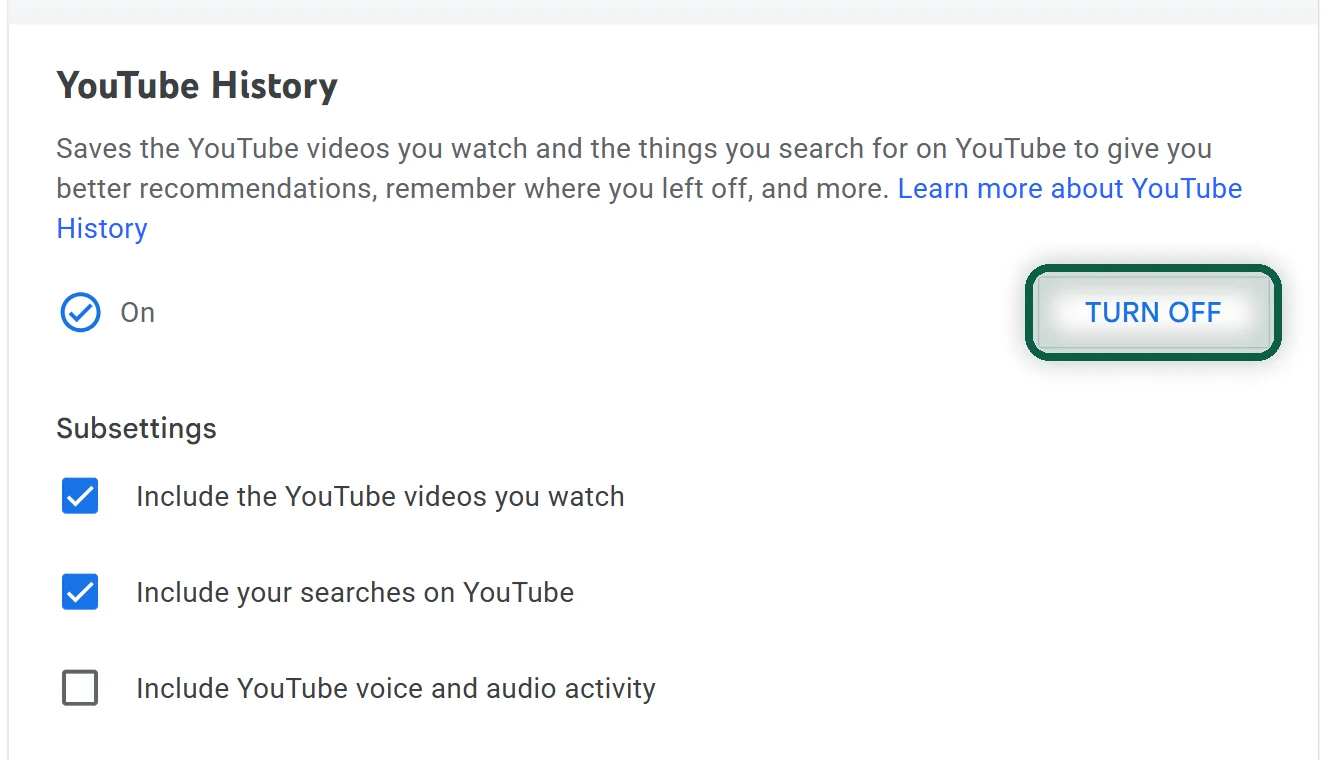
If you still sign in now and then, expect a blank home page once history is off. YouTube removes home-page recommendations when there’s no watch history, so use your subscriptions instead. More controls are in turn off Google tracking.
If you have a channel with videos, download them with Takeout before you do anything else. Deleting your Google account deletes the channel. See delete your Google account.
Keeping YouTube Signed In? Limit What It Records
Partial is fine. If you keep your account for a channel, a family plan or Premium, you can still cut down what it collects. YouTube history can include the videos you watch, your searches and your voice input, so these settings cover more than you might expect.
- Auto-delete history. In My Activity, open YouTube History, then Manage history, then Auto-delete. Pick the shortest period offered, then Next and Confirm.
- Stop saving watch history on your phone. In the YouTube app, tap your profile photo, then Settings, then Manage all history. On the Controls tab, untick Include the YouTube videos you watch.
- Turn off personalized ads. At myadcenter.google.com, set Personalized ads to Off and confirm. It applies on every device where you’re signed in, and on sites that partner with Google.