Deleting a Google account is quick. Most of the risk sits in the preparation, because a login that only works through Google, a 2FA code that lived in Google Authenticator or a photo that never made it into your download can’t be fixed once the account is gone.
So this page starts with a pre-flight checklist. Then it covers the two ways out (delete only Gmail, or delete the whole account) on a computer, an Android phone and an iPhone, what happens next, and why keeping the account dormant for a while is a sensible choice.
Run the Pre-Flight Checklist Before You Delete
Work through these in order. Each item is something you can’t fix after the account is deleted.
1. Download Your Data, Then Check the Download
Run Google Takeout for your mail, photos, Drive files, contacts, calendars, YouTube uploads and anything else you want to keep. Then check the result. Make sure every part downloaded (files ending -001, -002 and so on), open archive_browser.html inside the archive, and spot-check a few photos and an old email.
Takeout links expire after about 7 days, and each archive can be downloaded 5 times. Handle two things outside Takeout. Export your saved passwords from Google Password Manager, and move authenticator codes from inside the app (item 3). Our Google Takeout guide covers the settings and the Photos metadata problem.
2. Move Every Account That Uses Sign in With Google
After deletion, the Sign in with Google button stops working for you everywhere. The sites keep your data, but you lose the way in. Open myaccount.google.com/linkedapps, choose the Sign in with Google filter, and treat that list as your to-do list.
For each site, set a password there first, change the site’s email to your new address, and only then remove Google. Do the same for banks, government services, your Apple or Microsoft account, your mobile carrier, your domain registrar and any other account that uses your Gmail address as its login. Our Sign in with Google guide shows how to find them all and the safe order, and the Gmail migration guide sets up forwarding so nothing gets lost while you work through them.
3. Move Your Two-Factor Codes
If you use Google Authenticator, export your codes into a new authenticator app and test each one before you go further. If any site sends sign-in codes to your Gmail address, switch it to your new address. Save backup codes for your important accounts somewhere offline. Google Authenticator alternatives covers the export.
4. Put Recovery Details Somewhere Else
Plenty of accounts list your Gmail address as their recovery or backup email, Apple and Microsoft accounts included. In Gmail, search subject:(recovery OR "backup email") to find likely ones, and point each to your new address.
5. Cancel Subscriptions and Accept What Purchases You Lose
Google says you lose access to subscriptions and content you bought with that account on YouTube or Google Play. That means paid apps, movies and books too. Cancel Play subscriptions, Google One storage and YouTube Premium yourself first, so you know exactly when billing ends, and spend any Google Play balance.
6. Decide About Your YouTube Channel
If this account is the primary owner of a YouTube channel, deleting the account deletes the channel. Download your videos with Takeout first. If you want the channel to stay up, delete only Gmail (below), which keeps the account alive.
To remove the channel on its own, use a computer. Google says you can’t currently delete a channel on mobile devices.
- Go to studio.youtube.com, then Settings, Channel, Advanced Settings.
- Click Remove YouTube Content.
- Choose I want to hide my channel or I want to permanently delete my content.
- Tick the confirmation boxes, then click Delete my content.
7. Prepare Your Android Phone or Chromebook
On Android, a deleted account means you can’t get or update Play Store apps tied to it, contacts saved only in that account disappear from the phone, and Drive backups stop. Install your replacement apps and export your contacts first, then remove the account from the phone (see “Only want Google off your phone?” below). Our phone guide covers the rest.
On a Chromebook, Chrome apps and extensions for the deleted account stop working. Other accounts on the same Chromebook can still sign in. Our Chromebook alternatives page covers getting your files off and replacing ChromeOS.
8. Hand Over Shared Drive Files
Files you own are deleted with your account, so people you shared them with lose them as well. Transfer ownership of anything others depend on. In Drive, click Share, open the dropdown next to the person, and choose Transfer ownership.
Between personal accounts, the other person has to accept. They can find pending files by searching pendingowner:me in Drive. You can’t transfer from a personal account to a work or school account, and transferring a folder doesn’t transfer the files inside it.
9. Sort Out Family Link, Family Groups and Work Accounts
Google’s deletion page doesn’t say what happens to a family group or to a child’s account you supervise with Family Link. Settle it before you delete. At families.google.com, hand the family manager role to someone else, or decide what happens to the child’s account. Our Family Link alternatives page shows how to put other parental controls in place first and explains the choices for a supervised account.
Work and school accounts can’t be deleted by the person using them. Ask your administrator.
10. Last Checks
If you think the account was hacked, run Google’s Security Checkup first. Deleting one Google account doesn’t delete your others, so repeat this list for each account you want gone.
Not sure what’s tied to your account? Our free scanner reads your password export, your linked-apps list and a small Takeout inside your browser, and turns them into this checklist with your own accounts filled in. Nothing is uploaded.
Delete Only Gmail, or the Whole Account?
| Delete only Gmail | Delete the whole account | Keep it dormant | |
|---|---|---|---|
| Your emails | Deleted after 30 days | Deleted | Kept |
| Your Gmail address | Stops working, never reused | Stops working, never reused | Keeps working |
| Drive, Photos, YouTube, Play purchases | Kept | Deleted | Kept |
| Sign in with Google | Keeps working | Stops working | Keeps working |
| Good for | Leaving Gmail but keeping YouTube or an Android phone | A clean, final exit | A slow exit while mail trickles in |
Delete Only Gmail (or Another Single Service)
You keep the Google account, your Play purchases and your activity in other Google services. You need an email address that isn’t Gmail, because it becomes your new sign-in.
On a computer, follow these steps.
- Open Gmail, click your profile picture (top right), then Manage your Google Account.
- In the left menu, click Data & privacy.
- Scroll to Tools and click Remove data from services you no longer use. The direct link is myaccount.google.com/deleteservices.
- Sign in again.
- Next to Gmail, click Delete (the trash icon).
- Enter an alternate email address. It can’t be a Gmail address.
- Click Next, then open the verification email at that address and confirm.
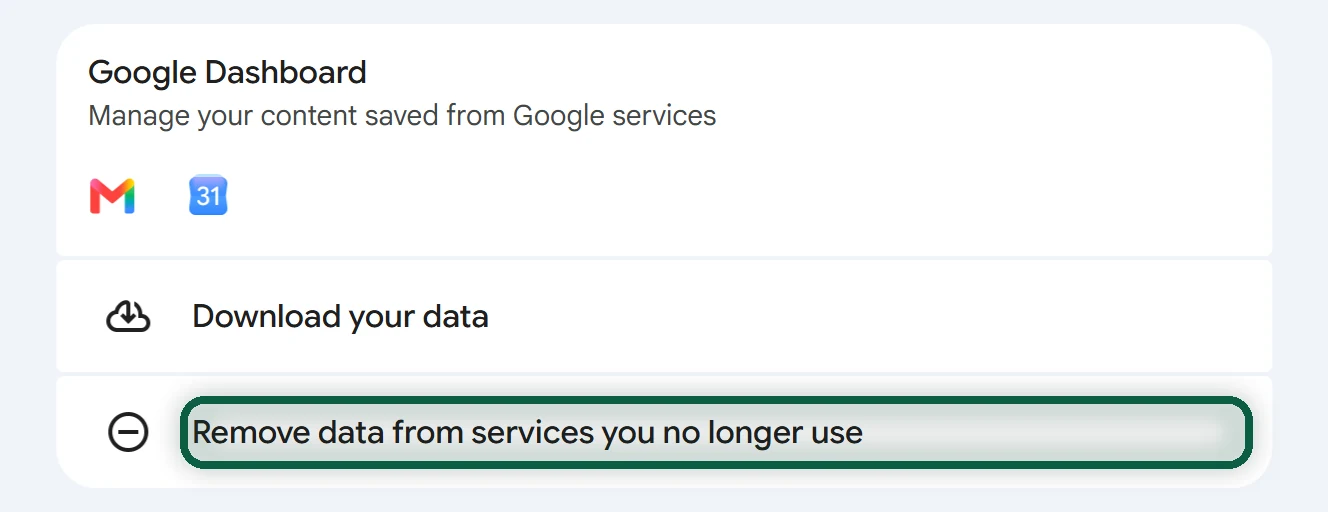
On Android or iPhone, open the Gmail app, tap your profile picture, then Manage your Google Account and Data & privacy. Scroll to Tools, tap Remove data from services you no longer use, and sign in. Tap Delete next to Gmail, enter the alternate address, and tap Next.
Here is what happens next, in Google’s words and ours.
- Nothing is removed until you click the link in the verification email.
- “Gmail deletes your emails and settings after 30 days.”
- “You can no longer use your Gmail address to send or receive emails,” and “your Gmail address can’t be used by anyone in the future.”
- Forwarding stops along with the address, so finish moving your accounts first.
- Google says you may be able to get the address back, but “if it’s been a while” you might not get your emails back.
The same Delete a Google service screen lists other services you can remove one at a time. YouTube channels are handled in YouTube Studio (item 6 above).
Delete the Whole Google Account
Follow these steps on a computer. A Chromebook works the same way.
- Go to myaccount.google.com and click Data & privacy.
- Scroll to Your data & privacy options.
- Click More options, then Delete your Google Account. The direct link is myaccount.google.com/deleteaccount.
- Sign in again if asked, then follow the instructions.
- Read the last screen line by line. It may list what you’ll lose and ask you to tick boxes (for example about pending charges and permanent deletion) before the final button, which may read “Delete Account”.
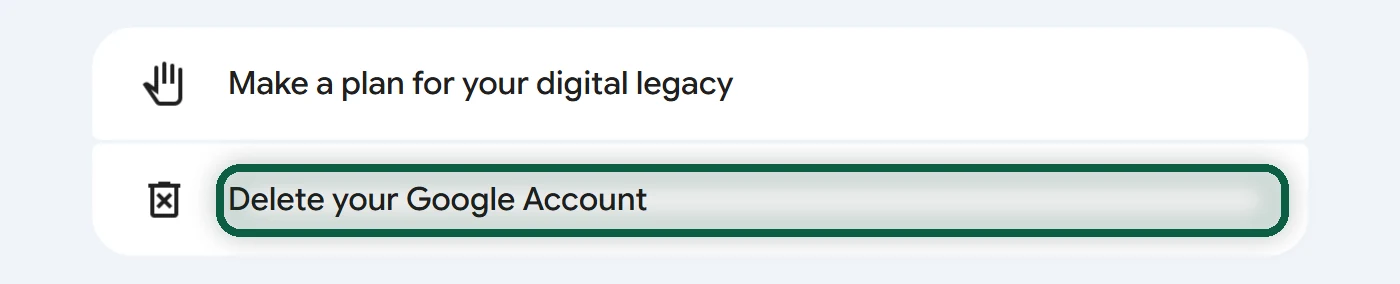
On Android. Google’s help page gives only the web steps, and they work on a phone. Open the Gmail app, tap your profile picture, then Manage your Google Account. Tap Data & privacy, scroll to Your data & privacy options, and tap More options, then Delete your Google Account. If your screen looks different, open myaccount.google.com/deleteaccount in your phone’s browser.
On iPhone. Take the same route from the Gmail or Google app through your profile picture, Manage your Google Account and Data & privacy, then continue as above. Or open myaccount.google.com/deleteaccount in Safari. Deleting the account doesn’t remove Google’s apps or the Gmail account you added to iOS Mail. Delete those separately (on recent iOS, the accounts list is usually under Settings, Apps, Mail).
Only Want Google off Your Phone?
Removing an account from a phone doesn’t delete it. The account and its data stay at Google; the phone just stops syncing. On Android, open Settings, then Passwords & accounts (some phones say Users & accounts or Manage accounts), tap the Google account, and tap Remove account. Contacts that live only in that account disappear from the phone. On iPhone, remove the Google account from the Mail accounts list in Settings.
What Happens After You Delete
| Area | What happens |
|---|---|
| Your content | Email, files, calendars, photos and everything else in the account is deleted |
| Purchases and subscriptions | You lose subscriptions and content bought on YouTube or Google Play |
| Android phone | You can’t get or update apps from the Play Store with that account |
| Chromebook | Chrome apps and extensions for that account stop working |
| YouTube channel | Deleted if this account was its primary owner |
| Drive files you shared | Gone for everyone, unless you transferred ownership |
| Sites using Sign in with Google | You can no longer sign in with Google. Your data on those sites isn’t deleted, so ask them to delete it |
| Your other Google accounts | Not affected |
Can You Undo It?
Maybe, for a short time. Google says you “might be able to recover it within a certain amount of time” and doesn’t say how long. If you change your mind, go to accounts.google.com/signin/recovery straight away. If recovery works, set a new password you haven’t used before.
Troubleshooting
You can’t find “Delete your Google Account.” Go straight to myaccount.google.com/deleteaccount. If it’s a work or school account, only the administrator can delete it.
The Gmail removal email never arrives. Check the spam folder at the alternate address, and make sure that address isn’t a Gmail one. Nothing is removed until you confirm.
Google asks for a code sent to an old phone. Update your recovery phone and email in your Google Account’s security settings before you start. If you can’t sign in at all, use Google’s account recovery page first.
You deleted it by mistake. Use accounts.google.com/signin/recovery as soon as possible. The longer you wait, the less likely it is to work.
Google’s Inactive-Account Policy
Google may delete a personal account that is “not used within a 2-year period,” along with its content. Google announced the policy in May 2023 and said December 1, 2023 was the earliest an account would be deleted under it.
Google counts a lot as activity. Reading or sending email, using Drive or Search, watching a YouTube video, sharing a photo, downloading an app and using Sign in with Google all count. It also treats the following accounts as active or exempt.
- work, school and other organization accounts
- accounts with a current subscription, a purchase or a bought digital item such as a book or movie
- accounts with a gift card balance
- accounts that manage a child’s account through Family Link
- owners of a published app with ongoing transactions
In 2023 Google also said it had “no plans to delete accounts with YouTube videos at this time.” Before deleting an inactive account, it sends several notices over the preceding months, to the account and to its recovery email.
So abandoning an account is not a reliable way to delete it. One old movie purchase keeps it alive, and every Sign in with Google login resets the clock. If you want it gone, delete it yourself.
Keeping It Dormant Is a Perfectly Good Option
You don’t have to delete today. Many people who leave Google do it in stages. They run Takeout, turn on forwarding, wait, and delete once the old address stops receiving anything important. That can take a year.
Here is what a dormant account done well looks like.
- Gmail forwards to your new address, with an auto-reply announcing the change (Gmail migration guide).
- Tracking is off and old history is deleted (turn off tracking).
- Photos, Drive files and old mail you’ve already downloaded are deleted from Google.
- The account keeps a strong password and two-step verification, with codes in your new authenticator app.
- Every few months, you check what still arrives and move those accounts.
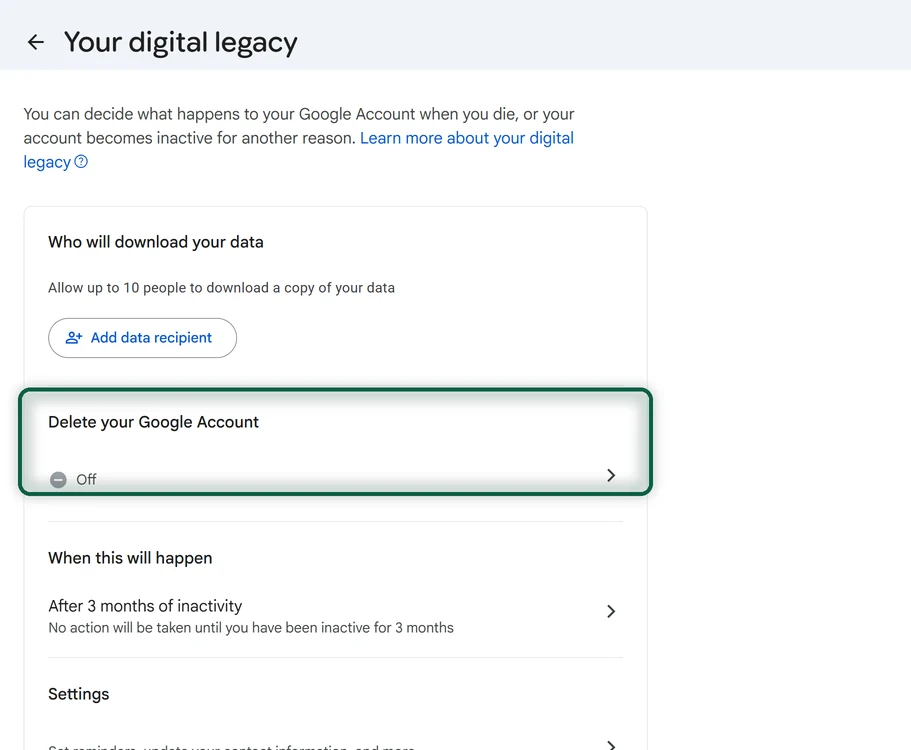
Google’s Inactive Account Manager (myaccount.google.com/inactive) can handle the ending for you. You choose how long the account must be inactive, add up to 10 trusted contacts (each needs a phone number for verification), and choose to share all or some of your data, or only notify them. Contacts aren’t told when you set it up, and you can edit or turn off the plan on the same page. Google’s 2023 announcement says the options include deleting the account once the waiting period ends. The exact period choices may differ on your screen, so pick the shortest one you’re comfortable with.
Whichever path you choose, partial is fine. Deleting Gmail and keeping YouTube is a real step. So is a dormant account with tracking off. The degoogle guide helps you pick what to move next.