Quick Comparison
| Alternative | Best for | Price (Oct 2026) | Encryption and privacy | Based in | Open source |
|---|---|---|---|---|---|
| Proton Docs and Sheets | Shared docs and spreadsheets | Free with a Proton account | End-to-end encrypted | Switzerland | Apps, yes |
| CryptPad | Encrypted suite with slides, forms and more | Free on public instances; cryptpad.fr plans €5–€100/month | End-to-end encrypted | France | Yes (AGPL) |
| LibreOffice | Offline writing, spreadsheets and slides | Free | Local files only | Germany | Yes |
| ONLYOFFICE | Word, Excel and PowerPoint compatibility | Desktop editors free; DocSpace free tier, Business $20/admin/month | Depends on where you store files | Latvia | Yes (core) |
| Collabora Online / Nextcloud Office | Teams that self-host | Free self-hosted edition | On your own server | UK | Yes |
| Zoho Workplace | Cheap all-in-one for small businesses | Free tiers, then paid plans | Not end-to-end encrypted | India | No |
Which One Fits How You Work
Most people don’t need one tool for everything. Match the editor to the job using the list below.
- You write alone, often long pieces. LibreOffice Writer. Browser editors can get sluggish with very large files, and a desktop editor keeps your drafts on your own machine. Sync the folder with encrypted storage so you have a backup.
- You edit with a partner, club or small group. Proton Docs and Sheets if everyone already uses Proton. CryptPad if they don’t, since guests can join from a link without an account.
- You live in spreadsheets. Proton Sheets for shared budgets and lists, LibreOffice Calc for heavy offline work. Rebuild anything that relies on Google-only functions (see “What you lose” below). Our Google Sheets alternatives page compares spreadsheet apps in more depth.
- You trade Word and Excel files with clients. ONLYOFFICE’s free desktop editors keep Office formatting intact.
- You run a small business on Google Workspace. Proton for Business bundles mail, calendar, Drive, Docs, Sheets and Meet. Workspace Standard is about $12.99 per user per month, billed yearly (Oct 2026). A team that already runs Nextcloud can add Collabora instead. If the business website is built with Google Sites or measured with Google Analytics, see our Google Sites alternatives and Google Analytics alternatives.
The Alternatives, One by One
Proton Docs and Sheets
Document and spreadsheet editors built into Proton Drive, from Proton AG in Switzerland. Proton Sheets launched on 4 December 2025.
- Pick it for real-time co-editing with end-to-end encryption, and nothing extra to install if you already use Proton Mail or Drive. Sheets handles formulas, charts, and Excel or Google Sheets imports.
- The deal-breakers start with the lack of presentations. It runs on the web, and it has fewer features than Google, with no add-ons, no Apps Script and simpler pivot tables. Reviewers find both editors less capable than Google’s.
- It’s free with a Proton account. You only pay if you need more Drive storage (see Google Drive alternatives).
CryptPad
An open-source, end-to-end encrypted office suite made by XWiki SAS. It includes Rich Text, Document, Sheet, Presentation, Form, Kanban, Diagram and Code apps.
- Pick it because it’s the most complete encrypted suite, slides included. You can self-host it, and you can try quick pads without an account, which makes it easy to invite people who live in Google.
- The deal-breakers are that it gets slow with large files, Office compatibility isn’t perfect, and it’s a browser app that feels cramped on a phone.
- It’s free on cryptpad.fr and other public instances. Paid cryptpad.fr plans run from €5 to €100/month (Oct 2026).
LibreOffice
LibreOffice is the free, open-source desktop suite from The Document Foundation, made up of Writer, Calc and Impress.
- Pick it because it’s the most capable offline suite. It uses OpenDocument natively and handles DOCX, XLSX and PPTX well. Your files stay on your computer.
- The deal-breaker is that there’s no live collaboration. Pair it with encrypted storage such as Proton Drive, Filen or Nextcloud to sync files between devices. Some people find Calc less pleasant than Google Sheets.
- It’s free on Windows, macOS and Linux.
ONLYOFFICE
Office editors from Ascensio System SIA with the best Microsoft Office format fidelity among open-source options.
- Pick it because your Word and Excel files look the way they should, which matters if clients or coworkers send Office files.
- The deal-breaker is that the cloud product, DocSpace, is aimed at businesses. For personal use, the free desktop editors are the sweet spot.
- DocSpace’s free Startup plan allows 3 admins, 12 rooms and 2 GB, and Business is $20 per admin per month (Oct 2026).
Collabora Online and Nextcloud Office
Google-Docs-style editing in the browser, running on your own server. Nextcloud ships it as Nextcloud Office.
- Pick it because a team gets shared editing without any document leaving its own hardware.
- The deal-breaker is that someone has to run and update the server.
Zoho Workplace
A mainstream suite from India with mail, documents, spreadsheets, slides (Zoho Show) and storage. It’s cheap and complete, and it gets you off Google. It isn’t end-to-end encrypted, though, so it won’t keep the provider out of your documents.
Google Docs Alternatives With No AI
Google Docs isn’t end-to-end encrypted, and Google’s “smart features” settings switch Gemini features in Workspace on or off. If you want an editor that keeps your writing away from AI entirely, pick one where the provider can’t read the text, like the editors below.
- Proton Docs and Sheets and CryptPad encrypt your work on your device. The server only stores scrambled data, so there’s nothing for a cloud AI to process or train on.
- LibreOffice works on files on your own computer. Nothing goes to anyone’s server unless you put it there.
If you have to stay in Google Docs for a while, turn smart features off. In Gmail on a computer, go to the gear icon, then See all settings, then General. Under Google Workspace smart features, click Manage Workspace smart feature settings, turn off both options, then click Save.
When Your Coworkers Stay on Google
This is the hardest part of leaving Google Docs, and there’s no perfect fix. Pick the approach that matches who owns the document.
- They own the document. If they share it with “anyone with the link”, you can usually open and edit it in a browser without signing in. Otherwise, ask them to send a .docx copy and send yours back. Google Docs opens Office files.
- You own the document. Send a CryptPad link. Guests don’t need an account, and the content stays encrypted. For final versions, share a PDF or DOCX.
- Your employer or school runs Google Workspace. Don’t fight it. Keep that account for work, in its own browser profile or on a work device, and degoogle your personal life. Work accounts are managed by an administrator anyway.
How to Switch From Google Docs, Sheets and Slides
The fastest way to get everything at once is Google Takeout’s Drive export, which converts your Docs, Sheets and Slides as it goes. Choose the format that suits where you’re headed from the table below.
| Going to | Documents | Spreadsheets | Presentations |
|---|---|---|---|
| Proton, ONLYOFFICE, Zoho or Microsoft Office | DOCX | XLSX | PPTX |
| LibreOffice or CryptPad | ODT | ODS | ODP |
| Archive only, no more editing | XLSX |
- Go to takeout.google.com and click Deselect all.
- Tick Drive, then click Multiple formats.
- Set the format for documents, spreadsheets and presentations using the table above. Check the dropdowns, because the exact choices can change.
- Click Next step, choose .zip and 50GB, then click Create export.
- Download every part from Google’s email within about 7 days, and extract them all into one folder.
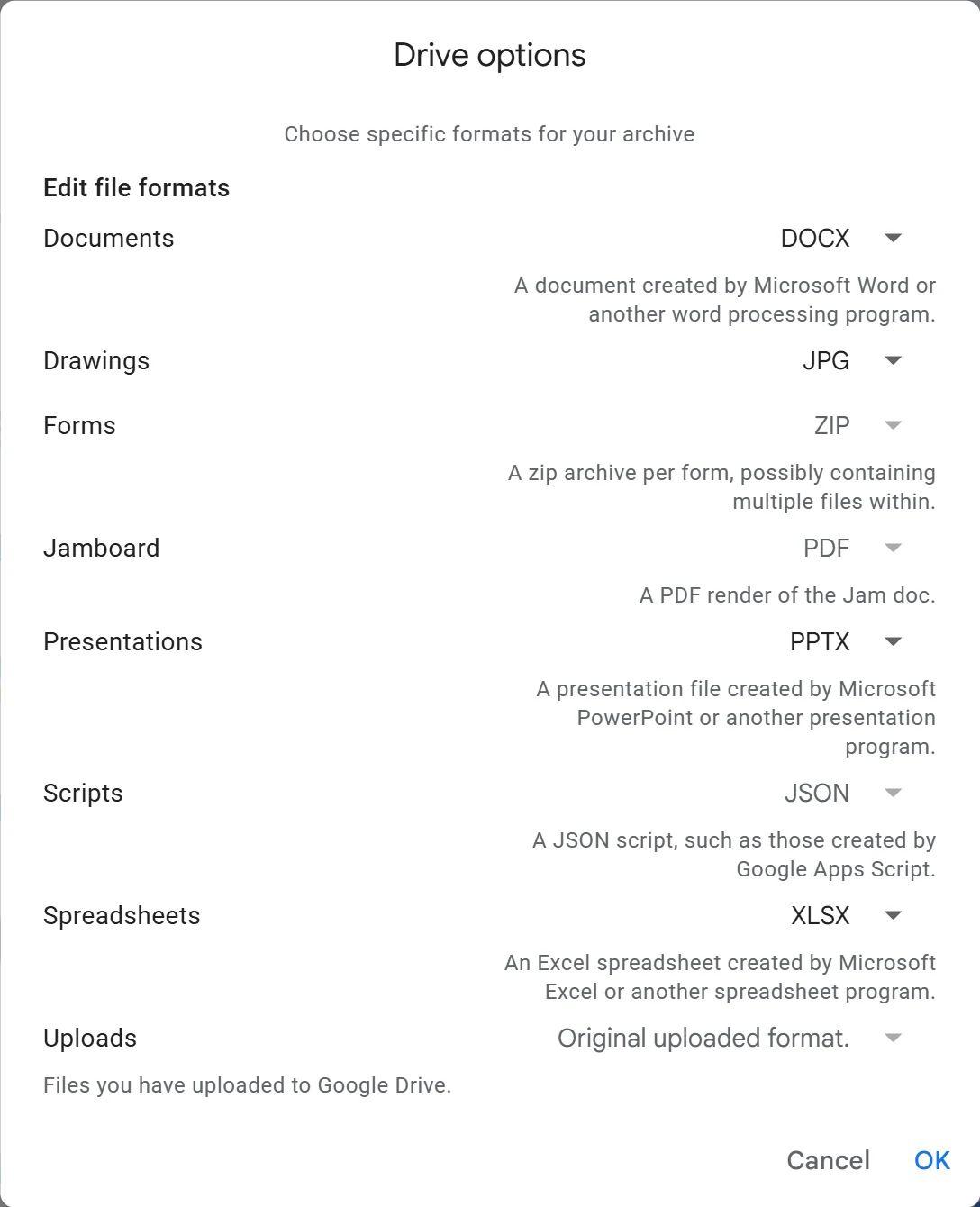
For a handful of files, skip Takeout. Open the document and choose File → Download, then pick Word (.docx), OpenDocument (.odt) or PDF.
Next, bring the files into your new editor.
- For Proton, upload the files to Proton Drive, then open them in Proton Docs or Sheets.
- In CryptPad, create a new document, sheet or presentation and use its Import option.
- In LibreOffice, open the files directly. There’s nothing to import.
- Check the complicated files. Look at formulas, conditional formatting, charts and embedded images in your most important spreadsheets and documents.
- Re-share with anyone who needs access.
Our Google Takeout guide walks through every export screen.
What You Lose
Partial is fine. Many people move personal documents first and keep a Google account only for the shared files their job requires.