Every website, app and smart device starts with a DNS lookup, which turns a name like example.com into an address. If your router, phone or browser uses Google Public DNS (8.8.8.8 and 8.8.4.4), Google receives every domain name your devices look up. A Google DNS alternative costs nothing, takes about five minutes per device, and is one of the easiest degoogling wins.
Many people never chose Google DNS on purpose, so start by finding where it’s set.
Quick Comparison
| Resolver | Best for | Price (Oct 2026) | Privacy | Based in | Open source |
|---|---|---|---|---|---|
| Quad9 | Most people | Free | Says it doesn’t record IP addresses; blocks malicious domains | Switzerland (non-profit) | Partly |
| DNS4EU | An EU-run service | Free | IP addresses anonymized before logging; ad-blocking and child-safe versions | Czechia (EU co-funded 2023–2025) | No |
| NextDNS | Custom blocklists and per-device rules | Free up to 300,000 queries a month; Pro about $1.99/month or $19.90/year | Logs only if you turn them on | US | No |
| AdGuard DNS | Ad blocking with zero setup | Free public servers; paid private plans | Says it processes no personal data on public servers | Cyprus | Partly |
| Cloudflare 1.1.1.1 | Speed from a big provider | Free | Full IP never written to disk; logs deleted within 25 hours | US | No |
Addresses to Copy
Use the plain addresses on a router or computer. Use the hostname for Android’s Private DNS, and the DNS-over-HTTPS (DoH) address in a browser.
| Resolver | IPv4 addresses | Android Private DNS hostname | DoH address |
|---|---|---|---|
| Quad9 | 9.9.9.9 and 149.112.112.112 |
dns.quad9.net |
https://dns.quad9.net/dns-query |
| DNS4EU Protective | 86.54.11.1 and 86.54.11.201 |
protective.joindns4.eu |
https://protective.joindns4.eu/dns-query |
| DNS4EU with ad blocking | 86.54.11.13 and 86.54.11.213 |
noads.joindns4.eu |
https://noads.joindns4.eu/dns-query |
| AdGuard DNS | 94.140.14.14 and 94.140.15.15 |
dns.adguard-dns.com |
https://dns.adguard-dns.com/dns-query |
| Cloudflare 1.1.1.1 | 1.1.1.1 and 1.0.0.1 |
one.one.one.one |
https://cloudflare-dns.com/dns-query |
| NextDNS | Shown in your dashboard | Your personal hostname | Your personal address |
If your connection uses IPv6, add the IPv6 pair as well. Quad9’s are 2620:fe::fe and 2620:fe::9, and the other services list theirs on the pages under Sources. Setting IPv6 DNS on a connection without an IPv6 address can break lookups, so skip it if you’re unsure.
Plain DNS or Encrypted DNS?
Changing the addresses moves your lookups away from Google. It doesn’t hide them. Plain DNS travels unencrypted, so your Wi-Fi network and internet provider can still read it. Encrypted DNS, called DNS over TLS (DoT) or DNS over HTTPS (DoH), wraps each lookup so only the resolver you chose can read it. Android has it built in as Private DNS (Android 9 and later), Apple devices use a small profile from the provider, Windows 11 has a DNS over HTTPS switch, and browsers have their own setting.
Encrypted DNS protects your lookups and nothing else. Your internet provider can still see which servers you connect to, so treat it as one privacy step among several.
The Alternatives, One by One
Quad9
Quad9 is a Swiss non-profit foundation. Its privacy policy says it doesn’t collect or record user IP addresses. It keeps counters instead, such as how often a domain was looked up and from which broad network or region. The standard service at 9.9.9.9 blocks domains its threat-intelligence partners flag as malicious and checks DNSSEC signatures.
- Pick it because it’s free, private by policy, and adds a layer of malware and phishing protection without blocking ordinary sites.
- A possible deal-breaker is that it doesn’t block ads. Its standard service also doesn’t pass your approximate network location to websites (a feature called ECS), so a video or download site may now and then send you to a server a little farther away. Quad9 runs a version with ECS at
9.9.9.11if that matters to you. - It costs nothing, and Mullvad announced in September 2026 that it’s financially supporting Quad9. Setup guides cover Android, iPhone, Mac, Windows and routers running OpenWrt, pfSense or OPNsense.
DNS4EU
DNS4EU is an EU-backed public DNS service operated by Whalebone in Brno, Czech Republic, and co-funded by the EU from 2023 to 2025. It says client IP addresses are fully anonymized before anything is logged, and that queries are never sold, profiled or used for advertising.
- Pick it because it keeps your lookups on EU infrastructure under EU rules. Protective blocks malicious domains, and other versions add ad blocking, child protection or both. An Unfiltered version blocks nothing.
- Possible deal-breakers are that it’s built for individual people, not business or organization networks, and it rate-limits heavy use. Court-ordered domain blocks apply to every version, Unfiltered included.
- It costs nothing. Its public resolver page has iPhone profiles for each version, router settings and DNS stamps for routers that need them.
NextDNS
NextDNS is a resolver you configure yourself. You create an account, pick blocklists, block specific sites, and see per-device logs if you want them. Its privacy policy says nothing is logged unless you ask for it, and you choose how long logs are kept and in which jurisdiction.
- Pick it because it’s the most flexible option here, for ad and tracker blocking across a whole family or for parental controls.
- Possible deal-breakers are that it’s a US company, and the free plan covers 300,000 queries a month, which a busy household can pass. After that, NextDNS keeps answering lookups like a normal resolver, without blocking, until the next month.
- Prices (Oct 2026) are free up to 300,000 queries a month, then Pro at about $1.99/month or $19.90/year for unlimited queries.
AdGuard DNS
AdGuard DNS blocks ads and trackers for every app on a device, with no account. The default public servers filter ads and trackers, a family version adds adult-content blocking and safe search, and a non-filtering version blocks nothing. Its privacy policy says it processes no personal data on the public servers and keeps a 24-hour list of requested domains that isn’t linked to anyone. The company is registered in Limassol, Cyprus.
- Pick it because it’s the simplest free way to cut ads in apps and browsers at once.
- A possible deal-breaker is that DNS ad blocking can break links that pass through ad trackers, such as sponsored search results. Keep the non-filtering address handy.
- The public servers are free. Private plans with your own settings and statistics cost money, so check the current price on its site.
Cloudflare 1.1.1.1
Cloudflare’s resolver is the mainstream alternative. Cloudflare says it never writes your full IP address to permanent storage, deletes resolver logs within 25 hours, doesn’t sell or share resolver users’ personal data, and has these promises audited by one of the four big accounting firms. Its Families versions at 1.1.1.2 and 1.1.1.3 block malware, and the second also blocks adult content.
- Pick it because it’s fast, free and has an official 1.1.1.1 app for phones, if you want a big provider that isn’t Google.
- A possible deal-breaker is that Cloudflare is a large US company. Moving from one tech giant to another is a smaller privacy gain than moving to Quad9 or DNS4EU.
What About Mullvad DNS?
Mullvad announced on September 3, 2026 that it’s shutting down its public encrypted DNS servers and sponsoring Quad9 instead. If you typed a Mullvad DNS address into a phone, browser or router, or installed its iPhone or Mac profile, switch to Quad9 before November 2, 2026. Mullvad VPN users don’t need to do anything, and Mullvad Browser’s default setting moves to Quad9 automatically.
How to Switch From Google DNS
Set the router first. It covers every device on your home Wi-Fi, including TVs and speakers you can’t configure. Then set your phone and laptop on their own, so they keep the new resolver on mobile data and other Wi-Fi networks.
Find Where Google DNS Is Set
Look for 8.8.8.8, 8.8.4.4 or dns.google in these places.
- Your router’s DNS settings, usually under WAN, Internet or DHCP.
- Private DNS on Android.
- The Wi-Fi network details on a phone or computer.
- Your browser’s secure DNS setting.
On Your Home Router
- Open your router’s admin page in a browser. The address and password are often printed on a sticker on the router.
- Find the DNS settings, usually under WAN, Internet or DHCP.
- Replace the existing addresses with the two IPv4 addresses of your chosen resolver, for example
9.9.9.9and149.112.112.112for Quad9. - Save, then restart the router.
If your internet provider’s router won’t let you change DNS, set it on each device instead.
On Android
- Open Settings, tap Network & internet, then Private DNS. If you can’t find it, search Settings for “Private DNS”.
- Choose Private DNS provider hostname and type the hostname, for example
dns.quad9.net. - Tap Save.
Private DNS is encrypted and works on both Wi-Fi and mobile data. If a hotel or airport Wi-Fi login page won’t open, switch to Automatic until you’re signed in, then switch back.
On iPhone and iPad
- In Safari, open your provider’s setup page and download its DNS profile. Quad9 lists its profiles in its iOS setup guide, and DNS4EU links one for each version on its public resolver page.
- Open Settings and tap Profile Downloaded near the top.
- Tap Install, enter your passcode, confirm with Install again, then tap Done.
If you install more than one DNS profile, pick the active one under Settings → General → VPN, DNS & Device Management → DNS. The menu name differs slightly between iOS versions. Quad9’s current profiles stop working on January 19, 2027, so set a reminder to download a fresh one.
Without a profile, you can set plain addresses for one Wi-Fi network under Settings → Wi-Fi, the info button, then Configure DNS → Manual.
On Windows 11
- Open Settings → Network & internet, then Wi-Fi or Ethernet, and select your connection.
- Next to DNS server assignment, click Edit. Change Automatic (DHCP) to Manual and turn on IPv4.
- Enter
9.9.9.9as Preferred DNS and149.112.112.112as Alternate DNS. Set DNS over HTTPS to On (automatic template) for both. - Click Save.
The automatic template works for Quad9. If Windows doesn’t offer it for your resolver, the plain addresses still move you off Google, and you can turn on encryption in your browser. On a laptop that moves between networks, Quad9’s guide suggests turning on Fallback to plaintext.
On a Mac
- Open System Settings → Network, select your connection and click Details.
- Open the DNS tab, remove the listed servers, and add your resolver’s two addresses.
- Click OK.
For encrypted DNS on a Mac, download your provider’s profile in Safari, then install it from System Settings → Profile Downloaded, as on iPhone.
In Your Browser
Firefox, Brave and Chrome can send their own lookups over DNS over HTTPS, whatever the system uses.
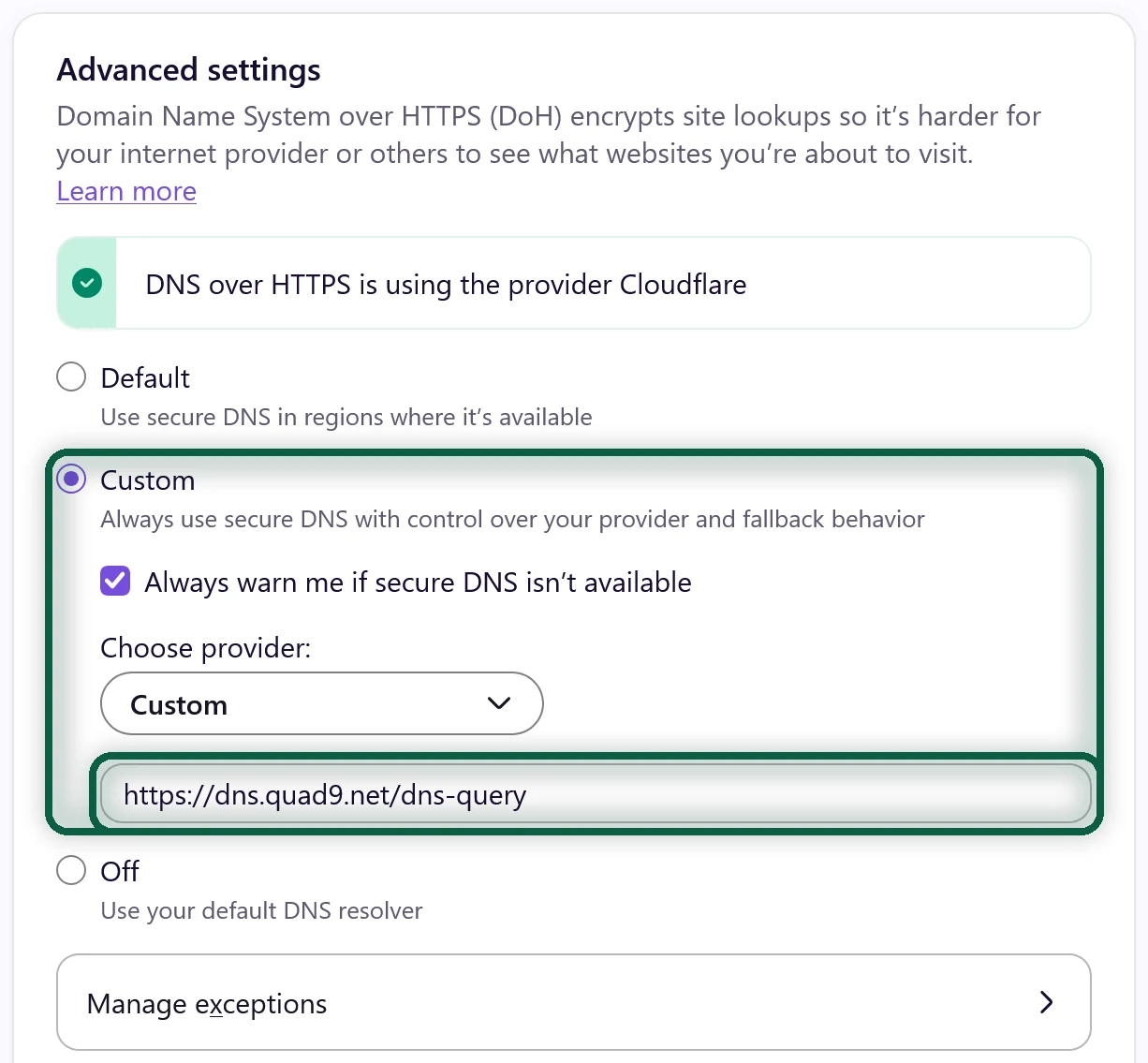
- In Firefox, open Settings → Privacy & Security, scroll to DNS over HTTPS and click Advanced settings. Choose Increased Protection or Max Protection, then choose your provider. If it isn’t listed, use a custom provider with the DoH address from the table above.
- In Chrome, open Settings → Privacy and security → Security. Under Advanced, turn on Use secure DNS and pick your provider from the drop-down menu, or a custom one with its DoH address. Brave has the same setting.
Replacing Chrome at the same time? Our Chrome alternatives page compares the browsers that are easiest to move to.
Check That It Worked
For Quad9, open on.quad9.net on each device. It tells you whether you’re using Quad9. For other services, use the test page linked from their setup instructions.
If Something Stops Working
- A site won’t load. Filtering resolvers sometimes block a legitimate site. Try an unfiltered version, such as Quad9’s
9.9.9.10, DNS4EU Unfiltered or AdGuard’s non-filtering servers, and tell the provider if the block was a mistake. - Hotel or office Wi-Fi breaks. Some networks block outside or encrypted DNS. Switch Android’s Private DNS to Automatic, or turn off the profile on iPhone or Mac, while you’re on that network.
- Your VPN ignores the change. Set a custom DNS in the VPN app if it has that option.
DNS is one small part of your Google footprint. Our free scan reads files you download from Google and shows which Google products and accounts you still depend on. Nothing is uploaded.
What You Lose
Partial is fine. Changing DNS on your router alone moves most of your home’s lookups away from Google.