The Google Workspace alternatives below all handle mail on your own domain, shared calendars, files and documents. They differ on encryption, on where your data lives and on how much admin work they need.
Workspace is easy to set up and hard to leave. Mail, calendars, shared drives, forms and your team’s logins to other tools all hang off one admin console. In January 2025 Google also built Gemini into its business plans and raised prices, with Business Standard going from about $12 to $14 per user per month.
Quick Comparison
| Alternative | Best for | Price per user (Oct 2026) | Encryption | Based in | Open source |
|---|---|---|---|---|---|
| Proton for Business | Privacy-first teams | Mail Essentials $6.99/month, Workspace Standard $12.99, Premium $19.99 (billed yearly) | End-to-end for mail, files and documents | Switzerland | Apps, yes |
| Infomaniak kSuite Pro | Low cost with Swiss hosting | Standard CHF 1.76/month, Business CHF 7.34, Enterprise CHF 13.83 (excl. VAT) | Not end-to-end across the suite | Switzerland | Partly |
| Tuta Business | Encrypted mail and calendars only | Essential €6/month, Advanced €8, Unlimited €12 (billed yearly) | End-to-end for mail, calendars and contacts | Germany | Apps, yes |
| Nextcloud | Full control on your own server | Free to self-host; Enterprise from €71.29/year at 100+ users | Depends on your setup | Germany (data where you host it) | Yes (AGPL) |
| Zoho Workplace | A cheap, familiar suite | Free mail for up to 5 users; check paid prices for your region | Not end-to-end | India, with EU data centers | No |
| Microsoft 365 | Teams that live in Word and Excel | Business Basic $7/month, Standard with Copilot $23.50 (billed yearly) | Not end-to-end by default | United States | No |
Which One Should You Pick?
- For privacy and a full suite in one subscription, choose Proton for Business.
- For the lowest price with Swiss hosting, choose Infomaniak kSuite.
- If you only need encrypted mail and calendars, choose Tuta Business and keep files in Proton Drive or Nextcloud.
- If someone on the team can run a server, choose Nextcloud and pair it with a mail host.
- If you want cheap and familiar more than private, Zoho Workplace is the easy move.
- If your clients send Word and Excel files all day, Microsoft 365 fits, but it swaps one US big-tech provider for another.
The Alternatives, One by One
Proton for Business
Proton is a Swiss company best known for encrypted email. Its business plans bundle its apps under one admin console, with end-to-end encryption on mail, files and documents.
- Pick it because it replaces most of Workspace in one subscription, and Easy Switch for business moves your organization’s mail, contacts and calendars. Each user gets 20 addresses and 25 calendars. Proton lists GDPR and HIPAA support, and Workspace Premium adds data retention policies.
- Possible deal-breakers are that Easy Switch doesn’t move Drive files, so you upload those yourself. Proton Docs and Sheets are newer and simpler than Google’s, so test your heaviest spreadsheets during the trial. Prices on the plans page are for yearly billing.
- Prices (Oct 2026) per user per month, billed yearly, are $6.99 for Mail Essentials (15 GB, 3 custom domains), $12.99 for Workspace Standard (1 TB, 15 domains) and $19.99 for Workspace Premium (3 TB, 20 domains, adds Proton’s Lumo assistant). There’s a 14-day trial and a 30-day money-back guarantee.
Infomaniak kSuite
Infomaniak is a Swiss host that develops and runs kSuite in Switzerland, under Swiss data protection law and the GDPR. kSuite Pro includes Mail, kDrive storage, kChat, kMeet video calls, calendars, contacts, OnlyOffice and Infomaniak’s Euria AI assistant. The Business plan adds Microsoft Office Online.
- Pick it because it’s the cheapest full suite here, with 3 TB per user on Business. Enterprise adds single sign-on and automatic user provisioning (SSO and SCIM).
- Possible deal-breakers are that it isn’t end-to-end encrypted across the suite, and Pro plans stop at 300 users. Mail moves one mailbox at a time, and imports from Google are throttled to about 1 GB a day. Infomaniak’s Google Drive guide relies on a command-line tool, rclone, and isn’t available on kSuite Standard.
- Prices (Oct 2026) per user per month, excluding VAT, are CHF 1.76 for Standard (50 GB), CHF 7.34 for Business (3 TB, or CHF 3.67 for the first year with an annual commitment) and CHF 13.83 for Enterprise (6 TB, or CHF 6.92 for the first year).
Tuta Business
Tuta is a German provider that encrypts mail end to end, including subject lines, along with calendars and contacts. Data sits on Tuta’s own servers in ISO 27001 certified data centers in Germany.
- Pick it because it’s an affordable way to get encrypted mail and shared calendars on your own domain, with an admin console, several admin roles and shared mailboxes (each priced like an extra user).
- Possible deal-breakers are that it has no office suite, so documents and shared files need another service. Email import from MBOX or EML files, in Tuta’s desktop app, is only on the Unlimited plan. Tuta has announced a one-click migration over IMAP, but it was still in closed beta when we checked. Custom branding is also Unlimited only.
- Prices (Oct 2026) per user per month, billed yearly, are €6 for Essential (50 GB, 3 custom domains), €8 for Advanced (500 GB, 10 domains) and €12 for Unlimited (1,000 GB, unlimited domains).
Nextcloud
Nextcloud is open-source software (AGPL) from a German company. It covers files, Talk chat and video calls, calendars, contacts and online office editing, on a server you control. You can run it yourself, rent it from a hosting provider, or use Nextcloud One, the company’s own managed service hosted in Germany for teams under 100 users.
- Pick it because no vendor holds your data, and you can move hosts without changing tools. The free Google integration app imports Google calendars, contacts, photos and files once, after an admin sets it up in Google’s API console.
- Possible deal-breakers are the upkeep, since someone must handle updates, backups and security. Nextcloud doesn’t host email, and its Mail app is only a client, so pair it with a mail host such as Proton, Tuta or Infomaniak.
- Prices (Oct 2026). Self-hosting is free. Enterprise support subscriptions start at €71.29 per user per year for at least 100 users. Nextcloud One has a 30-day free trial, so check its current price on its site.
Zoho Workplace
Zoho is an Indian software company with a full suite of Mail, Calendar, WorkDrive storage, Writer, Sheet, Show, Cliq chat and Meeting. It opened EU data centers in Amsterdam and Dublin in 2016.
- Pick it because it feels familiar, it’s cheap and its migration tool moves mail, contacts and calendars straight from Google Workspace. For team Drive data, Zoho enables a separate migration tool on request.
- Possible deal-breakers are that it isn’t end-to-end encrypted, so it’s a change of vendor rather than a privacy upgrade. The free plan covers up to 5 users with 5 GB each on one domain, in some regions only, and has no IMAP, POP or ActiveSync.
- Prices (Oct 2026) vary by region and didn’t display reliably on Zoho’s pricing page. Yearly billing is about 20% cheaper than monthly, so compare both at checkout.
Microsoft 365
Microsoft 365 is the mainstream reference. The Exchange admin center has a batch tool that moves mail, rules, calendars and contacts from Google Workspace.
- Pick it because Word, Excel and Outlook are the standard in many industries, and every plan includes 1 TB of OneDrive storage per user.
- Possible deal-breakers are that Microsoft is another US big-tech company, so your data stays within reach of US law. Copilot is bundled into the Business Standard and Premium prices. Its Google migration skips vacation replies, room bookings, shared calendars and event colors. Business plans top out at 300 users.
- Prices (Oct 2026) per user per month, paid yearly, are $7 for Business Basic, $23.50 for Business Standard with Copilot and $32 for Business Premium with Copilot.
What to Check Before You Commit
- Where the data lives. Switzerland has an EU adequacy decision, so GDPR transfers to Proton and Infomaniak are allowed. Tuta keeps data in Germany. With Zoho, choose the EU region.
- Your GDPR paperwork. Ask for the provider’s data processing agreement before you move personal data.
- Admin features by plan. SSO is on kSuite Enterprise, data retention on Proton Workspace Premium and custom branding on Tuta Unlimited. Check the plan you’re buying, not the top tier.
- Your way out. Make sure mail, calendars, contacts and files export in standard formats.
How to Switch From Google Workspace
Before You Start
- List what runs on Google. Write down users, aliases, groups, shared drives, Google Forms, Apps Script automations and every outside tool your team signs into with Google. Those logins break when the Workspace accounts go. Our Sign in with Google guide shows how to find them.
- Export everything. As a super admin with 2-Step Verification on, open the Google Admin console and go to Menu → Data → Data import & export → Data export. Click Set up new export, choose Export all user data for the entire organization, then click Start export.
The export lands in a Google Cloud Storage bucket. It’s ready after 48 hours at the earliest, usually takes about 72 hours and can take up to 14 days. Google deletes it 60 days after the start, so download it to your own storage.
- Lower the TTL on your MX records to a few minutes, two days before the switch, so the change spreads quickly.
- Set up the new provider. Add your domain, prove you own it with the TXT record it gives you, create the users, then add the SPF, DKIM and DMARC records. Leave the MX records pointing at Google for now.
Move Mail, Calendars and Contacts
- Run the new provider’s Google Workspace import while mail still flows to Google. Each provider does it differently, as listed below.
- Proton. In Easy Switch for business, choose emails, contacts and calendars, sign in with a Google Workspace admin account, then install the Proton Easy Switch app from the Google Workspace Marketplace.
- Zoho. Its migration tool needs a super admin address, a service account and its key file, and the users must already exist in Zoho Mail.
- Microsoft 365. Use the batch migration in the Exchange admin center.
- Infomaniak. Use its email import tool once per mailbox, signing in with Google for each.
- Tuta. Import MBOX files from your export in the desktop app, on the Unlimited plan.
Move Files
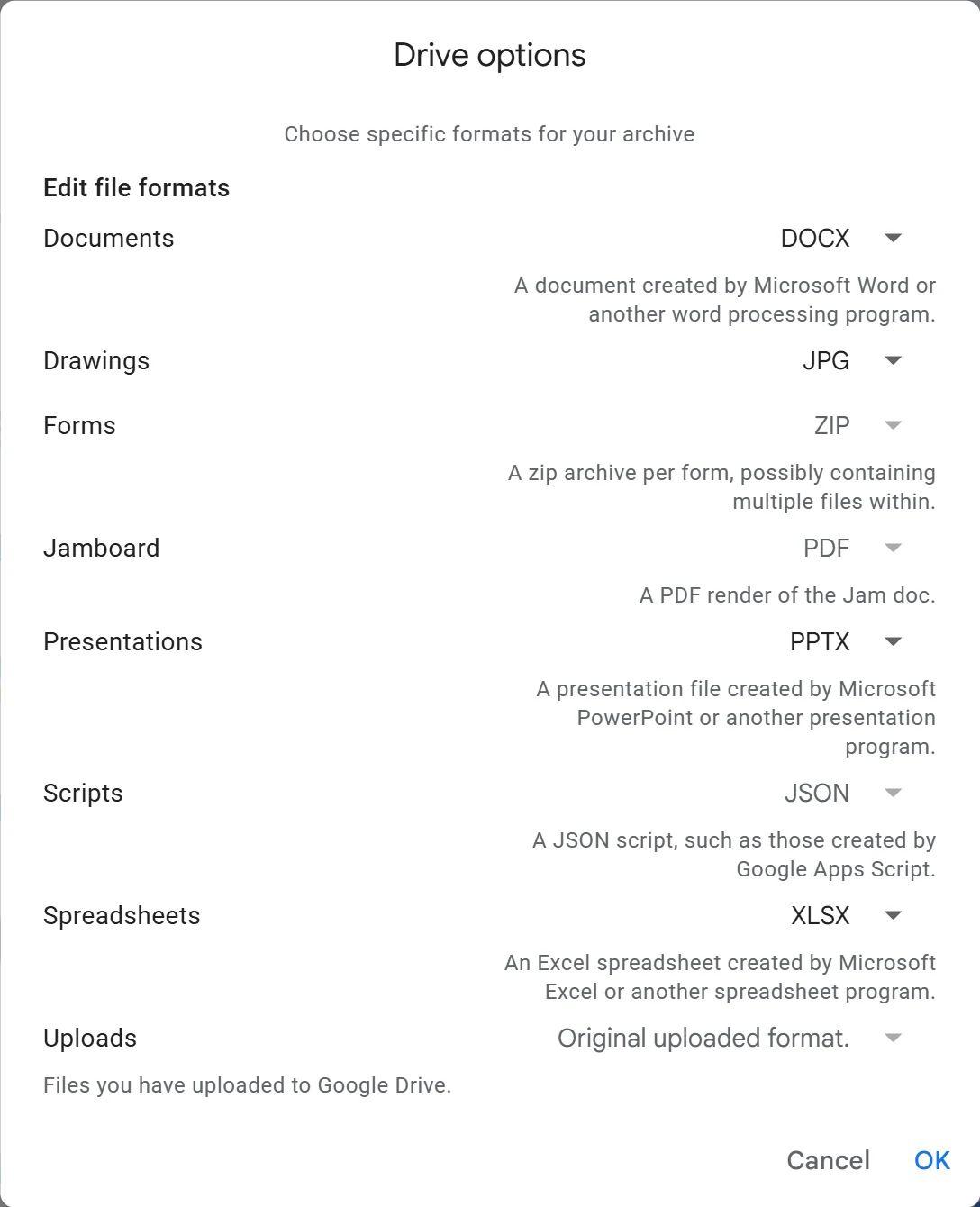
- Download each user’s Drive folder from the export, or ask each person to run Google Takeout for Drive with DOCX, XLSX and PPTX chosen, so Docs, Sheets and Slides convert to Office files.
- Upload with the new provider’s desktop sync app, shared drives first, then rebuild folder permissions.
- Send clients and partners the new links. Old Google Drive links stop working once the files or accounts are deleted.
Switch Over and Close Workspace
- At your DNS host, replace Google’s MX records with the new provider’s. For Proton those are mail.protonmail.ch and mailsec.protonmail.ch. New mail starts arriving there within the TTL you set.
- Check Gmail for a few days and move any stragglers. Then move each Sign in with Google login to a password on the new address.
- After a few weeks of normal use, cancel Workspace. In the Admin console, go to Menu → Billing → Subscriptions, click your subscription, then More → Cancel Subscription (you may not need More), and follow the prompts.
- If you bought the domain through Google, it’s registered with Squarespace. Keep renewing it there or transfer it before you delete the organization’s Google account.