Gemini is hard to avoid. Google’s Gemini app had 950 million monthly users by mid-2026, and Gemini features now sit inside Gmail, Drive, Android and Search. Google says human reviewers read a subset of Gemini chats, and that reviewed chats are kept for up to three years. Its privacy hub also says it uses your activity to improve its services, including training generative AI models.
You don’t have to give up AI to leave Gemini. The assistants below come from providers that publish stricter rules about your chats, and two of them run entirely on your own computer. Every privacy claim on this page is the provider’s own, linked in the sources.
Quick Comparison
| Alternative | Best for | Price (Oct 2026) | Privacy, per the provider | Based in | Open source |
|---|---|---|---|---|---|
| Lumo (Proton) | Everyday chat with an account | Free; Plus about $9.99/month | Zero-access encrypted history, no training | Switzerland | Yes, Proton says |
| Duck.ai | Quick questions, no account | Free; paid plans add models (check site) | IP address removed, chats saved on your device | US | No |
| Mistral Vibe (formerly Le Chat) | Strong European models | Free; Pro about $14.99/month | Training opt-out in settings | France | Some open-weight models |
| Brave Leo | AI inside your browser | Free; Premium about $14.99/month | No account, chats not retained or trained on | US | Browser yes |
| Kagi Assistant | People who pay for Kagi Search | From about $5/month with search | No training; threads deleted after 24 hours by default | US | No |
| Ollama or Jan | Nothing leaves your computer | Free | Runs locally | Your computer | Yes |
Which One Should You Pick?
- If you want a Gemini-style app on your phone and computer, use Lumo. It has web, Android and iOS apps.
- If you just want answers without signing up, use Duck.ai in any browser or in the DuckDuckGo apps.
- If you need the strongest models and want a European company, use Mistral’s Vibe and turn off training.
- If you already use Brave, try Leo. It’s built into the browser and needs no account.
- If your chats must stay on your own hardware, use Ollama or Jan on a computer with at least 16 GB of memory.
The Alternatives, One by One
Lumo by Proton
Lumo works like the Gemini app. You chat, generate images and organize work into projects. Proton says it doesn’t log your chats, stores them with zero-access encryption so even Proton can’t read them, and never trains on your data. Its FAQ says you can also use Lumo as a guest without an account, including over Tor.
- Pick it because it pairs well with Proton Mail and Drive, and it’s from a European company with a published no-training rule.
- A possible deal-breaker is that the free plan limits messages, chat history, image generation and use of its most capable “Max” model.
- Prices (Oct 2026) are free, or about $9.99/month for Lumo Plus ($119.88 billed yearly). Euro and Swiss franc prices are on Proton’s site.
Duck.ai
DuckDuckGo’s chat lets you pick between models from several AI companies, with no account. Its privacy policy says it removes metadata such as your IP address before prompts go to the model provider. It also says providers may not use your prompts to train their models and must delete them within 30 days, with limited exceptions. Recent chats are saved on your device only.
- Pick it because it’s the fastest way to ask an AI something without handing over an identity.
- A possible deal-breaker is that the model providers still receive your prompts, even if they can’t tie them to you. Don’t paste anything you’d regret.
- It costs nothing (Oct 2026). DuckDuckGo’s paid subscription adds more advanced models, so check the price on its site.
Mistral Vibe (Formerly Le Chat)
Mistral is a French AI company, and its chatbot was renamed from Le Chat to Vibe in 2026. Your conversations and plan carry over. The phone apps are still listed as “Le Chat by Mistral AI.” It’s the most capable European option here, with agent and coding features on top of chat.
- Pick it because you want strong models and a company based in the EU.
- A possible deal-breaker is training. Mistral’s help center says Team and Enterprise users are opted out by default, while other plans may need to opt out. In the mobile app, its help names the setting Enable data sharing, under Data & Account Controls. Labels may change after the rename.
- Prices (Oct 2026) are free, Pro about $14.99/month before tax, and Team about $24.99 per user per month. Verified students pay about $5.99/month for Pro.
Brave Leo
Leo is the assistant built into the Brave browser on Windows, macOS, Linux, Android and iOS. Brave says no account or login is required, and that Leo doesn’t retain or share chats or use them for model training. A “Bring Your Own Model” option can point Leo at a model you run yourself.
- Pick it because it summarizes web pages and PDFs, translates and drafts text right where you browse.
- A possible deal-breaker is that it lives inside one browser. If you don’t use Brave, one of the others fits better.
- Leo is free (Oct 2026). Leo Premium adds more models and costs about $14.99/month or $149.99/year.
Kagi Assistant
Kagi is a paid, ad-free search engine, and every plan includes its AI assistant. Kagi says your data is never used to train AI models, by Kagi or the model providers. It also says threads are deleted after 24 hours of inactivity by default.
- Pick it because you want private search and an assistant on one bill. See our search alternatives.
- A possible deal-breaker is that the flagship models need the Ultimate plan.
- Prices (Oct 2026) are Starter about $5/month, Professional about $10/month and Ultimate about $25/month, plus tax.
Run AI on Your Own Computer With Ollama or Jan
Local models are the only option where no company sees your chats at all. Jan is a free desktop app (Apache 2.0) for Windows, macOS and Linux that looks like a normal chatbot. Its developers suggest 16 GB of memory to run 7B models. Ollama is free, open source and runs models from the command line or behind other apps, on the same three systems.
- Pick them because your chats never leave the machine, and they work offline.
- Possible deal-breakers are speed and quality. Ollama warns that large models are slow without a strong graphics card. Both can also connect to cloud models, and those cloud chats do leave your computer. Ollama’s optional cloud plans start at about $20/month and run mainly in the US.
- Local use costs nothing (Oct 2026).
ChatGPT, Claude and Microsoft Copilot
Switching to one of these moves you from one big tech company to another. All three are US companies that store your chats on their servers. If you use one, open its privacy or data settings first and decide whether your chats may be used for training.
How to Turn Gemini Off
Do these steps even if you keep some Google services. Partial is fine. Our tracking guide covers the other account settings.
Save, Then Delete Your Gemini History
- If you want a copy, open takeout.google.com, click Deselect all and tick My Activity.
- Click All activity data included, then Deselect all in that window. Tick only Gemini Apps and click OK. Then click Next step and Create export. Your chats arrive as an HTML file. Labels can differ slightly.
- Go to myactivity.google.com/product/gemini, click Delete, then All time.
Turn off Keep Activity
Google renamed “Gemini Apps Activity” to Keep Activity. It’s on by default for adults.
- On a computer, go to gemini.google.com and click Settings & help, then Activity.
- Click On near the top, then choose Turn off and delete activity.
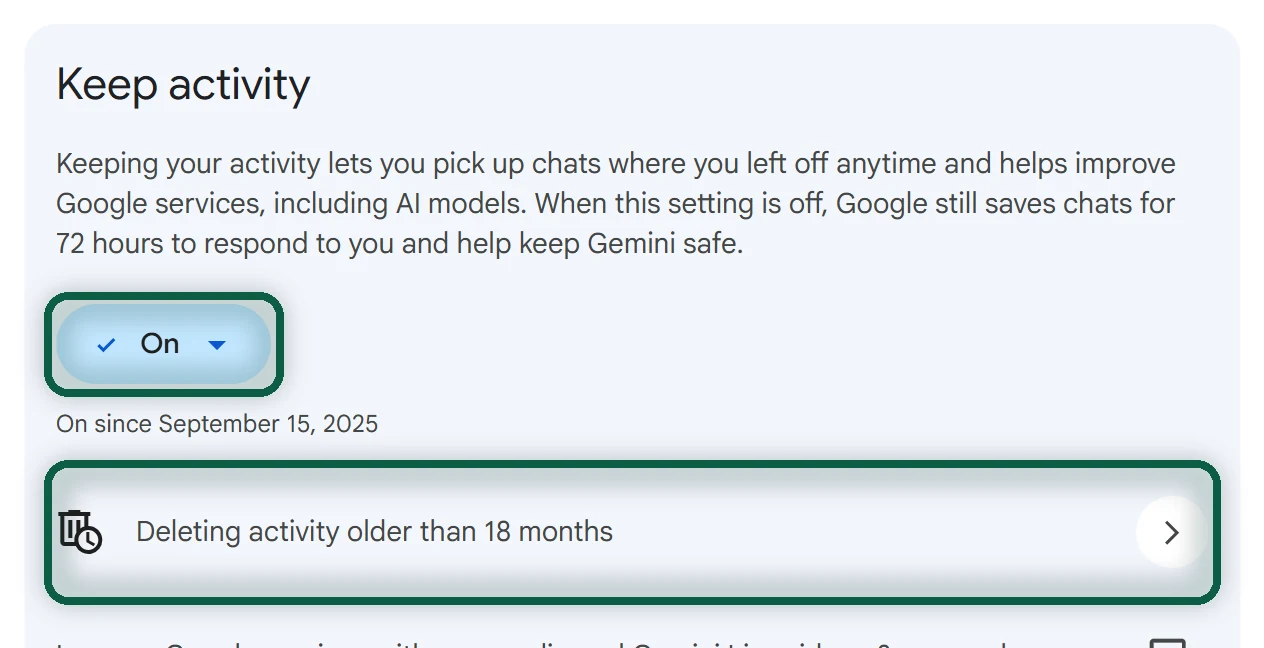
Google says that with Keep Activity off, new chats are still kept for 72 hours, and connected apps such as Google Workspace stop working. On Android, Gemini keeps access to Phone, Messages, WhatsApp and Device assistance even with Keep Activity off. The Android steps below remove Gemini from those.
Turn off Gemini in Gmail and Workspace
Gemini features in Gmail, Drive and Docs depend on Gmail’s “smart features.” These let Google’s systems process your email content, and they’re on by default in many accounts. Google says it does not use Gmail content to train Gemini. You need to turn off two switches.
- In Gmail on a computer, click the gear icon, then See all settings, and stay on General.
- Next to Smart features, untick Turn on smart features in Gmail, Chat, and Meet.
- Next to Google Workspace smart features, click Manage Workspace smart feature settings. Turn off Smart features in Google Workspace and Smart features in other Google products, then click Save.
Google says some changes made on a computer don’t show in the mobile app, so check the Gmail app too. Our tracking guide has the Android and iPhone steps.
Turn off Gemini on Android
- Go to Settings → Apps → Default apps → Digital assistant app and set Default digital assistant app to None.
- Go to Settings → System → Gestures → Press & hold power button and choose an action other than the digital assistant.
- In the Gemini app, tap your profile picture, then Settings. Under Talk to Gemini hands-free, turn off Hey Google. Under Gemini on lock screen, turn off Use Gemini without unlocking.
- Delete the Gemini app, or disable it in Settings → Apps if your phone won’t let you delete it.
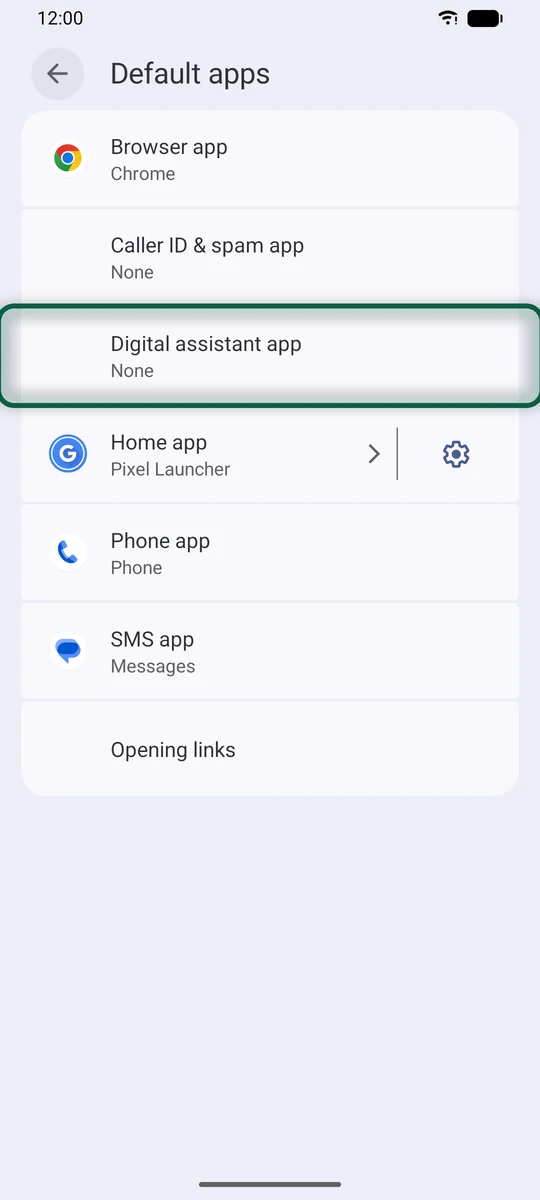
Do steps 9 to 11 before you delete the app. Google notes that deleting it doesn’t remove Gemini as your default assistant. The Gemini app also offers Switch to Google Assistant, but that’s still Google. If you want a voice assistant without Google, Dicio is free and open source. It handles timers, calls, weather and opening apps, with speech recognition on your phone. Gemini is also coming to Nest speakers and displays, and our Google Home alternatives page covers a voice assistant that can run on your own hardware.
On an iPhone or iPad, delete the Gemini app and turn off Keep Activity on the web as above. To stop Google’s AI answers in search, see our search alternatives.