Picking a Google Home alternative is really two decisions. You choose a new app and hub to run the house, and you decide what to do with each Nest device you already own. Some Nest devices move over in minutes. Others only work with Google, and you’ll replace them when it suits you.
There are good reasons to start. Nest Aware is gone, and camera history now needs a Google Home Premium plan at $10 or $20 a month (Oct 2026). Gemini is coming to Nest speakers and displays. And Google has already cut app support for older hardware, such as the first two generations of the Nest Learning Thermostat on October 25, 2025.
Quick Comparison
| Alternative | Best for | Price (Oct 2026) | Privacy | Based in | Open source |
|---|---|---|---|---|---|
| Home Assistant | Local control of almost any device | Software free; Green hub about $199 or €179; optional Home Assistant Link about $6.50/month | Runs on your own hardware, works offline | Switzerland (Open Home Foundation) | Yes |
| Apple Home | iPhone households | App free; needs an Apple TV 4K or HomePod as hub (HomePod mini 2 is $149) | Apple says it can’t read your Home data | US | No |
| Home Assistant Voice | Replacing Nest speakers for home control | About $69 or €59 | Can run fully locally in supported languages | Home Assistant project | Yes |
| Local cameras with Frigate | Replacing Nest cameras | Camera cost; Frigate is free | Video stays on your network | Community project | Yes |
| Matter devices you already own | Keeping the newest Nest thermostats | Free | Controlled by whichever app you choose | Any brand | Varies |
Which One Should You Pick?
- If you’re comfortable following a setup guide and want the most control, use Home Assistant. It’s the only option here that runs fully without a cloud account.
- If everyone at home uses an iPhone, use Apple Home. You’ll need an Apple TV or HomePod as the hub, and you may already own one.
- If you mostly used Nest speakers to switch lights, pair Home Assistant with Home Assistant Voice.
- If cameras and the doorbell are what keep you on Google, plan those last. They’re the only part that usually means new hardware.
Partial is fine. Many people move lights, plugs and thermostats first and leave a Nest doorbell running until it’s due for replacement.
The Alternatives, One by One
Home Assistant
Home Assistant is free, open-source smart home software. The Open Home Foundation owns it, and you run it on a box at home, either the official Home Assistant Green or a computer you already have. Apps for Android and iPhone, plus a web dashboard, let you control everything and build automations.
- Pick it because it works with devices from a very wide range of brands, keeps running without the internet, and stores your home’s data on your own hardware. It’s Matter certified.
- A possible deal-breaker is the learning curve. You set it up, update it and fix it yourself. The Green hub has no Zigbee or Thread radio built in, so those devices need an add-on such as the Connect ZBT-2 (about $49 or €45), which handles one of the two at a time.
- Prices (Oct 2026) start at free for the software. The Green hub is about $199 or €179. Home Assistant Link (formerly Home Assistant Cloud) adds easy remote access and backups for about $6.50/month or $65/year. You don’t need it.
Apple Home
Apple Home is built into every iPhone, iPad and Mac. Apple says your Home data is stored in a way Apple can’t read, and that communication is encrypted end to end. It supports Matter accessories, so many devices you used with Google Home can join it.
- Pick it because it’s the least work. Setup is a scan of the device’s code with your iPhone.
- A possible deal-breaker is that it’s Apple only. Anyone at home with an Android phone can’t use the Home app. You also need a home hub for Matter accessories, remote control and automations. That’s an Apple TV 4K or a HomePod. The new HomePod mini 2 is $149 (Oct 2026).
- For cameras, HomeKit Secure Video needs a compatible camera, a home hub and a paid iCloud+ plan.
Home Assistant Voice
Home Assistant Voice Preview Edition is a small speaker that replaces a Nest Mini or Nest Audio for home control. It listens for its wake words (“Okay Nabu”, “Hey Jarvis” or “Hey Mycroft”) on the device itself.
- Pick it because speech can be processed entirely on your own hardware when your language is supported. You don’t need a Home Assistant Link subscription.
- A possible deal-breaker is that local voice is narrower than Google’s assistant. The lightweight local option only understands set home-control phrases. Full local speech recognition needs a more powerful computer, and Home Assistant suggests at least an Intel N100-class processor.
- It costs about $69 or €59 (Oct 2026).
Looking for an alternative to both Alexa and Google Home? Amazon’s speakers aren’t a privacy upgrade. Your voice and device data go to Amazon’s cloud instead of Google’s.
Local Cameras With Frigate
Nest cameras and doorbells send video to Google’s cloud. To see more than a short window of history, you now pay for Google Home Premium. Standard is $10/month for 30 days of event history. Advanced is $20/month for 60 days of events plus 10 days of round-the-clock recording.
The private alternative is a camera that streams to your own network, recorded by Frigate. Frigate is an open-source video recorder that runs object detection on your own hardware, so footage stays at home. It plugs into Home Assistant for alerts and automations.
- Pick it because you keep all your footage with no monthly fee.
- A possible deal-breaker is the work. You choose cameras that offer a local video stream, wire a doorbell, and give Frigate a capable computer. Check a camera’s specifications for local streaming before you buy. Apple households can use HomeKit Secure Video instead, with an iCloud+ plan.
Matter and Thread Devices That Don’t Need Google
Matter is a shared standard for smart home devices. A Matter device works with any Matter-certified app, and Google Home can share it with a second app while you test. Google says only one platform actively controls the device at a time, but changes sync between apps. Thread is the low-power radio many Matter devices use. It needs a border router, such as a HomePod mini, some Apple TV 4K models, or Home Assistant with a Thread radio.
- Pick it because you buy once and choose your app freely. Look for the Matter logo on new plugs, bulbs, sensors and thermostats.
- A possible deal-breaker is that Matter covers basic controls. Some brand-specific features stay in the maker’s own app.
What Happens to Your Nest Devices
| Nest device | Works without Google? | What to do |
|---|---|---|
| Nest Learning Thermostat (4th gen) | Yes, it’s Matter-certified | Share it to your new app with a pairing code |
| Nest Thermostat (2020) | Yes, it gained Matter support in 2023 | Share it the same way |
| Nest Learning Thermostat (1st and 2nd gen) | Google ended app support on October 25, 2025 | Its schedules and dial still work. Replace it when convenient |
| Other Nest thermostats | Only through Google’s cloud | Keep it, or reach it from Home Assistant’s Nest integration |
| Nest cameras and doorbells | No, video goes through Google | Keep for now, or replace with local cameras |
| Nest speakers and displays | No | Replace with Home Assistant Voice or a HomePod |
| Nest Protect | Google’s API for other apps doesn’t cover smoke and CO alarms | Leave them in place and replace them at their expiry date |
Home Assistant’s Nest integration is a halfway step. It shows Nest thermostats, cameras and doorbells inside Home Assistant, but it relies on Google’s Device Access program, which costs a one-time $5 fee and sends events through Google’s cloud. It also needs a Google account. Use it to keep everything on one dashboard while you replace hardware.
How to Switch From Google Home
First, Take Stock and Save What You Need
- In the Google Home app, tap Home, then All devices. Write down every device and its brand. Check the table above for your Nest devices.
- Download any camera clips you want to keep before you cancel Google Home Premium. Clips older than your plan’s history window are already gone.
- Note your routines and automations. They don’t transfer, so you’ll rebuild them in the new app.
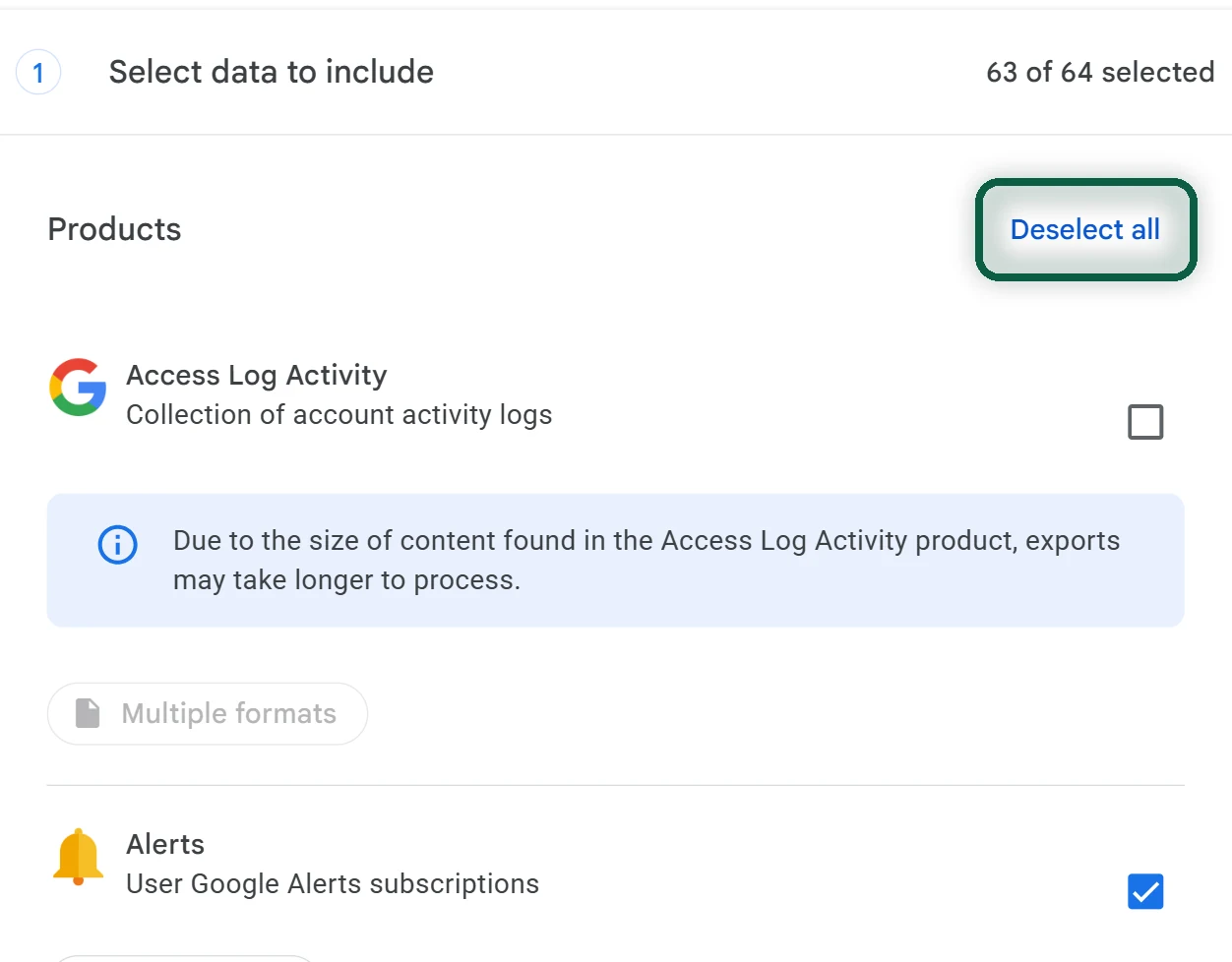
- Optionally, make a copy of your data with Google Takeout. Open takeout.google.com, click Deselect all, and tick any Home or Nest entries your account shows.
Then Set up Your New Hub
- For Home Assistant, plug the Green into your router with the included Ethernet cable and follow the onboarding in the app or browser. It needs internet access for the first setup.
- For Apple Home, set up your Apple TV or HomePod and add it to a room in the Home app. It becomes your home hub.
Share Matter Devices Before You Remove Anything
- In Google Home, tap Home, then All devices, and touch and hold the device’s tile.
- Tap More or Settings, then Linked Matter apps & services, then Link apps & services.
- Pick your new app from the list, or tap Use pairing code to get a temporary code. The new app has to be installed on the same phone to appear in the list.
- In Home Assistant or Apple Home, add a new device and enter the code. Test it for a few days while Google Home still works.
Re-Pair Everything Else
- Zigbee and Thread devices that aren’t shared through Matter need a factory reset, then pairing to your new hub. Follow each maker’s reset instructions.
- Devices that use a brand’s own bridge or app, such as Philips Hue lights, usually have a Home Assistant integration or Apple Home support. Add them one brand at a time.
- Rebuild your routines as automations in the new app.
Finally, Remove Devices From Google Home
- In Google Home, touch and hold each device’s tile, tap More or Settings, then Remove device, and confirm with Remove. This also deletes the automations tied to it.
- Factory reset any device you’re selling or giving away.
- Cancel your Google Home Premium plan, then delete the empty home in the app’s home settings.
Your Google account may also hold voice and Home activity. Our tracking guide shows where to review and delete it. If your TV or streamer runs Google TV, our Google TV alternatives cover that part of the living room.