Google Alerts is one of the quiet Google services. Many people set it up years ago, and it still emails your Gmail address every time your name, your company or a topic shows up online. Talkwalker Alerts is the free alternative to Google Alerts that covers the same job for most people, and it doesn’t care which email provider you use.
That matters if you’re moving away from Gmail. Google Alerts are tied to your Google Account, so they keep landing in the inbox you’re trying to leave. Each alert is a single search phrase, so re-creating your list somewhere else is quick.
Quick Comparison
| Alternative | Best for | Price (Oct 2026) | Privacy | Based in | Open source |
|---|---|---|---|---|---|
| Talkwalker Alerts | A free drop-in replacement | Free | Any email address, or RSS; owned by Hootsuite | Luxembourg | No |
| Inoreader | Reading every alert in one RSS reader | Reader free; keyword feeds need Pro, about $7.50/month billed yearly | Hosted account; Pro removes ads | Bulgaria (EU) | No |
| changedetection.io | Watching specific pages and prices | Free to self-host; hosted about $8.99/month | Self-hosting keeps everything on your machine | Runs where you install it | Yes (Apache 2.0) |
| F5Bot | Reddit, Hacker News and Lobsters | Free; paid plans from about $9.99/month | Sign up with just an email address | US | No |
| Brand24 | Businesses tracking their brand | From about $199/month billed yearly | Hosted business tool | US | No |
Which One Should You Pick?
Think about what your alerts actually do for you.
- You track your name, a company or a topic in the news, so use Talkwalker Alerts. It’s the closest match and costs nothing.
- You already read news in an RSS reader, so send your Talkwalker alerts there as feeds, or use Inoreader’s keyword feeds if you pay for Pro.
- You watch one page, such as a job board, a product page, a government notice or a price, so use changedetection.io. Keyword alerts miss changes on a page that doesn’t publish new articles.
- You care what people say on Reddit or Hacker News, so add F5Bot next to Talkwalker. It’s built for those sites.
- You run marketing for a business and need reports, sentiment and social networks, so try Brand24 or Mention. They cost far more and are built for teams.
The Alternatives, One by One
Talkwalker Alerts
Talkwalker built its free alert service as a direct alternative to Google Alerts, and says more than 600,000 people use it. The form will feel familiar. You enter a search, choose the result type (news, X, blogs or discussion forums), a language, how often you want results and whether you want All results or Only the best results. Then you confirm your email address.
- Pick it because it covers what most people used Google Alerts for, with no Google account and no cost. Every alert can also be read as an RSS feed from the Manage tab, so you don’t even need to give it your main inbox.
- A possible deal-breaker is that it’s a free side product of a commercial social listening company. Hootsuite, a Canadian social media company, bought Talkwalker in 2024. You’re trading one company for another, so give it an email alias if you’d rather not hand over your main address.
- Search syntax. Talkwalker supports exact phrases in quotes, plus AND, OR and AND NOT, with brackets for longer queries.
- Price (Oct 2026). Free.
Inoreader
Inoreader is a hosted RSS reader with apps for the web, Android and iPhone. On the Pro plan you can create a Monitoring feed for a keyword, person, company or event. It searches the articles in your account or all the public feeds Inoreader knows about, so its reach depends on those feeds rather than the whole web.
- Pick it because you want all your alerts and news in one reader, with rules and filters to sort them. It’s also the place to read your Talkwalker RSS feeds.
- A possible deal-breaker is that monitoring feeds, rules and filters need Pro. The free plan follows up to 150 feeds, and ad-free reading is a Pro feature.
- Price (Oct 2026). The free plan is free. Pro costs about $7.50/month billed yearly or $9.99 monthly, and allows 2,500 feeds. Inoreader is made by Innologica, a Bulgarian company.
changedetection.io
changedetection.io watches web pages you choose and tells you when they change. You can watch a whole page or one part of it, trigger only when certain text appears, and track a product’s price or restock. It can notify you through more than 85 channels, including email, Discord, Telegram, Matrix and ntfy.
- Pick it because it catches changes keyword alerts never see, such as an updated PDF link, a new job posting or a price drop on one shop.
- A possible deal-breaker is that it watches pages, not the web. You have to know where to look. Self-hosting means running Docker or a Python package on a computer that stays on.
- Price (Oct 2026). It’s free and open source under the Apache 2.0 license if you host it yourself. The hosted plan costs about $8.99/month for up to 5,000 watched pages.
- If you want something simpler, Visualping is a hosted page watcher with a free plan for 5 pages, checked at most once an hour (150 checks a month). Paid personal plans start at about $10/month billed yearly.
F5Bot
F5Bot watches Reddit, Hacker News and Lobsters for your keywords and emails you instantly, in batches or as a daily digest. It has been running since 2017.
- Pick it because these discussions are often where people talk about a product, a project or you, and F5Bot watches them directly.
- A possible deal-breaker is that it covers only those three sites. RSS and JSON feeds need a paid plan, and Slack or Discord delivery needs Gold.
- Price (Oct 2026). The free plan needs only an email address. Silver costs about $9.99/month for 20 keywords and Gold about $49.99/month for 200.
Brand24 and Mention (Paid)
These are social listening tools for businesses. They track mentions across news, blogs and social networks and add reports, sentiment and team features that Google Alerts never had.
- Brand24 starts at about $199/month billed yearly ($249 monthly) for 3 keywords and 2,000 mentions a month, with a 14-day free trial and no card needed (Oct 2026).
- Mention, now part of Agorapulse, sells a single Company plan with a free trial. Check the current price on its site.
If you only replaced Google Alerts for yourself, you don’t need either of these.
Collect Every Alert in One RSS Reader
RSS is the simplest way to keep alerts out of your inbox. A feed reader checks each feed for you and shows new items in order, with no algorithm.
- Talkwalker Alerts gives each alert its own feed. Open the Manage tab and copy the feed from the RSS icon next to the alert.
- Inoreader reads those feeds and adds its own keyword feeds on Pro.
- Feeder on Android and NetNewsWire on iPhone, iPad and Mac are free, open source readers that work with any of these feeds. Our Google News alternatives page explains how to set one up.
If you’re leaving Gmail before you’re ready to leave Google Alerts, there’s a halfway step. Edit each Google alert, click Show options and set Deliver to to an RSS feed. The results stop going to your Gmail inbox while you test the replacements.
How to Switch From Google Alerts
There’s no tool that moves alerts from Google to another service. You copy the search terms, then re-create each alert. With a few alerts, that takes minutes.
First, Get Your List of Alerts
- Open google.com/alerts on a computer while signed in. Your alerts are listed on that page.
- Click Edit next to each alert and copy its search text exactly, including quotes, OR and minus signs. Note the options under Show options too, such as how often, the sources and the language.
If you have dozens of alerts, Google Takeout can give you the list as a file. Google describes this data as your alert subscriptions, with each query and its language, region, sources and delivery settings.
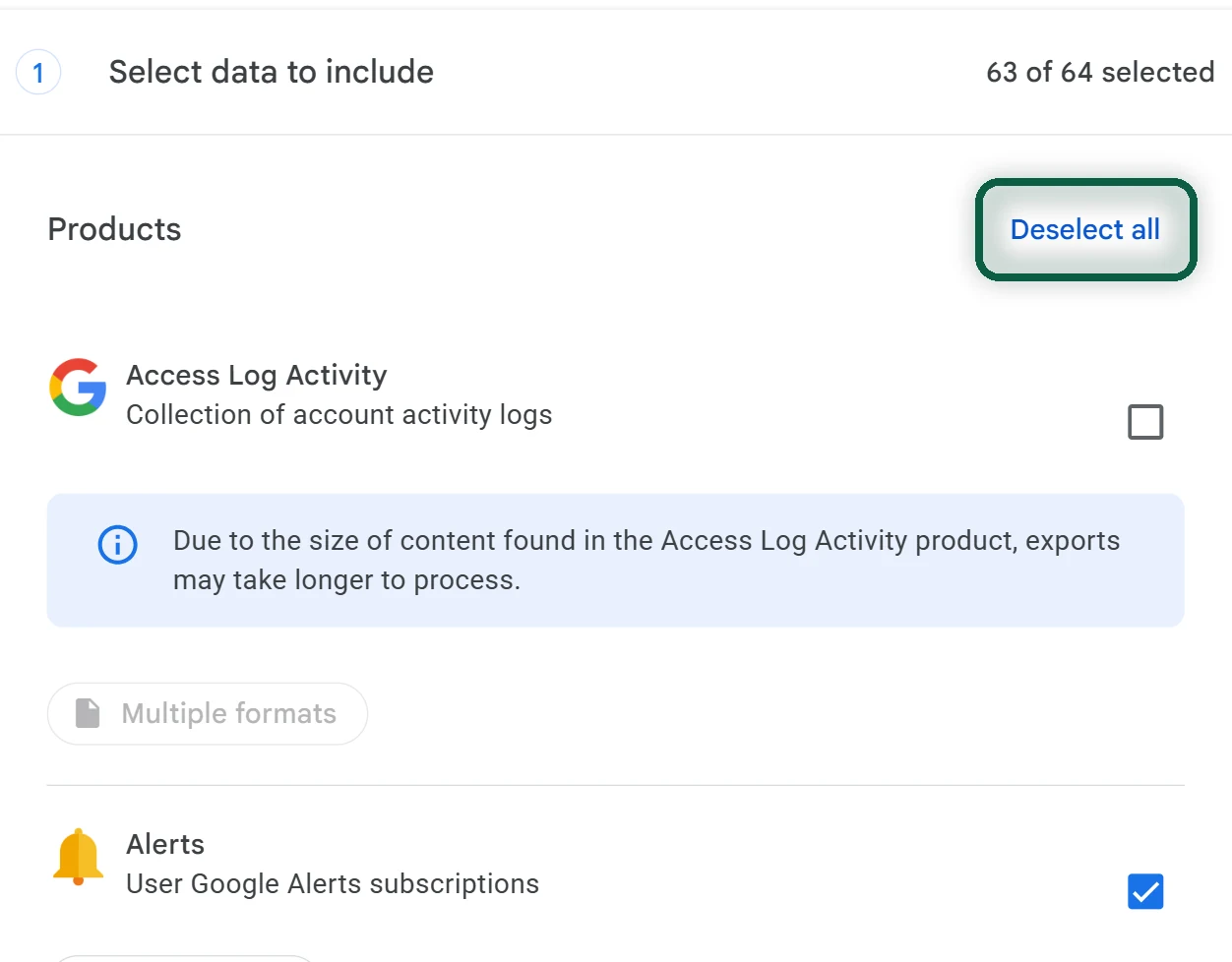
- Open takeout.google.com and click Deselect all.
- Tick Alerts, click Next step, then Create export. Download the file from Google’s email when it arrives.

Our Google Takeout guide explains the export options in more detail.
Then Re-Create Them in Talkwalker Alerts
- Open talkwalker.com/alerts and type your first search in the alerts search bar.
- Choose the result type, the language and how often you want results, such as As it happens. Pick All results or Only the best results.
- Enter the email address that should get the alerts, click Create Alert, and confirm the address from the email Talkwalker sends.
- Repeat for each alert. Where your Google alert used a minus sign to exclude a word, write AND NOT before that word instead.
Finally, Compare and Switch off Google
- Run both for a week or two. Check which service finds the results you care about, and adjust the searches.
- Add changedetection.io for pages you need to watch, and F5Bot if you track Reddit or Hacker News.
- Back on google.com/alerts, click Delete next to each alert. You can also click Unsubscribe at the bottom of any alert email.
Not sure which other Google services you still rely on? Our free scan reads files you download from Google and lists them, right in your browser.