Google News decides which stories you see, based on what Google knows about you. The best Google News alternative hands that choice back to you. With an RSS reader, you pick the sources, and the app simply shows what they publish.
RSS is old technology, and that’s its strength. Many news sites and blogs still publish a feed, podcasts run on it, and dozens of apps can read it. Your list of feeds is a small file you can move between apps in seconds, so you never get locked in again.
If you’d rather keep a curated feed, that’s fine too. Ground News and Kagi News pick stories for you without tying them to your Google Account.
Quick Comparison
| Alternative | Best for | Price (Oct 2026) | Privacy | Based in | Open source |
|---|---|---|---|---|---|
| Feeder | Android, no account | Free | Runs on your phone, no account | Open source project | Yes (GPLv3) |
| NetNewsWire | iPhone, iPad and Mac | Free | No account; syncs through iCloud or a service you choose | Open source project | Yes |
| Inoreader | Phone and computer, power features | Free for 150 feeds; Pro about $7.50/month billed yearly | Hosted account; Pro removes ads | Bulgaria (EU) | No |
| Ground News | Comparing coverage across outlets | Free plan; Vantage about $8.33/month billed yearly | Hosted service | Canada | No |
| Kagi News | One short daily briefing | Free, no account | AI-written summaries | US | Source list public on GitHub |
| FreshRSS | Self-hosting for a household | Free | Runs on your own server | Open source project | Yes (AGPL 3) |
Which One Should You Pick?
- If you read news on an Android phone, use Feeder. It’s the simplest start.
- If you use an iPhone, iPad or Mac, use NetNewsWire. It syncs between your Apple devices through iCloud.
- If you read on a phone and a Windows or Linux computer, use Inoreader in the browser and its phone app. If you run a home server, FreshRSS does the same job on your own hardware.
- If you want someone else to pick the stories, try Ground News for side-by-side coverage, or Kagi News for one short briefing a day.
- If you only read three or four outlets, their own apps may be enough. Turn on notifications for breaking news only.
The Alternatives, One by One
Feeder
Feeder is a free, open source RSS reader for Android, around since 2014. It runs entirely on your phone, with no account and no server in between. It reads RSS, Atom and JSON feeds, works offline, refreshes in the background and can notify you about new articles from the feeds you choose.
- Pick it because it’s the most private setup on Android. Your feed list never leaves your phone, and you can import or export it as an OPML file at any time.
- A possible deal-breaker is that there’s no sync. Your feeds live on one phone. Back them up with an OPML export.
- Price and platforms (Oct 2026). Free, GPLv3, on F-Droid. Version 2.24.0 came out on October 14, 2026 and needs Android 10 or newer.
NetNewsWire
NetNewsWire is a free, open source reader for Mac, iPhone and iPad, now on version 7. It has a reader view, smart feeds such as Today and All Unread, and a Safari extension for adding feeds.
- Pick it because it’s fast, clean and private, and it syncs between your Apple devices through iCloud. It can also sync with Feedbin, Feedly, BazQux, Inoreader, NewsBlur, The Old Reader or your own FreshRSS server.
- A possible deal-breaker is that it’s Apple only, and the current version needs macOS 15 or iOS 26 or newer.
- Price (Oct 2026). Free.
Inoreader
Inoreader is a hosted reader with apps for the web, Android and iPhone. It’s the most capable reader on this page, with rules, filters, newsletters delivered as feeds and keyword monitoring on its Pro plan.
- Pick it because your feeds follow you to any device, including a work computer where you can’t install apps.
- A possible deal-breaker is that a company holds your reading list, and the useful extras need Pro. Ad-free reading is a Pro feature too.
- Price (Oct 2026). Free for up to 150 feeds. Pro costs about $7.50/month billed yearly or $9.99 monthly, for up to 2,500 feeds. Inoreader is made by Innologica, a Bulgarian company.
Ground News
Ground News groups the articles about one story from many outlets, so you can see who covered it and how. Its paid plans include Blindspot feeds, which flag stories covered mostly by one side of the political spectrum. Vantage, the top plan, adds bias and factuality ratings and details on who owns each outlet.
- Pick it because you like a curated front page and want to see more than one side of each story.
- A possible deal-breaker is that it still chooses stories for you, and its ratings are its own labels. The 7-day Vantage trial renews into a paid plan unless you cancel.
- Price (Oct 2026). A free plan, plus Premium and Vantage. Vantage costs about $8.33/month billed yearly. Ground News is based in Ontario, Canada.
Kagi News
Kagi News, from the company behind the Kagi search engine, condenses thousands of news feeds into one daily briefing. It’s free and works without an account. At launch in October 2025, it published one update a day, around noon UTC, and its source list is curated in public on GitHub.
- Pick it because you want to catch up in five minutes and then stop. It also publishes RSS feeds, such as one for world news, so you can read it in your reader.
- A possible deal-breaker is that AI writes the summaries. Open the cited sources before you rely on a detail.
- Price (Oct 2026). Free.
FreshRSS
FreshRSS is a free, open source feed aggregator (AGPL 3) that you install on your own server. It can build feeds for sites that don’t publish one, by scraping their pages, and it supports real-time updates.
- Pick it because you want sync across every device and every family member, with no company in the middle. NetNewsWire can sync with it.
- A possible deal-breaker is that you need a server and some comfort with self-hosting.
- Price (Oct 2026). Free.
Other Options
- Feedly is the best-known hosted reader. Its website now pitches AI tools for teams tracking competitors and security threats. NetNewsWire can sync with a Feedly account if you already have one.
- Apple News is built into Apple devices. Its paid tier, Apple News+, is sold only in the US, UK, Canada and Australia. It’s another big company’s curated feed, so it changes who picks your news more than how.
- Publisher apps from outlets such as your local paper or a public broadcaster give you their full stories, often with subscriber features RSS can’t show.
RSS Basics
What a Feed Is
A feed is a list of a site’s newest articles, published in a standard format. Your reader checks each feed every so often and shows what’s new. Nothing is ranked, and with an app like Feeder, your list of feeds stays on your phone.
How to Find a Site’s Feed
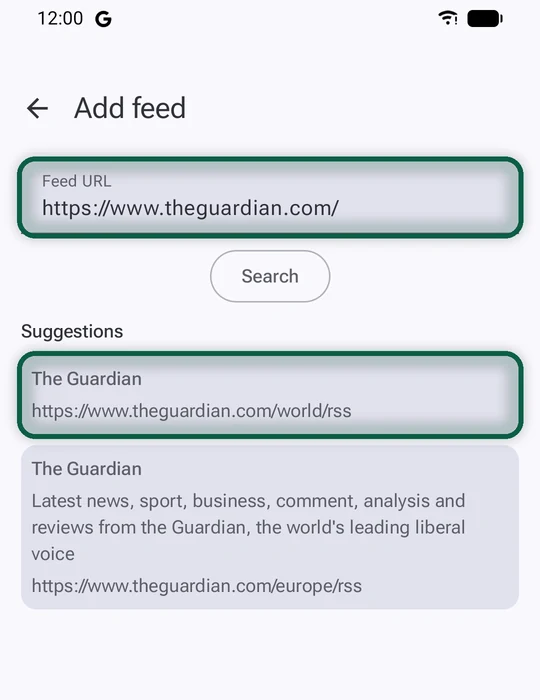
- Paste the site’s address into your reader. Most readers look for the feed themselves and offer to add it.
- Look for an RSS or feeds link, often in the site’s footer. Many large news sites have one feed per section, such as world, tech or local.
- Try the usual addresses. On many blogs and news sites, adding /feed/ or /rss to the end of the home page address works.
- Follow a keyword instead of a site. A Talkwalker alert can deliver to an RSS feed. See our Google Alerts alternatives.
Move Your Feeds Between Apps
OPML is the file format readers use for a list of subscriptions. Export it from one reader and import it into the next. Feeder imports and exports OPML, so keep a copy somewhere safe.
Newsletters and Paywalls
Feeds from paywalled outlets usually show the headline and a summary. You still need a subscription to read the full story. Inoreader Pro can turn email newsletters into feeds, which keeps them out of your inbox.
How to Switch From Google News
Google News has no export for the sources and topics you follow, so you rebuild the list by hand. The good news is you only do it once. After that, your OPML file moves with you.
First, List What You Follow
- On a computer, open news.google.com and click Following. Write down the sources and topics you follow.
- If you also follow sites in Discover, in the Google app on your phone, note those too. They’re kept separately from Google News.
Then Build Your Reader
- Install your reader. Get Feeder from F-Droid on Android, or NetNewsWire from netnewswire.com on a Mac and from the App Store on iPhone and iPad.
- Add your sources one by one. Use the reader’s add button and paste each site’s home page address. The reader finds the feed.
- For topics rather than outlets, add two or three sites that cover the topic well, or a Talkwalker keyword alert delivered as RSS.
- Group your feeds in folders, such as Local, World and Work, so the busiest sources don’t bury the rest.
- Export an OPML backup of your list.
Finally, Switch off Google News
- In the Google News app on Android, tap your profile picture, then News settings, and turn off the notifications and briefing emails you no longer want.
- Remove the app from your home screen, or uninstall it.
- Delete your Google News activity and pause the setting that saves it. Our tracking guide shows where those controls are.
Want to see which other Google services you still use? Our free scan reads files you download from Google and builds your list, right in your browser.