Google Wallet does two jobs. It pays in shops, and it holds your passes, which Google lists as cards, tickets, keys and IDs. Finding a Google Wallet alternative is easier when you split those jobs, because the best tool for each is different.
There’s also a privacy reason to leave. Wallet has a Google Wallet history setting that records your activity in Wallet and Google’s payment services. Google says it uses that data to help maintain and improve its products, including ads. And if you move to a degoogled phone, Wallet’s tap-to-pay will most likely stop working anyway.
Quick Comparison
| Alternative | Best for | Price (Oct 2026) | Privacy | Based in | Open source |
|---|---|---|---|---|---|
| Contactless bank card | Paying anywhere, any phone | Free | No phone app involved | Your bank | Not applicable |
| Apple Pay and Wallet | iPhone users | Free | Card number hidden from merchants, per Apple | US | No |
| Curve Pay | Android phone payments (UK, EEA) | Free; paid plans from about £5.99 or €5.99/month | Curve sees your purchases | UK and Lithuania | No |
| Garmin Pay | Paying with a watch | Free with a compatible watch | Garmin Connect is a cloud service | US | No |
| Samsung Wallet | Galaxy owners | Free | Needs a Samsung account | South Korea | No |
| Catima | Loyalty cards, tickets, boarding passes | Free | Works offline, data stays on the phone | Community project | Yes (GPLv3+) |
Which One Should You Pick?
- If you’re moving to GrapheneOS or another custom system, carry a contactless card or use a watch wallet, and put passes in Catima.
- If you’re on an iPhone, use Apple Pay and Apple Wallet. You don’t need anything else.
- If you want to keep paying with an Android phone in the UK or EEA, test Curve Pay, or ask whether your bank builds tap-to-pay into its own app.
- If you own a Samsung Galaxy and plan to keep it, Samsung Wallet covers payments, passes and loyalty cards. You swap Google for Samsung.
The Alternatives, One by One
Your Contactless Bank Card
It’s the most private option that still works everywhere. No phone app records the purchase, and your bank sees what it always saw. Cash is more private still, where shops accept it.
- Pick it because it never breaks after an update and works on any phone, or with no phone.
- A possible deal-breaker is that you carry a card again. Some cards have a limit on contactless payments without a PIN, so check with your bank.
Apple Pay and Apple Wallet
On an iPhone, Apple Wallet holds payment cards, boarding passes with live flight status, event tickets, loyalty cards, transit cards, keys and, in some places, IDs. Apple says your card number isn’t stored on Apple’s servers or shared with merchants. It also says Apple doesn’t keep transaction information that can be tied back to you.
- Pick it because it’s the most complete replacement, and every bank app works on an iPhone.
- A possible deal-breaker is that you trade Google for Apple. Our phone guide weighs the iPhone path.
- It’s free with a supported card from a participating bank.
Curve Pay
Curve Pay is a wallet app from Curve that pays at contactless terminals with the cards you link to it. It works on Android and iOS across the UK and EEA, and on iPhone it can replace Apple Pay as your payment app in the EEA.
- Pick it because it’s one of the few ways to pay with an Android phone without Google Wallet.
- Possible deal-breakers are compatibility and data. Curve’s help says it won’t work on rooted phones and may not work on less common systems or non-Global ROMs. Some GrapheneOS users in the UK report that it works, while others report setup failures after updates. Curve also sees every purchase you make through it.
- Prices (Oct 2026) start with the free Curve Pay plan. Curve Pay X costs about £5.99 or €5.99/month, Pro about £9.99 or €9.99 and Pro+ about £17.99 or €17.99.
Garmin Pay and Other Watch Wallets
If you already wear a Garmin watch with Garmin Pay, you can tap your wrist instead of your phone. You add cards in the Garmin Connect app under Garmin Pay, then Get Started. Garmin lists participating banks at garmin.com/garminpay/banks.
- Pick it because the payment happens on your wrist, so your phone’s system doesn’t matter at the till. Check that the Garmin Connect app runs on your phone before you buy a watch for this.
- A possible deal-breaker is that your bank has to support it, and Garmin Connect stores your fitness data in Garmin’s cloud.
- Garmin Pay is free (Oct 2026). You pay for the watch.
Leaving a Fitbit at the same time? Our Fitbit alternatives page compares Garmin with other watches that don’t need a Google account.
Your Bank’s Own Payment App
Some European banks build tap-to-pay into their own Android app, so you don’t need Google Wallet. Ask your bank whether it offers this. Test it on your phone first, because some banking apps refuse to run on systems Google hasn’t certified.
Samsung Wallet
On a Galaxy phone, Samsung Wallet stores payment cards, boarding passes, tickets, loyalty cards, transit cards, digital keys and some IDs. You sign in with a Samsung account. It also works on a Galaxy Watch6 or newer.
- Pick it because you keep tap-to-pay and passes on a Samsung phone without Google Wallet.
- A possible deal-breaker is that it’s still big tech. Updated Samsung phones can’t run a custom system since One UI 8, so this is a stock-Android choice.
Catima for Loyalty Cards, Tickets and Boarding Passes
Catima is a free, open-source (GPLv3+) Android app for loyalty cards and tickets. It doesn’t need internet access, has no ads or tracking, and keeps your data on your phone with a one-tap export. It reads the common barcode types, including the QR, Aztec and PDF417 codes used on boarding passes. You can add tickets from “Add to Apple Wallet” files, PDFs or images.
- Pick it because it replaces the pass half of Google Wallet with no account at all.
- A possible deal-breaker is that it’s Android only, and it can’t pay for anything.
- Get it from F-Droid, Google Play, IzzyOnDroid or Obtainium. It can also sync cards to supported Wear OS and Gadgetbridge watches.
Why Tap-to-Pay Fails on Degoogled Phones
Google’s own help page says Wallet tap-to-pay may not work on phones that run a custom ROM, are rooted, have an unlocked bootloader, or aren’t approved by Google. GrapheneOS, /e/OS and CalyxOS are custom systems, so plan on Wallet not working there. Our phone guide says the same.
If you need Google Wallet on your phone, keep a stock Android phone and degoogle it without flashing. Wallet needs the Google account, so stay at level 1 of that process. Or move to an iPhone and use Apple Pay.
How to Switch From Google Wallet
Set up How You’ll Pay
- Decide on your payment method first. A card needs no setup. For Curve Pay or a bank app, install it and add your cards.
- If you’re on Android and switching to another payment app, go to Settings → Connected devices → Connection preferences → NFC → Contactless payments and choose the new app. Menu names vary by brand.
- Make a small purchase to test it before you remove anything from Wallet.
Move Loyalty and Gift Cards
- In Google Wallet, tap View more, then View more passes, and open a card. Tap the barcode to show it full screen.
- In Catima, add a new card and scan that barcode with a second phone. On a single phone, take a screenshot of the barcode and add the image instead, or type the card number.
- Do the same for gift cards. Google says removing a card from Wallet doesn’t affect its balance, which stays with the store.
Boarding Passes and Event Tickets
Get these from the source rather than from Wallet. Download the boarding pass from the airline’s app or email. Many airlines offer an “Add to Apple Wallet” file, and Catima imports those. For concert and event tickets, use the PDF or link from the ticket seller.
Wallet also adds tickets and passes it finds in your email. Google lists “Wallet suggestions for tickets, passes, and loyalty cards” among the features that stop when you turn off Smart features in other Google products in Gmail. Our tracking guide shows where that switch is.
Transit Cards, IDs and Keys
These need the most care, because some hold money or stand in for a physical document.
- Transit cards live on one phone at a time. If you delete a transit pass, Google says you can’t get it back, and Google doesn’t issue refunds. Use up the balance or ask your transit agency how to move it first. Keep the email Google sent with your card number, since the agency can use it to help recover funds.
- Digital IDs don’t appear on the Wallet website, so remove them in the phone app. Keep your physical ID.
- Digital car and home keys need a replacement before you remove them. Set up the maker’s own app or keep the physical key.
Export, Then Remove Everything
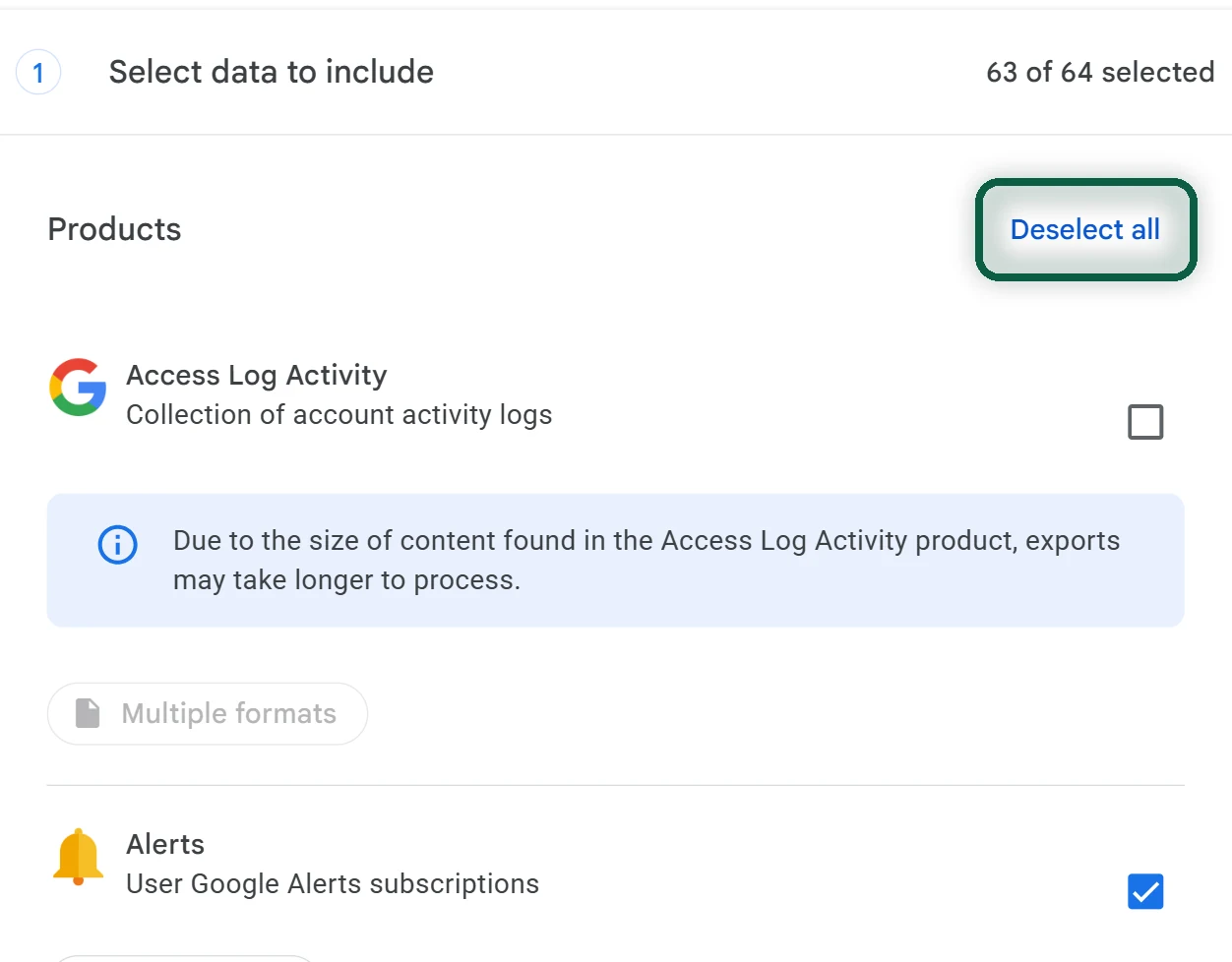
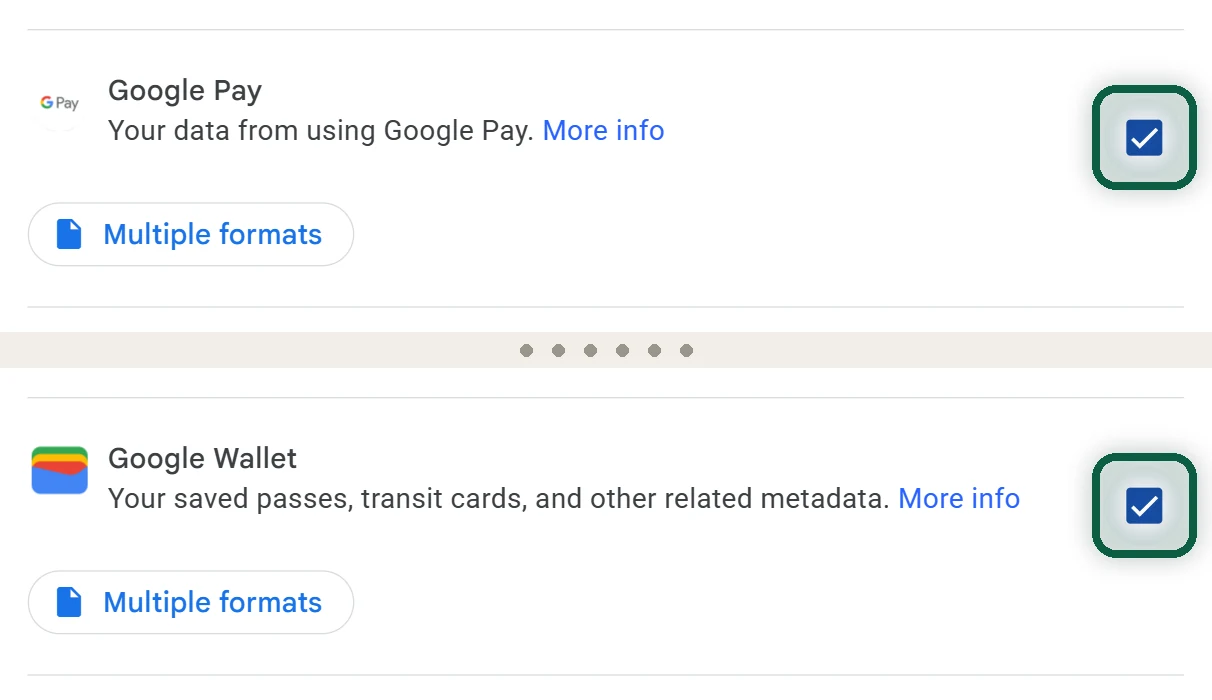
- Open takeout.google.com and click Deselect all. Tick Google Wallet and Google Pay, then click Next step and Create export.
- In the Wallet app, open each pass, scroll to the bottom and tap Remove pass. Loyalty cards keep the option under Settings, then Remove.
- Swipe to each payment card, tap it, then tap Remove payment method. This removes the card from that device only, so repeat it on every phone and watch.
- On wallet.google.com, remove any passes and saved cards that are still listed.
If you keep your Google account, also limit what Wallet records. On wallet.google.com, open Settings and, under Data & Privacy, turn off Google Wallet history, Google Wallet personalization and Use Wallet to personalize experiences across Google. Google says these settings are still rolling out, so you may not see all of them yet.
Deleting your Google Pay data entirely is a separate step in your Google Account. Do it only after you’ve stopped buying from Google, including Play and YouTube subscriptions. Use the Delete a Google service screen described in our account deletion guide.