If you’re looking for a Fitbit alternative, you’re probably reacting to the same change everyone else is. Fitbit is now part of Google. Your Fitbit account had to become a Google account, and the Fitbit app has been renamed Google Health. You have plenty of choice, from cheap bands to serious training watches, and some keep your data off every company’s servers.
What Changed for Fitbit in 2026
Google’s timeline, as published in its help pages, went like this.
- From May 19, 2026, you can no longer sign in with a Fitbit account. The Fitbit app updated to become the Google Health app over the following week, and Fitbit Premium became Google Health Premium.
- From July 15, 2026, Google began deleting the data of Fitbit accounts that weren’t moved. Until then, owners could still download or delete it.
- A Google account is now required for the Google Health app and to activate newly released Fitbit and Pixel devices. Google Workspace accounts can’t be used, and moving an account can’t be undone.
Google says health and wellness data from Fitbit devices is kept separate from Google Ads and isn’t used for ads. It’s still stored in your Google account, though. The new paid tier, Google Health Premium (from $9.99 in the US, Oct 2026), adds a health coach built with Gemini.
Quick Comparison
| Alternative | Best for | Price (Oct 2026) | Privacy | Based in | Open source |
|---|---|---|---|---|---|
| Gadgetbridge with Amazfit | Most privacy | App free; Amazfit Bip 6 launched at $79.99 | Data stays on your phone after a one-time pairing key | App is a community project; Amazfit is Chinese (Zepp Health) | App yes (AGPLv3) |
| Garmin | Easiest switch, sports | Watch price; optional Connect+ $6.99/month | Garmin’s cloud | US | No |
| Withings | Hybrid watches, EU company | ScanWatch Light $249.95; optional Withings+ $9.95/month | Withings’ cloud | France | No |
| Polar | Training, screenless band | Polar Loop $199.90 or €179.90; optional Fitness Program €9.99/month | Polar’s cloud | Finland | No |
| Coros | Long battery, no paid tier | Watch price | Coros’ cloud | US and China | No |
| PineTime | Tinkerers | Low; check the Pine64 store | Open firmware, works with Gadgetbridge | Pine64 community | Yes |
Which One Should You Pick?
- If your phone runs Android and privacy is the point, use Gadgetbridge with a supported Amazfit watch.
- If you have an iPhone or want the easiest move, buy a Garmin. Gadgetbridge is Android only.
- If you prefer an EU company and a watch that looks like a watch, choose Withings.
- If you liked Fitbit’s screenless bands or you train seriously, look at Polar.
- If you want to keep your current Fitbit for now, that’s fine. Export your data today and switch when the device wears out.
The Alternatives, One by One
Gadgetbridge With an Amazfit Watch
Gadgetbridge replaces the watch maker’s app on Android. It’s licensed under AGPLv3 and comes from F-Droid or IzzyOnDroid. Its device list covers dozens of brands, including Amazfit, Bangle.js, Pebble, Xiaomi, some Garmin, Withings and Polar watches. Recent Amazfit models such as the Bip 6, Active 2 and Balance 2 are listed as highly supported.
- Pick it because no company receives your health data. Steps, sleep and heart rate sync to your phone over Bluetooth.
- A possible deal-breaker is the one-time setup. New Amazfit and Xiaomi watches need an authentication key that only the maker’s servers hold. You pair once with the official app, which can mean creating an account there, then copy the key into Gadgetbridge. There’s no cloud backup, so back up Gadgetbridge’s data yourself.
- The app is free (Oct 2026). The Amazfit Bip 6 launched at $79.99 or €79.90 in March 2025.
Garmin
Garmin makes watches for every budget, from casual to serious training. The Garmin Connect app covers sleep, heart rate and workouts for free. Garmin Pay lets you tap to pay from the wrist with a supported bank, which our Google Wallet guide covers.
- Pick it because it’s the easiest switch from Fitbit, on Android or iPhone, with no subscription needed. Garmin said “All existing features and data in Garmin Connect will remain free” when it launched Connect+.
- A possible deal-breaker is that your data lives in Garmin’s cloud. Some Garmin watches, mostly Fenix and Enduro models, also work with Gadgetbridge, but not every feature does.
- Prices (Oct 2026) depend on the watch. Garmin Connect+ is optional at $6.99/month or $69.99/year.
Withings
Withings is a French company that makes hybrid watches with real hands, plus smart scales. Its watches list up to 35 days of battery life.
- Pick it because it’s a European company with discreet watches, and your basic data and trends stay available without a subscription.
- A possible deal-breaker is that features such as a cardiologist’s review of your ECG and Withings’ AI assistant need Withings+.
- Prices (Oct 2026) start at $249.95 for the ScanWatch Light. The ScanWatch 2 is $369.95. Withings+ costs $9.95/month or $99.50/year.
Polar
Polar is a Finnish company known for heart-rate and training watches. Its Polar Loop is a screenless band, close to Fitbit’s simpler trackers, and Polar sells it as a one-time purchase with the Polar Flow app free.
- Pick it because it’s European, strong on training, and doesn’t require a subscription.
- A possible deal-breaker is that the extra coaching in Polar’s Fitness Program costs €9.99/month. Polar says you don’t need it to use its products.
- The Polar Loop costs $199.90 or €179.90 (Oct 2026).
Coros
Coros makes running and outdoor watches with long battery life. It’s legally based in California and runs its operations in China. At the time of writing, its app has no paid tier.
- Pick it because you want a sports watch with no subscription at all.
- A possible deal-breaker is that your data goes to Coros’ cloud, and Gadgetbridge doesn’t list Coros watches.
PineTime
The PineTime from Pine64 is a free and open-source smartwatch that runs community firmware called InfiniTime. It has a step counter and a heart-rate sensor.
- Pick it because everything from firmware to phone app can be open source. Gadgetbridge supports steps, manual heart-rate checks, music control and call alerts.
- A possible deal-breaker is that InfiniTime doesn’t track sleep, and step counts may be inaccurate. It’s a project for tinkerers rather than a Fitbit replacement for everyone.
- It’s inexpensive. Check the current price in Pine64’s store.
What About Google Fit?
Google Fit is being folded into Google Health. Google says it will invite Fit users to move their data into the Google Health app later in 2026. Google’s developer pages say the Fit APIs will be deprecated in 2026, and new developers couldn’t sign up after May 1, 2024.
If you used Google Fit only to count steps on your phone, you may not need a watch at all. Export your Fit history with Takeout (the product is called Fit), then use Gadgetbridge or another app that keeps data on the phone. On Android, Health Connect stores health data on the device and lets apps share it with each other.
How to Switch From Fitbit
First, Export Your Data
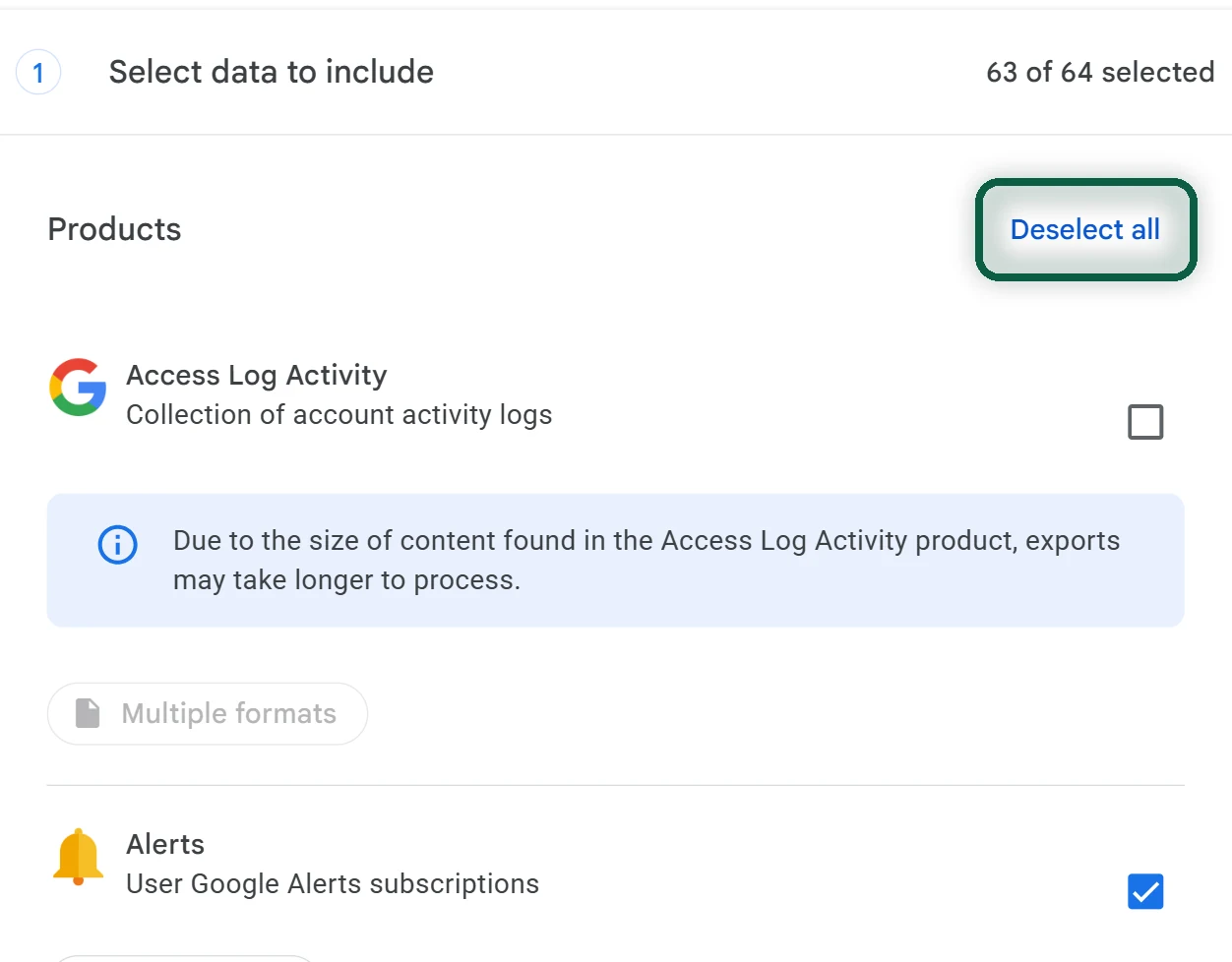
- On a computer, open takeout.google.com and click Deselect all.
- Tick Google Health. If you used Google Fit, tick Fit too. Click Next step, then Create export.
- Download the archive from Google’s email. Links expire after about 7 days, and large health archives can take a few days to prepare.
If you never moved your Fitbit account, try the old route. Sign in on Fitbit’s settings page, open Data Export, and under Export Your Account Archive click Request Data, then confirm the email. Google started deleting unmoved accounts on July 15, 2026, so the data may already be gone. Google says data isn’t available for deleted accounts.
Then Move Your GPS Workouts
- In the Google Health app, tap the Fitness tab and open a workout that recorded GPS.
- Tap More, then Export, and save the TCX file.
- Upload the files to a service that accepts TCX, such as Strava. Strava takes TCX, FIT and GPX files of up to 25 MB each, 15 at a time on a free account.
Everything else in the archive (steps, sleep, heart rate) is a record for you to keep. Most other apps can’t import it, so keep the zip somewhere safe.
Set up Gadgetbridge With Your New Watch
- Install Gadgetbridge from F-Droid or IzzyOnDroid.
- For a new Amazfit or Xiaomi watch, follow Gadgetbridge’s server-pairing guide to get the authentication key through the maker’s app.
- In Gadgetbridge, add the watch and enter the key. From then on, Gadgetbridge talks to the watch directly over Bluetooth.
- Set your notification, sleep and heart-rate options in Gadgetbridge, and wear the watch for a day to check the data comes through.
Finally, Leave Google Health
- If you pay for Google Health Premium, cancel it where you subscribed, such as in Google Play.
- Factory reset your Fitbit before you sell or recycle it.
- Once your archive is safe on your computer, delete your health data. Google’s help for the Google Health app explains the option for your account.
Our Google Takeout guide explains the export in more detail, and our account deletion guide covers the last step if you’re leaving Google altogether.