DuckDuckGo vs Google Search is the easiest decision in degoogling, because you can try one, switch back in seconds and lose nothing. Nearly 90% of the world’s search-engine traffic goes through Google (StatCounter, Sept 2026). In the US, Google takes about 85% and DuckDuckGo handles under 2%. That gap is mostly habit and defaults. DuckDuckGo is already offered as a choice in Safari and Chrome, so switching takes one click.
DuckDuckGo and Google Search Side by Side
| DuckDuckGo | Google Search | |
|---|---|---|
| Price (Oct 2026) | Free. Optional Plus (about $9.99/month) and Pro (about $19.99/month) add a VPN and other extras | Free |
| Where results come from | Links and images largely from Bing, plus its own crawler (DuckDuckBot), its own indexes and sources such as Wikipedia | Google’s own index |
| Search history | Not saved. DuckDuckGo says it doesn’t store your IP address with your searches | Saved to your Google account while Web & App Activity is on |
| Ads | Based on the results page you’re viewing, mostly served through Microsoft’s ad network | Based on your Google activity, unless you turn personalized ads off |
| AI answers | Search Assist, which you can set to Never, or noai.duckduckgo.com | AI Overviews can’t be turned off. The Web filter hides them one search at a time |
| Local results | Location guessed from your IP address and then discarded, or a place you choose | Location from signals such as your IP address and your device |
| Extras | !bangs that jump straight to other sites, and Duck.ai chat |
Maps, Shopping, Flights and Lens built into the results |
| Company | Duck Duck Go, Inc., USA | Google, USA |
| Open source | The search engine isn’t. Its apps are on GitHub, such as the Android app (Apache 2.0) | No |
| Share of US search traffic (Sept 2026) | Under 2% | About 85% |
Who Should Pick Which
- Pick DuckDuckGo if you want private search by default and you’re happy to send the odd search to Google.
- Pick Google if most of your searches are for local businesses, opening hours, products or flights, or you search with photos through Lens.
- Use both. Make DuckDuckGo your default and type
!gwhen a search needs Google. Each!gis a real Google search, so keep them occasional. - Want results that don’t come from Bing? Brave Search runs its own index. Our Google Search alternatives page compares seven engines, including Kagi and European options.
Where the Results Come From
Google crawls the web itself and runs the biggest index there is. When you’re signed in, it can also draw on your activity, and it works out roughly where you are from signals such as your IP address.
DuckDuckGo says it “largely” sources traditional links and images from Bing. It also runs its own crawler, DuckDuckBot, and its own indexes. Its Instant Answers come from specialized sources such as Sportradar and crowd-sourced sites such as Wikipedia. It doesn’t use Google’s results at all unless you send a search there yourself.
In practice, DuckDuckGo’s links look a lot like Bing’s, without the tracking. They don’t follow your past searches, because DuckDuckGo keeps no history to base them on.
Regional results. For local results, DuckDuckGo guesses your rough location from your IP address, then throws away both the guess and the address, it says. You can share your browser’s location instead, which stays on your device, or set a spot on a map. If you set a region in DuckDuckGo’s settings, !bangs follow it too. With Germany selected, !amazon opens amazon.de.
AI Answers on Both
Google now leads many searches with AI. AI Overviews sit above the links, and Google’s help page says plainly that these features can’t be turned off. At its May 2026 I/O conference, Google said AI Mode, its chat-style search, had passed one billion monthly users in its first year, and it rebuilt the search box around AI. The only way around the overviews is the Web filter. Choose it after a search to see text links only. It doesn’t stick, so you repeat it every time.
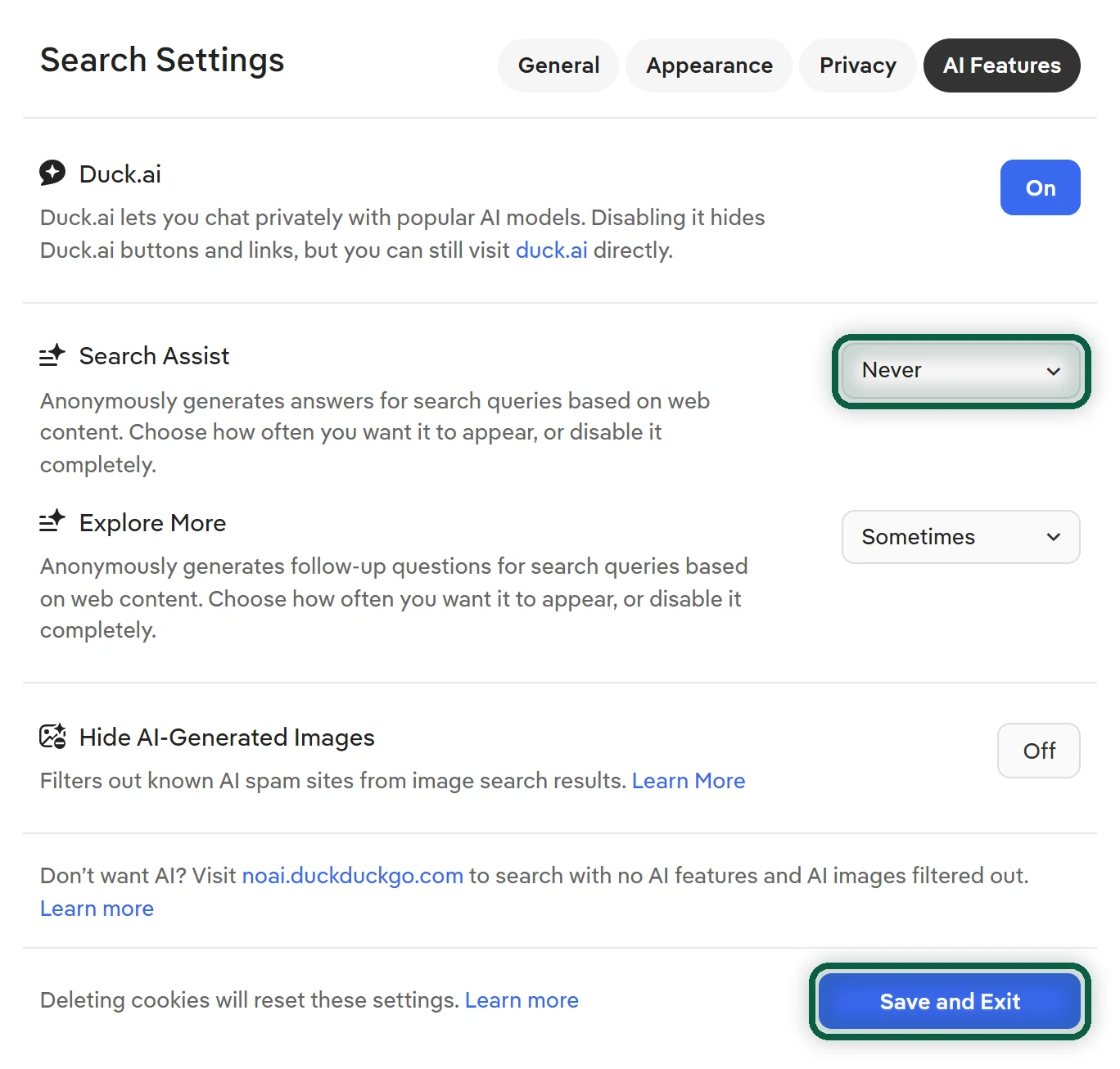
DuckDuckGo has AI answers too, called Search Assist, plus the Duck.ai chat. You choose how often AI shows up. In Search Settings, open AI Features, choose Never in the Search Assist dropdown, then click Save and Exit. Or bookmark noai.duckduckgo.com, which turns off Search Assist, AI-generated answers and AI-generated images by default.
After Google announced more AI-driven search at I/O 2026, DuckDuckGo’s US app installs rose by up to 30% in a week, according to TechCrunch. If AI everywhere is why you’re leaving, our Gemini alternatives page covers the chatbot side.
Ads and Tracking
Both engines are free and both show ads. They differ in what the ads are based on and what gets kept.
- Google lists “terms you search for” among the activity its privacy policy says it collects. With Web & App Activity on, your searches are saved to your account, and your activity helps choose the ads you see across Google unless you turn personalized ads off.
- DuckDuckGo says it doesn’t save or share your search history and doesn’t store your IP address with your searches. Its search ads are based on the results page you’re viewing, so a search for cars shows car ads. Most ad clicks are handled by Microsoft’s ad network, which DuckDuckGo says doesn’t tie your clicks to a profile.
You don’t need an account for DuckDuckGo. The settings you change are saved in your browser, so set them once on each device.
Bangs and Other Everyday Differences
Bangs. DuckDuckGo has more than a thousand !bang shortcuts that run your search on another site. !a bags opens Amazon’s results for bags, and !g runs the same words on Google. They make the switch easier, because the sites you used to reach through Google are one shortcut away.
Google’s built-in services. Google ties search to Maps, Shopping, Flights and Lens. DuckDuckGo shows local results and a map, without Google’s reviews, photos and busy times. Searching with a photo is Lens territory, and our Google Lens alternatives cover what replaces it.
The rest of your phone. Changing the engine in your browser doesn’t touch the Google search bar on an Android home screen or the Google assistant. Those keep sending searches to Google until you remove or change them.
What It Costs
Both are free. DuckDuckGo’s optional Plus (about $9.99/month or $99.99/year) and Pro (about $19.99/month or $199.99/year) subscriptions add a VPN, data-broker removal, identity restoration and extra AI models (Oct 2026). None of that is needed to search. Google Search has no paid version. Advertising pays for it.
How to Switch From Google Search to DuckDuckGo
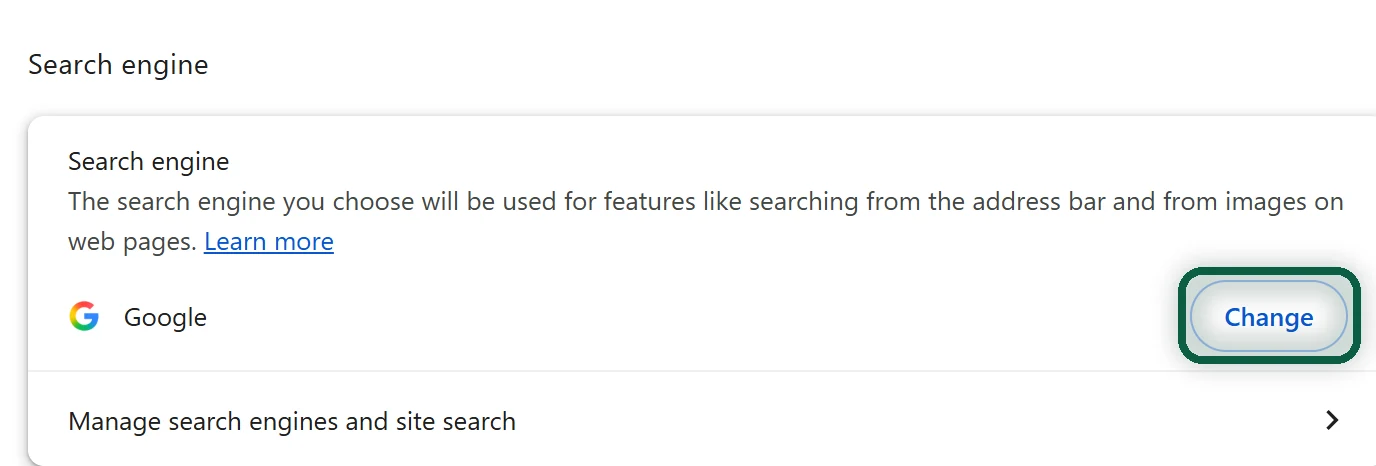
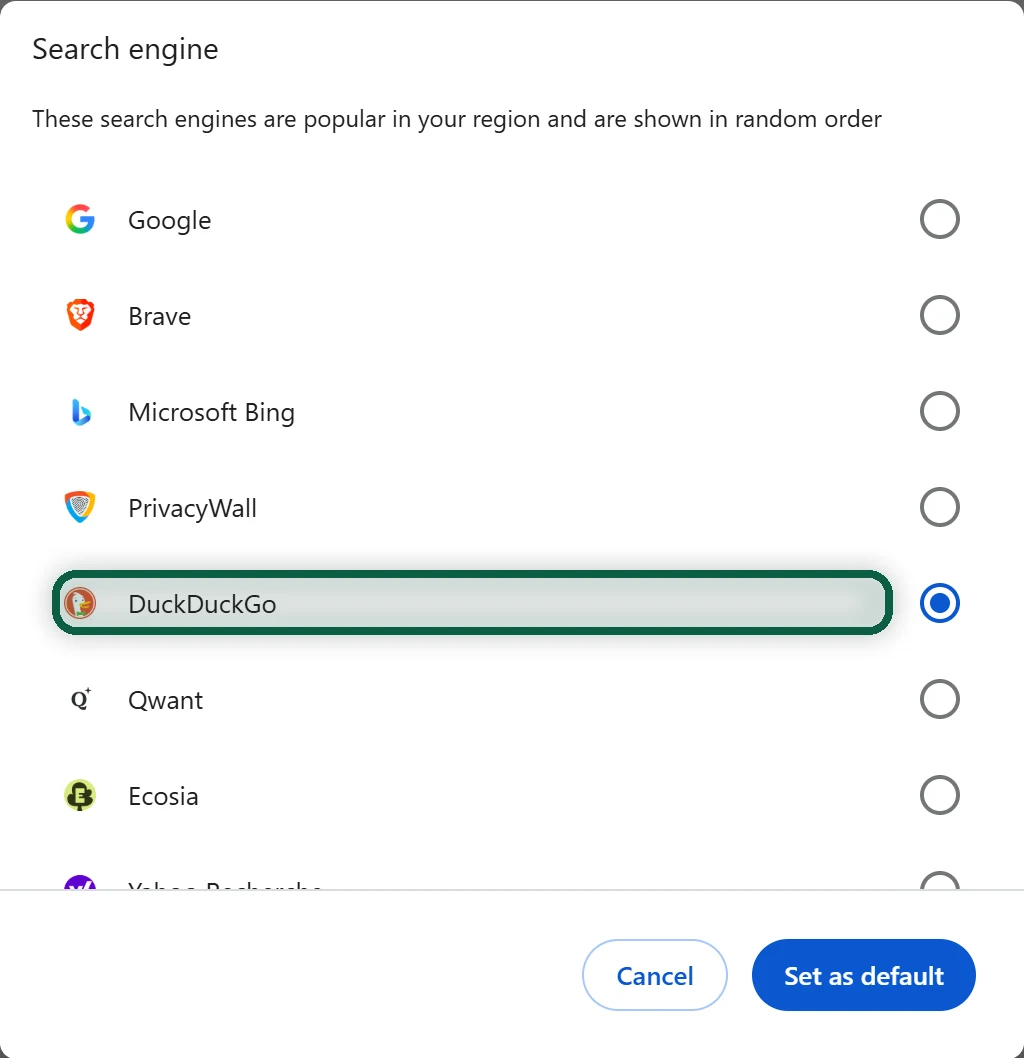
- In Chrome, click More (three dots), then Settings, then Search engine. Next to Search engine, click Change and pick DuckDuckGo.
- In Firefox, open Settings, then Search, and choose DuckDuckGo under Default Search Engine.
- On iPhone, go to Settings, then Apps, then Safari, then Search Engine, and tick DuckDuckGo.
- On Android, remove the Google search widget from your home screen and change the engine in your browser.
- Open DuckDuckGo’s settings once on each device to set your region and how often AI answers appear.
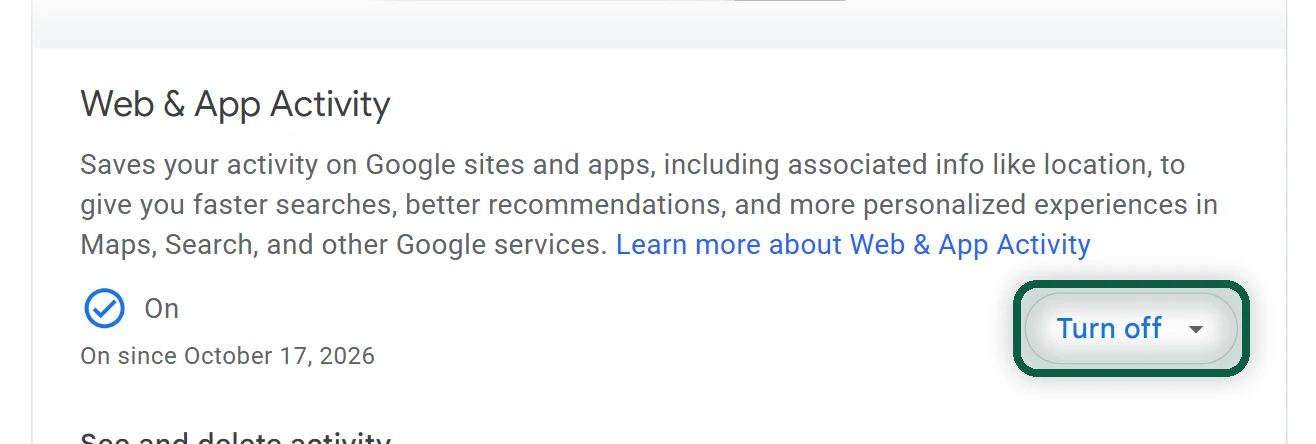
Then deal with what Google already has. If you want a copy of your past searches, export My Activity with Google Takeout first. Next, at myaccount.google.com/activitycontrols, click Turn off on Web & App Activity, and choose Turn off and delete activity if you want past searches gone too.
Our Google Search alternatives page has the steps for Edge and Safari on a Mac, and turn off Google tracking covers the rest of your account. Search is the easy part. To see which other Google products and logins you still depend on, run our free scan in your browser.
When Google Is Still Better
You don’t have to leave all at once. Even keeping Google for a few searches a week, signed out, means far less of your search life ends up in your Google account. Next, look at your browser. Our Brave vs Chrome comparison and Chrome alternatives help you pick one.