Organic Maps vs Google Maps is really a question of what you use maps for. Organic Maps gives you offline maps and turn-by-turn directions with no account, no ads and no tracking. Google Maps gives you live traffic, timetabled transit and a huge directory of businesses with reviews, in exchange for your location data when you’re signed in.
There’s a third name to know. CoMaps is a community fork of Organic Maps, and it’s the app we recommend. This page explains how the two differ, then compares both with Google Maps. Everything was checked in October 2026.
Organic Maps, CoMaps and Why There Are Two
Organic Maps is run by Organic Maps OÜ, a company in Estonia, and passed 6 million installs in December 2025. In March 2025, many of its contributors sent an open letter to the company’s shareholders. They asked for a not-for-profit structure, open accounts of how donations were spent, and a say in decisions. Talks stalled, and on 12 May 2025 contributors announced CoMaps, a community-led fork built on transparency, community decision-making and not-for-profit values. Its finances are public on Open Collective.
For you, the two apps still look and work much the same, and both use OpenStreetMap data. The differences are small but real.
- CoMaps ships a new release every few weeks, can update maps without an app update, and runs on Android, iPhone, macOS and Linux. It’s the default maps app on CalyxOS and iodéOS, and the privacy community now recommends it most often.
- Organic Maps is still actively developed. In 2026 it added public transport routing, alternate routes and a CarPlay dashboard. It also opens Google’s starred-places export directly, which CoMaps can’t.
We pick CoMaps because of who runs it. If you already use Organic Maps and it works for you, there’s no urgent reason to move.
Google Maps, Organic Maps and CoMaps Side by Side
| Google Maps | Organic Maps | CoMaps | |
|---|---|---|---|
| Price (Oct 2026) | Free | Free, with donations | Free, with donations |
| Tracking and account | Tied to your Google account when signed in | No ads, no tracking, no account | No ads, no tracking, no account |
| Who runs it | Google, USA | Organic Maps OÜ, Estonia | Not-for-profit community project |
| Map data | Google’s own, with business listings and reviews | OpenStreetMap | OpenStreetMap |
| Offline | Driving only, in downloaded areas that expire unless updated | Every feature | Every feature |
| Live traffic | Yes | No | No |
| Public transport | Trip planning with departure times in many cities | Subway, light rail, bus and tram routing since June 2026 | Subway and light rail layer in a growing list of cities |
| Reviews, hours, photos | Extensive | Thin, plus Wikipedia articles | Thin, plus Wikipedia articles |
| Street View and satellite | Yes | Experimental satellite layer with your own tile server | No |
| AI | Gemini in navigation | None | None |
| CarPlay and Android Auto | Both | Both | CarPlay, and Android Auto when installed from Google Play |
| Platforms | Android, iPhone, web | Android, iPhone, Linux beta | Android, iPhone, macOS, Linux |
| Google’s starred places | Exported with Google Takeout as a GeoJSON file | Opens that GeoJSON file directly | Needs it converted to KML or KMZ first |
| Open source | No | Yes (Apache 2.0) | Yes (Apache 2.0) |
Offline Maps
This is where Organic Maps and CoMaps are clearly better. You download your country or region once, then search, browse and navigate on foot, by bike or by car with no signal at all. Organic Maps says 100% of its features work without an internet connection.
Google Maps can download areas too, but its own help pages list the limits. Offline, it gives driving directions only if the whole route sits inside the downloaded area, with no traffic and no alternate routes. Walking, cycling and transit directions don’t work offline. Downloaded areas expire and have to be updated.
Traffic and Driving
Google Maps wins here. It has live traffic, incident reports and rerouting around jams. Since November 2025 Google has also been adding Gemini to navigation, so you can ask questions out loud while you drive.
Organic Maps and CoMaps have no live traffic. Their driving directions are good, with voice guidance and speed limits, and they work offline. They just can’t see a traffic jam ahead. If you commute by car, pair them with Magic Earth, HERE WeGo or Apple Maps, as our Google Maps alternatives page explains.
In the Car
- On iPhone, both Organic Maps and CoMaps work with CarPlay. Organic Maps added a CarPlay dashboard view in August 2026.
- On stock Android, Organic Maps works with Android Auto. CoMaps does too, but only when Google Play installed it, so copies from F-Droid won’t show up in the car.
- On a degoogled phone, Android Auto itself is the problem. GrapheneOS supports it through sandboxed Google Play. On microG systems, test it with your car first. Our phone guide covers which system suits a car-heavy life.
Public Transport
Google is far ahead for buses and trains. It plans trips with departure times in many cities. Organic Maps added routing for subway, light rail, bus and tram in June 2026, and it doesn’t say whether it uses timetables. CoMaps has a transit layer for subway and light rail in a growing list of cities. If you rely on transit every day, keep Google Maps in a signed-out browser, or use your local transit operator’s app.
Places, Reviews and Opening Hours
Both open-source apps use OpenStreetMap, a map built by volunteers and published under the Open Database License. Footpaths, hiking trails and bike routes are often very detailed. Shops, restaurants and opening hours are thinner and vary a lot by region, and there are no user reviews or photos. Both apps show Wikipedia articles for well-known places.
You can fix the map yourself. Organic Maps and CoMaps let you add or correct places from inside the app, and the StreetComplete app turns small fixes into quick quizzes. Every fix helps the next person who searches there.
Address search is the other weak spot, and Google’s is stronger. In the open-source apps, an exact house number can be missing, so search the city first, then the street or the place name.
Before you commit, search for five places you visit often, such as your doctor, a favorite restaurant and your kid’s school. If the app finds them, you’ll probably be fine.
Privacy
Google Maps is one of Google’s seven products with more than 2 billion users, and your location says more about you than almost anything else Google collects. Since 2024, Google keeps Maps Timeline on your device by default. Ireland’s regulator nevertheless fined Google €403 million in 2026 over how it handled location data in 2018 to 2020.
Organic Maps and CoMaps say they collect nothing and don’t track you, and both have been checked by the Exodus privacy auditor. Neither needs an account.
What It Costs
All three are free to use. Organic Maps is funded by donations and grants, such as one from the NLnet Foundation. CoMaps runs on donations and publishes its finances on Open Collective.
How to Switch From the Google Side
The only data worth moving is the places you saved. Google exports them with Takeout.
- Install CoMaps or Organic Maps and download the offline map for your region over Wi-Fi.
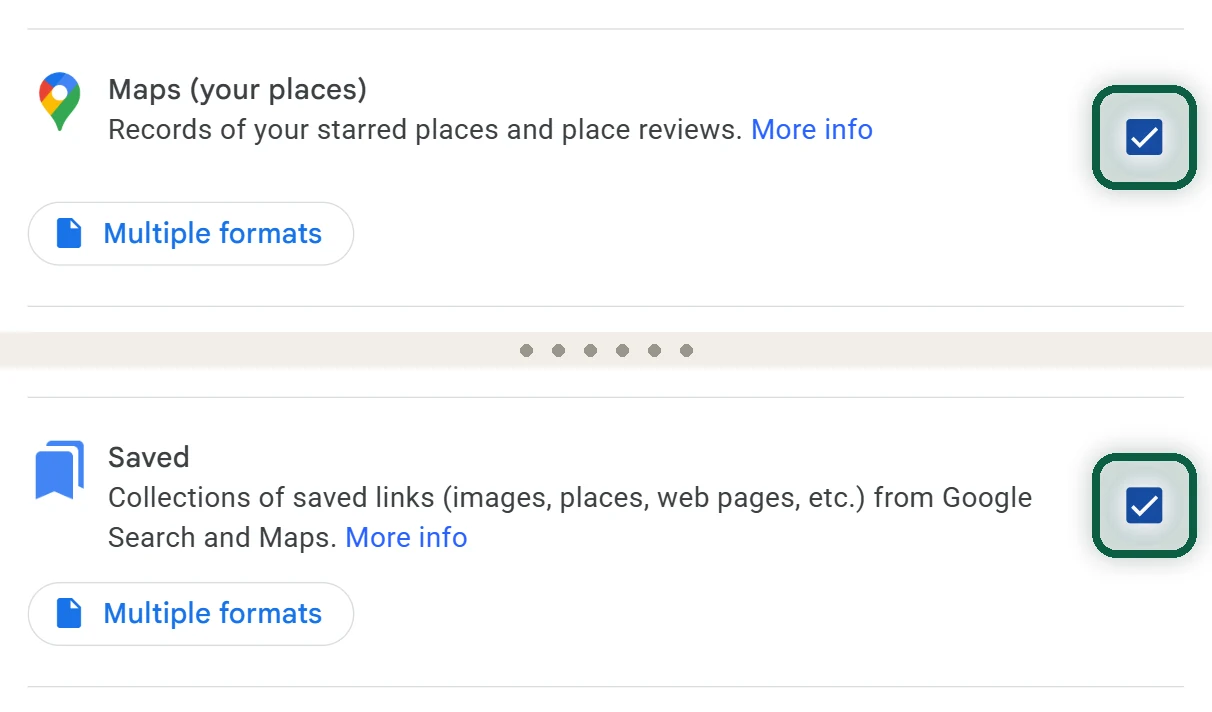
- At takeout.google.com, click Deselect all, tick Maps (your places) and Saved, and create a one-time export.
- Your starred places arrive as a GeoJSON file, often called
Saved Places.json. Organic Maps opens it directly. For CoMaps, open it in Organic Maps first, export the list as KMZ, then open that file in CoMaps. - Your other lists arrive as CSV files with names and links but no coordinates. Re-add the places you actually use by hand.
- Set your home and work addresses, and choose the app for CarPlay or Android Auto.
Our Google Maps to CoMaps guide shows every screen of that conversion, plus the settings worth changing on day one. Then turn off Google’s location tracking.
When Google Maps Is Still Better
Partial is fine. Many degooglers navigate with CoMaps and look up a restaurant’s hours on maps.google.com in a private window. Nothing you look up there joins your Google account.
Maps is rarely the only Google service you rely on. Our free scan finds the others from files you download yourself.