Your Google Voice number can leave Google and keep working somewhere else. This page walks through the port itself, in the order that keeps your texts and verification codes safe. To choose where the number should go, or to replace it with a fresh number instead, see our Google Voice alternatives. Personal Google Voice gives you a US number, so this guide is written for US readers.
Before You Start
Run through this list first. Each item avoids a common way to lose a code or stall the port.
- A computer. Google’s unlock setting is in Voice on the web, at voice.google.com.
- Your Google password and 2-Step Verification device. You sign in to Google to unlock the number and to download your history. If Google sends your sign-in codes to the Voice number, switch them to another phone or an authenticator app now.
- A payment method in your Google account for the $3 unlock fee.
- A list of accounts that text codes to the number, such as banks, card issuers, government sites, Signal and WhatsApp. Move what you can to an authenticator app before anything changes.
- A quiet two weeks. Don’t start a port right before travel or anything else that depends on the number.
Not sure which accounts you’ve tied to Google over the years? Our scan builds a list in your browser from files you download from Google.
Where Your Number Can Go
| Destination | Monthly cost (Oct 2026) | Port timing | Good to know |
|---|---|---|---|
| JMP.chat | About $4.99, with unlimited texts and about 120 minutes of US and Canada calling | Normally 1–2 weeks | Open source, no ads, no 911. Apps include Cheogram (Android), Snikket (iPhone) and Gajim (computer) |
| A mobile carrier | Your plan’s price | Ask the carrier | Works on any phone, includes 911. Ask first whether they accept numbers from Google Voice |
| VoIP.ms | Varies with usage, check their site | About 5 business days | Free port-in for local numbers in the lower 48 states. Technical setup with a VoIP app or desk phone |
| Ooma | $0 on Basic plus taxes and fees, or $9.99 on Premier, plus a $99.99 device | Ask Ooma | Home phone with 911. Porting costs $39.99 on Basic, free on Premier |
MySudo, the privacy pick for new second numbers, doesn’t mention porting in an existing number. Whatever you pick, check that the provider can take your number before you pay. Some numbers sit in areas a provider doesn’t serve, which is why VoIP.ms asks you to check portability first.
Moving the number to another Google product, such as Google Fi, keeps you with Google. Google also warns that some services may still refuse a number that started at Google Voice, even after it moves.
Step 1. Download Your Voice History
Your texts, call history and voicemails stay in Google Voice. Download them before you touch the number.
- On a computer, open takeout.google.com and click Deselect all.
- Tick Voice, click Next step, then Create export.
- When Google’s email arrives, click Download archive, unzip it, and open archive_browser.html to check that your texts and voicemails are there.
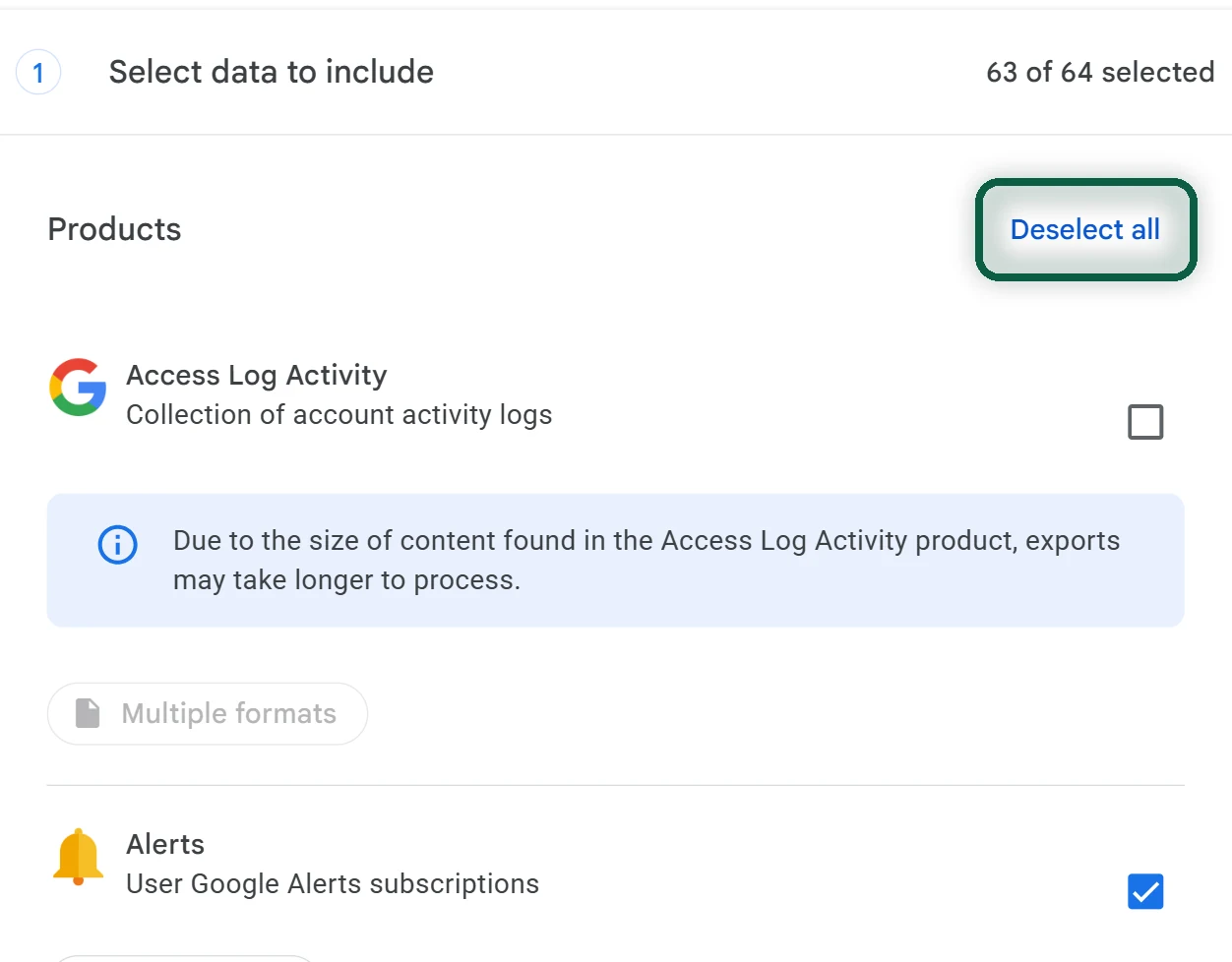
Google’s Voice export includes call logs, text messages, voicemails and their transcripts, voicemail greetings, billing history, your Voice number and your service address. Anything you already deleted isn’t included. Download links expire after about 7 days. Our Google Takeout guide covers the export screens in more detail.
Step 2. Set or Check Your Voicemail PIN
The new provider asks for a PIN, and for Google Voice that’s your voicemail PIN, not your Google password. If you’ve never set one, or can’t remember it, set a new one.
- Go to voice.google.com.
- At the top right, click Settings, then Account.
- Scroll to Voicemail and turn on Call to listen.
- Set a PIN and click Save. Write it down for the port request.
Step 3. Open the New Account
Set up the destination before you unlock anything.
- JMP.chat. Sign up with a temporary JMP number first. Once the account works, you request the port from your account settings, which you reach through JMP’s chat bot. JMP normally makes a new number receive a text before it can send one, but it waives that rule for ported numbers.
- A mobile carrier. Tell them the number is coming from Google Voice, and ask whether they’ll take it before you pay for anything.
- VoIP.ms. Check portability first, then open a port request. Google doesn’t publish a billing address for Voice numbers, so use the service address saved in your Voice account, which appears in your Takeout export. VoIP.ms doesn’t accept a PO box.
Step 4. Unlock the Number in Google Voice
- On your computer, open Google Voice. At the top right, click Settings.
- Go to the Account section.
- Under the number you want to port out, click Unlock.
- Complete the $3 payment with your Google account. It’s free if you originally ported this number into Voice.
- When it works, Number unlocked appears at the bottom left.
Changed your mind? In the same place, click Lock, then Yes, and Number locked appears. You can unlock again later at no charge. You can’t relock once the new carrier has contacted Google about the port.
Step 5. Submit the Port Request
Fill in the new provider’s port form with these details.
- Account number. Your 10-digit Google Voice number.
- PIN. Your Google Voice voicemail PIN from step 2.
- Name and address. Your name, and the service address from your Voice export if the form asks for one.
Then leave everything alone. Changing a submitted request can get it rejected or push the date back. Don’t delete the number in Google Voice once the port has started. Calls and texts keep arriving in Voice until the move completes, so keep the Voice app on your phone for now.
How Long It Takes
JMP.chat says a port normally takes 1 to 2 weeks. VoIP.ms says about 5 business days for US numbers, and warns that holidays and a slow losing carrier can stretch that. Many providers give you a confirmed date, often called the FOC date, once the request is accepted. Until then, treat the number as being in transit, and don’t plan anything around it.
After the Port Completes
Your provider tells you when the number is live. On port day, a call or text can still land in Voice for a short while, so check both places.
- Text the number from another phone and reply.
- Make a call and receive one.
- Re-verify Signal and WhatsApp if they used this number. In Signal, turn Registration Lock back on.
- Trigger a code from your bank and other key accounts to confirm it arrives.
- Turn off Google Voice call forwarding on your phone and uninstall the Voice app.
The number is no longer in Google Voice once the port is done. Don’t count on seeing the old history there afterward. That’s why your Takeout archive comes first. Once nothing else depends on your Google account, our deletion checklist covers what to check before closing it.
If you’d rather let the number go than port it, the steps are shorter. Download your history, move every account to another number or an authenticator app, and wait a few weeks for stragglers. Our Google Voice alternatives page covers new second numbers, and the Google Messages guide covers texting on your main number.
If the Port Fails or Stalls
Ask the new provider for the exact rejection reason, fix that one thing and resubmit. These are the usual causes.
- The number is still locked. In Voice settings, the button under your number should read Lock. If it reads Unlock, unlock it again.
- The account number or PIN is wrong. The account number is the Voice number itself, and the PIN is the voicemail PIN, not your Google password.
- The details don’t match. Port requests must match the losing carrier’s records. Use your name and the service address from your Voice export.
- The provider can’t serve your number. Some numbers sit in areas a provider doesn’t cover. Run its portability check, or pick another provider.
- The request was edited after submission. Edits can trigger a rejection or a new date. VoIP.ms charges $8.75 to resubmit a rejected port.
- The number was deleted in Voice. A disconnected number can’t be ported, so never delete it mid-port.
If the port itself works but a bank or app refuses the number afterward, that’s the VoIP issue Google warns about. Ask the service for another verification method, such as an authenticator app, or keep that account on a regular mobile number.