Sharing is easy to replace. Live data pulled from other sheets and from the web is harder, and that’s why leaving Sheets takes more work than leaving Docs. A plain budget moves in minutes, while a sheet full of IMPORTRANGE links and Apps Script needs rebuilding. Pick one of the Google Sheets alternatives below, then find every formula that will stop working before you delete anything.
Quick Comparison
| Alternative | Best for | Price (Oct 2026) | Encryption and privacy | Based in | Open source |
|---|---|---|---|---|---|
| Proton Sheets | Shared budgets, trackers and lists | Free with a Proton account | End-to-end encrypted | Switzerland | Apps, yes |
| LibreOffice Calc | Heavy offline work | Free | Local files only | Germany | Yes |
| ONLYOFFICE | Excel files that must look right | Desktop editors free; DocSpace free tier, Business $20/admin/month | Depends on where you store files | Latvia | Yes (core) |
| CryptPad Sheet | Encrypted sharing with people who have no account | Free on public instances; cryptpad.fr plans €5–€100/month | End-to-end encrypted | France | Yes (AGPL) |
| Zoho Sheet | A free cloud spreadsheet that feels like Google’s | Free | Not end-to-end encrypted | India | No |
| Microsoft Excel | Advanced analysis and Office workplaces | Free on the web; Microsoft 365 Personal $99.99/year | Not end-to-end encrypted | US | No |
Which One Fits How You Use Sheets
- For household budgets, trip planners and shared lists, use Proton Sheets. Everyone edits the same file, and Proton can’t read it.
- For big models, years of data, or work you do alone, use LibreOffice Calc. It runs on your computer, works offline and copes with large files better than browser editors.
- If clients and coworkers send you Excel files, use ONLYOFFICE’s free desktop editors. They keep the formatting intact.
- For a club or group where not everyone will make an account, use CryptPad. Guests edit from a link, and the content stays encrypted.
- If your team runs its own server, Collabora Online, also sold as Nextcloud Office, gives you live co-editing on your own hardware.
- If you mainly want off Google and privacy comes second, Zoho Sheet and Excel for the web are free and familiar. Neither is end-to-end encrypted.
The Alternatives, One by One
Proton Sheets
Proton launched Sheets on 4 December 2025. It has formulas, charts, conditional formatting, data validation and real-time collaboration. In February 2026 it gained OpenDocument (.ods) import and export in beta, and an April 2026 update made currency and date formats follow the country you choose in Settings.
- Pick it because it’s the closest thing to Google Sheets with end-to-end encryption, and it’s already in your account if you use Proton Mail or Drive.
- The deal-breakers are a smaller feature set than Google’s, with no Apps Script and no add-ons. It runs in the browser. Reviewers still rate it below Google Sheets.
- It’s free with any Proton account. You only pay if you need more Drive storage (see Google Drive alternatives).
LibreOffice Calc
Calc is the spreadsheet in LibreOffice, the free, open-source desktop suite from The Document Foundation. It uses OpenDocument (.ods) natively and opens and saves .xlsx files. Version 24.8 (August 2024) added FILTER, SORT, SORTBY, UNIQUE, SEQUENCE, LET, XLOOKUP and XMATCH, so many modern formulas from Google and Excel now have a match.
- Pick it because it’s the most capable spreadsheet you can run offline for free, with pivot tables, charts and macros. Your files never leave your computer unless you sync them.
- The deal-breakers are that there’s no live co-editing, and some people find it less pleasant than Google Sheets. To work across devices, sync your files with encrypted storage such as Proton Drive, Filen or Nextcloud.
- It’s free on Windows, macOS and Linux.
ONLYOFFICE
ONLYOFFICE, from Ascensio System SIA, has the best Microsoft Office format fidelity among open-source editors. The desktop editors are free for personal and professional use on Windows, macOS and Linux. The free ONLYOFFICE Documents app edits spreadsheets on iPhone and Android.
- Pick it because spreadsheets from Excel users keep their formatting. Connect the editors to a cloud such as Nextcloud or ONLYOFFICE DocSpace and you can co-edit in real time.
- The deal-breakers start with macros, which are written in JavaScript, so neither Apps Script nor Excel’s VBA runs as it is. DocSpace, the cloud product, is built for businesses. The editors also include optional AI tools, which you connect to a provider you choose.
- DocSpace’s free Startup plan allows 3 admins, 12 rooms and 2 GB, and Business costs $20 per admin per month (Oct 2026).
CryptPad Sheet
CryptPad is an open-source office suite with end-to-end encryption, made in France by XWiki SAS. Its Sheet app is built on ONLYOFFICE, so it imports and exports .xlsx and .ods files.
- Pick it because you can share an encrypted spreadsheet with people who don’t have an account, and you can self-host the whole suite.
- The deal-breakers are that macros and plugins don’t run, and large files get slow. In the default Fast mode, edits sync live but you can’t undo them. Strict mode lets you undo, and it locks the cells you change until you save.
- It’s free on cryptpad.fr and other public instances. Paid cryptpad.fr plans run from €5 to €100/month (Oct 2026).
Zoho Sheet
Zoho Sheet is a free cloud spreadsheet from Zoho Corp. in India. It has real-time collaboration, it imports Excel files, and there are apps for Android, iPhone, Windows and Mac.
- Pick it because it’s the most Google-like experience on this list, at no cost.
- The deal-breakers are privacy related. It isn’t end-to-end encrypted, so you swap one cloud company for another. Its assistant, Zia, uses ChatGPT to generate formulas and sample data, which matters if you want a spreadsheet without AI.
Microsoft Excel (and Apple Numbers)
Excel is still the most powerful spreadsheet. Excel for the web is free with a Microsoft account, which includes 5 GB of OneDrive storage. Microsoft 365 Personal costs $99.99/year (Oct 2026) and adds the desktop apps and Copilot.
- Pick it because your job runs on Excel, or you need features nothing else here has.
- The deal-breakers are that you trade one US tech giant for another, your files aren’t end-to-end encrypted, and Copilot comes with the paid plans.
On a Mac, iPad or iPhone, Apple’s Numbers is free and opens Excel files. Shared iWork files aren’t end-to-end encrypted, even with Advanced Data Protection turned on.
Formulas, Apps Script and IMPORTRANGE
This is where leaving Sheets takes real work. Check which of the groups below your spreadsheets fall into before you export anything.
Formulas That Move Without Trouble
SUM, IF, VLOOKUP, INDEX and MATCH, SUMIFS, COUNTIFS, and the date and text functions all work in Excel, LibreOffice and ONLYOFFICE. Charts, conditional formatting and pivot tables come across too, though their look can change.
Formulas That Only Work in Google
These functions have no direct equivalent anywhere else.
| Google function | What it did | What to do instead |
|---|---|---|
IMPORTRANGE |
Pulled cells from another spreadsheet | Copy the source data into the same file as a new tab |
GOOGLEFINANCE |
Live stock and currency prices | Paste prices from your bank or broker’s export, and update them when you need to |
QUERY |
SQL-style filtering and grouping | Use a pivot table, or FILTER plus SORT |
IMPORTHTML, IMPORTXML, IMPORTDATA |
Pulled tables from web pages | Copy the data in by hand, or drop it |
GOOGLETRANSLATE |
Translated text in a cell | Translate once and paste the result |
Google doesn’t delete these formulas when you download a file. It stores each one as text, next to the last value it calculated. The cell shows that number, so the sheet looks fine, but the value never updates again. Search the file’s formulas for DUMMYFUNCTION to find every one. Newer functions like FILTER can be stored the same way even though Excel and LibreOffice support them, so retype any that matter.
Apps Script
Apps Script doesn’t run outside Google, so custom menus, buttons, triggers and scheduled jobs all stop. Before you export, open each spreadsheet that uses scripts, go to Extensions → Apps Script, and copy the code into a text file. It records what the sheet was doing.
Then rebuild only what you still need. LibreOffice macros are written in Basic or Python, and ONLYOFFICE macros in JavaScript. CryptPad doesn’t run macros at all, and Proton Sheets has no Apps Script equivalent. Many small scripts are easier to replace with a few manual steps.
Linked Files
Sheets fed by Google Forms stop receiving responses once you leave the form behind (see Google Forms alternatives). Charts in Docs and Slides that link to a sheet stop updating as well.
How to Switch From Google Sheets
Choose the file format first.
- For Proton, ONLYOFFICE, Zoho or Excel, export as .xlsx.
- For LibreOffice or CryptPad, export as .ods. Both open .xlsx too.
Export Everything With Takeout
- Go to takeout.google.com and click Deselect all.
- Tick Drive, then click Multiple formats.
- Set the spreadsheet format to XLSX or ODS. Check the dropdown, because the exact choices can change.
- Click Next step, choose .zip and 50GB, then click Create export.
- Download every part from Google’s email within about 7 days, and extract them all into one folder.
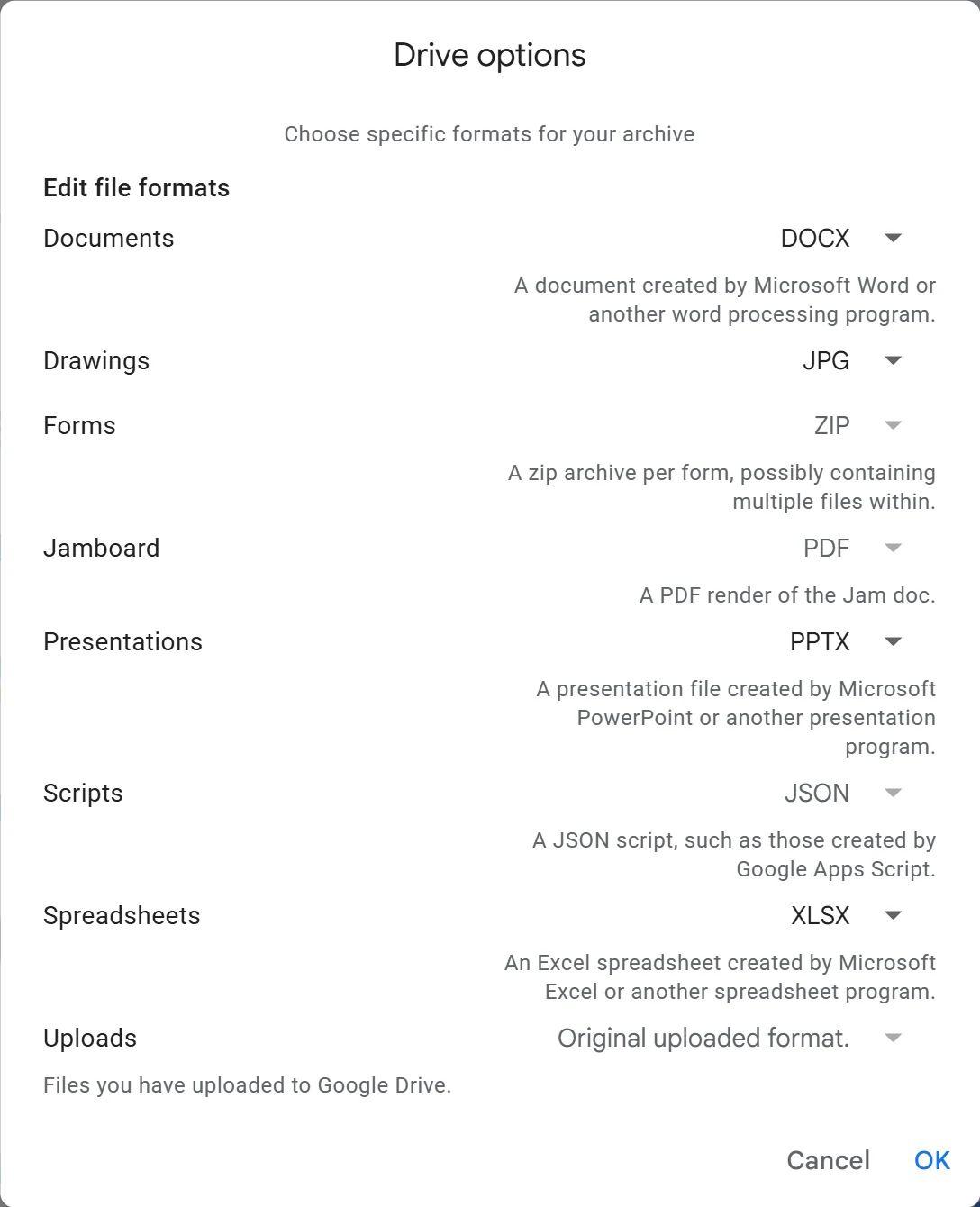
Takeout exports your whole Drive by default. To export one folder only, click All Drive data included, untick Include all files and folders in Drive, tick the folder you want, and click OK.
Or Download a Few Files by Hand
For a handful of spreadsheets, open each one and choose File → Download, then pick Microsoft Excel (.xlsx) or OpenDocument (.ods). A CSV file holds only the values of one tab, with no formulas or formatting, so use it for raw data only.
Import and Check
- For Proton, upload the files to Proton Drive, then open them in Sheets.
- In CryptPad, create a new sheet and use its Import option.
- In LibreOffice or ONLYOFFICE, open the files directly. There’s nothing to import.
- Find the frozen formulas. Open Find and Replace, set it to search in formulas, and look for
DUMMYFUNCTION. Rebuild each result, or accept it as a fixed value. - Check your most important sheets for charts, conditional formatting, data validation and pivot tables.
- Re-share with anyone who edits with you.
Our Google Takeout guide walks through every export screen, and our Google Docs alternatives page covers your documents.
What You Lose
Partial is fine. Many people move personal spreadsheets first and keep a Google account only for the shared files their job requires.