Proton Drive is our default pick for replacing Google Drive. It’s end-to-end encrypted, it comes from the same Swiss company as Proton Mail, and Proton Docs and Sheets live inside it. There’s no button that pulls your files across from Google, though. You export with Takeout, then upload.
This guide covers the Proton side in detail. To compare Proton Drive with Filen, Nextcloud and others first, see our Google Drive alternatives.
Pick a Proton Plan
Check how much space your Drive uses at drive.google.com/settings. Google’s storage is shared with Gmail and Google Photos, and only the Drive part moves here.
| Plan | Storage | Price (Oct 2026) | Notes |
|---|---|---|---|
| Proton Free | 5 GB | Free | Starts at 2 GB and rises to 5 GB after a few setup steps |
| Drive Plus | 200 GB | about $4.99/month | 10 years of file version history |
| Proton Unlimited | 500 GB | about $12.99/month, or $9.99/month billed yearly | Includes Proton Mail and VPN |
| Proton Duo | 2 TB | about $19.99/month | Up to 2 people |
| Proton Family | 3 TB | about $29.99/month | Up to 6 people |
Prices are for monthly billing unless stated, and yearly billing is cheaper, so check Proton’s pricing page before you buy. Duo and Family give each person their own account, which helps if you’re moving a household’s files. For a business, Drive Professional offers 1 TB per user for about $9.99/month per user.
Before You Export
Takeout copies what’s in My Drive. Three things need attention first.
Files Other People Shared With You
Files under Shared with me aren’t in your export unless you added them, or shortcuts to them, to My Drive. Search Drive for to:me to list them. Save copies of the ones you need, or ask the owners to send them.
Files You’ve Shared
Search for from:me to list the files you’ve shared with others. Note who has what, because you’ll re-share from Proton later.
If someone relies on a file you own, transfer it to them before you delete anything. Open Share, click the dropdown next to the person’s name and choose Transfer ownership. With personal accounts, they have to accept.
Files That Don’t Convert
Google Forms, Sites, Apps Script and Jamboard files have no portable format. Search for type:forms and download your form responses first. Our Google Forms and Google Sites pages cover what to use instead.
Export Drive With Takeout
The export screens work the same as for any product, and our Google Takeout guide covers them. These are the Drive-specific choices.
- On takeout.google.com, click Deselect all, then tick Drive. To leave folders out, click All Drive data included and untick them.
- Click Multiple formats and choose how Google files are converted, using the table below.
- Click Next step. Choose Send download link via email, a one-time export, .zip and 50GB, then click Create export.
- When Google’s email arrives, download every part. Links expire after about 7 days, and each part can be downloaded 5 times.
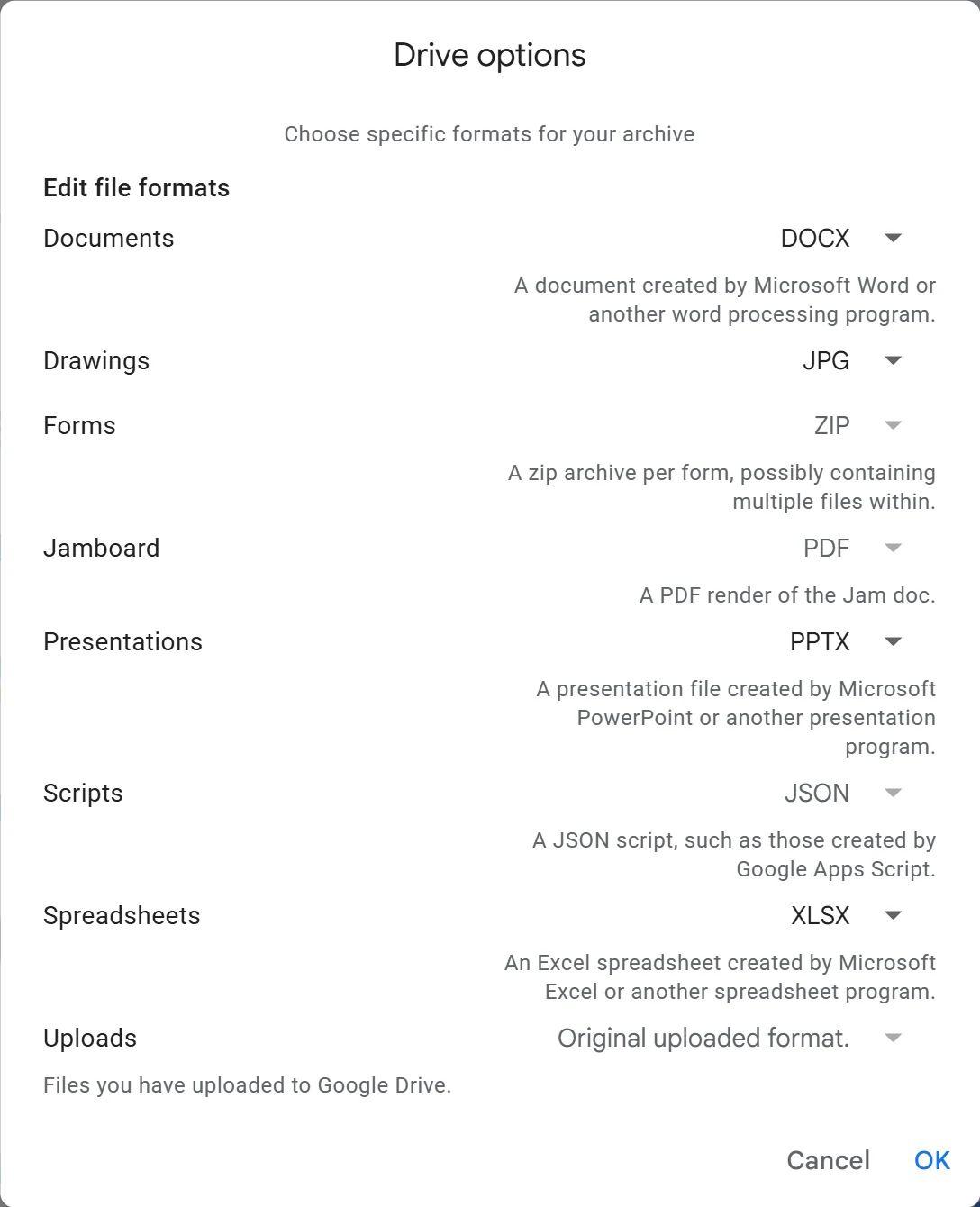
Which Formats to Choose
| Google file | Choose | Where it goes in Proton |
|---|---|---|
| Docs | DOCX (Word) | Opens in Proton Docs |
| Sheets | XLSX (Excel) | Imports into Proton Sheets |
| Slides | PPTX (PowerPoint) | Stays a file. Proton has no slides app, so edit it in LibreOffice Impress or PowerPoint |
Proton Docs opens Word files and Proton Sheets imports Excel files, so Office formats are the safe choice. Pick OpenDocument formats (ODT, ODS, ODP) only if you’ll mostly edit offline in LibreOffice.
Unzip and Merge Into One Folder
A large export comes as several zips, and the files from one Drive folder can be spread across them. Unzip every part into the same parent folder so the pieces merge back into one tree. Proton suggests doing this tidying on your computer before you upload, because it’s faster than rearranging folders in Proton Drive afterwards.
While you’re at it, delete what you don’t need. File names with /, : or emoji can fail to unzip on Windows, so rename those if extraction stops.
Upload With the Proton Drive Desktop App
Proton recommends its desktop app for big uploads, because it retries failed uploads by itself. It’s available for Windows and macOS.
- Install Proton Drive for Windows or macOS and sign in.
- On Windows, open File Explorer, then Proton Drive, then My files. On a Mac, open Finder and select Proton Drive.
- Drag your merged Drive folder in.
- Keep the computer on and awake, and watch the sync status in the app until everything has uploaded.
Upload time depends on your upload speed, which is usually far lower than your download speed. As a rough guide, 100 GB over a 20 Mbps upload takes at least 11 hours. Proton keeps your folder structure.
Without the Desktop App
- The web app at drive.proton.me needs no install. Click Upload to pick files or folders, or drag them in, and keep the tab open until it finishes. It’s fine for a few gigabytes.
- On Linux, there’s no desktop app as of October 2026. Use the web app, or Proton’s command-line tool (released June 2026), which runs on Windows, macOS and Linux and can upload and download files.
Turn Files Into Proton Docs and Sheets
Uploaded Word and Excel files stay as files, and you can download and edit them in any office app. To edit one in Proton’s own editors, together with other people, convert it. Convert only the files you still work on. Archives can stay as DOCX and XLSX.
Documents
- In Proton Drive on the web, select the .docx file and click its ⋮ menu.
- Click Open in Docs. You can also double-click the file to preview it, then click Open in Docs.
Proton Docs saves the result as a new document with the same name, and it appears in My files. It also opens .txt, .md and .html files. To get a file back out, click the Docs icon in the top-left corner, choose Download and pick .docx, .pdf, .html, .txt or .md.
Spreadsheets
- Create a new spreadsheet in Proton Drive, or open an existing one.
- Click File, then Import, then Browse, and choose the XLSX, CSV or TSV file.
- Choose Insert as new sheet, so nothing in the spreadsheet is overwritten.
- Leave Convert text to numbers, dates, and formulas ticked, then click Import data.
Then check your formulas. Google-only functions such as IMPORTRANGE, GOOGLEFINANCE and QUERY won’t work, links between spreadsheets break, and a Google Form stops feeding its sheet. To save a copy, use File, then Download for XLSX, CSV or TSV.
Our Google Docs, Google Sheets and Google Slides alternatives pages cover other editors.
Re-Share Folders and Replace Broken Links
Every Google Drive link you’ve sent stops working once you delete the file for good, including links inside other documents, websites and emails. Work through your from:me list and share again from Proton, in one of two ways.
Invite People by Email
- On drive.proton.me, click ⋮ next to the file or folder, then Share.
- Enter email addresses and choose Can view or Can edit, then click Share.
People without a Proton address get an email invitation and must accept it within 60 days. Shared files count toward your storage, not theirs, so people on the free plan can work with you. Can edit is the default, and editors can re-share and manage access unless you turn off Access under the Settings gear.
Create a Public Link
- Select the file or folder and click the Share icon.
- Turn on Create public link and choose Viewer or Editor.
- Click the gear icon, turn on Expiry and Require password, then click Save changes.
- Click Copy link and send it. Send the password through a different channel.
Recipients don’t need a Proton account to open a public link, edit a shared document or upload to a shared folder. On the free plan, you can have up to 3 links with Editor access.
Check, Then Delete From Google Drive
- Compare a few folders. Check that file counts and sizes on your computer match what Proton Drive shows.
- Open converted files, especially long documents and spreadsheets with formulas.
- Test a new link by opening it in a private browser window.
- Disconnect Google Drive for desktop if it’s installed. Its folder mirrors your Drive, so deleting files online also removes them from that folder on your computer.
- On drive.google.com, select your files, right-click and choose Move to Trash. For files other people own, choose Remove.
- Click Trash, then Empty trash, then Delete forever.
People you shared with keep access while files sit in the trash, and lose it when you delete them forever. Trash still counts toward your Google storage, and anything left there is deleted after 30 days. If you paid for Google storage only for Drive, downgrade or cancel it.
Partial is fine. Many people move their own files first and leave a shared family folder in Google Drive until everyone is ready.
Troubleshooting
The upload stalls. Keep the computer awake and the app running, since the desktop app retries failed uploads by itself. In the web app, closing the tab stops the upload.
You run out of space. The free plan holds 5 GB at most. Upgrade before you upload, or move only part of your Drive.
A Proton Doc became a 0-byte file. It was moved out of the synced folder. Look in Proton Drive’s Trash for the real document.
A converted document looks wrong. Keep working on the DOCX in LibreOffice or Word instead. Proton Drive stores it like any other file.
An invitation expired. Invitations last 60 days. Share the item with that address again.
Files are usually only one part of the move. To see which accounts and services still depend on your Google account, run our free scan. It reads files you download from Google and uploads nothing.